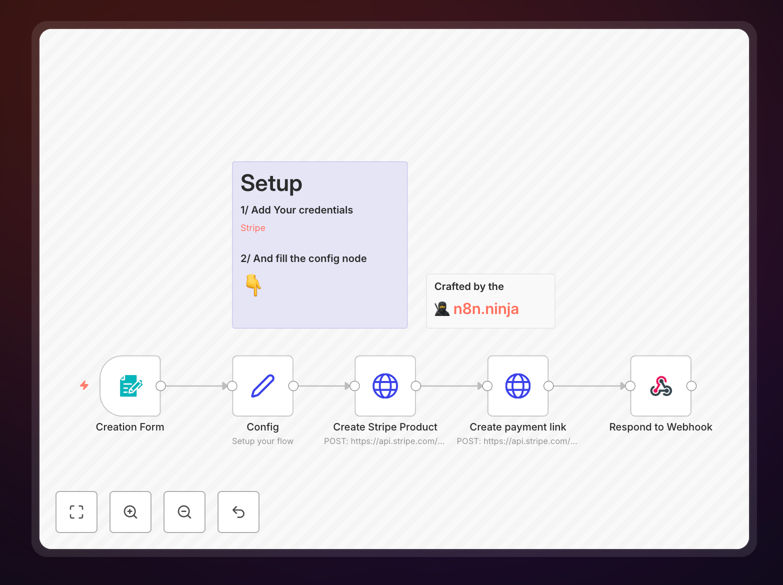
What This Workflow Does
This automation solves the tedious process of manually creating Stripe payment links for every transaction. Instead of logging into Stripe's dashboard repeatedly, the workflow generates payment links automatically based on your specified parameters.
The template creates customizable payment links that can include preset amounts, product descriptions, customer metadata, and expiration dates. It's particularly valuable for businesses that process numerous one-off payments or need to send payment requests quickly.
How It Works
1. Trigger Setup
The workflow can be triggered manually or connected to other systems like your CRM, invoicing software, or ecommerce platform. Common triggers include new invoice creation, booking requests, or donation pledges.
2. Parameter Configuration
You define the payment link parameters either statically in the workflow or dynamically from incoming data. This includes amount, currency, product name, and any custom metadata needed for reconciliation.
3. Link Generation
The workflow connects to Stripe's API to generate a unique payment link with your specified settings. The API returns a URL that customers can use to complete their payment.
4. Link Delivery
The generated payment link can be automatically sent via email, SMS, or integrated into other systems. The workflow can also store the link in your database for tracking purposes.
Who This Is For
This automation benefits any business that regularly creates Stripe payment links. Service providers can use it for deposit requests, nonprofits for donation collection, and ecommerce stores for one-off product sales. It's especially valuable for:
- Freelancers and consultants sending client invoices
- Event organizers collecting ticket payments
- Digital product sellers distributing purchase links
- Nonprofits processing recurring donations
What You'll Need
- An active Stripe account with API access enabled
- n8n instance (cloud or self-hosted)
- Basic understanding of n8n workflows
- Your Stripe API keys (available in Stripe dashboard)
Quick Setup Guide
- Download the template file
- Import into your n8n instance
- Connect your Stripe account using API keys
- Configure default payment parameters
- Test with a small transaction amount
- Connect to your trigger source (if not manual)
Key Benefits
Save 5-10 minutes per transaction by eliminating manual payment link creation. What used to require logging into Stripe and filling out forms now happens instantly.
Reduce human error in payment amount entry and product descriptions. Automated links pull data directly from your systems, avoiding copy-paste mistakes.
Enable dynamic pricing by generating links with amounts calculated from other data sources like quotes, invoices, or shopping carts.
Improve cash flow by getting payment links to customers faster. Automated delivery means no delays between request and payment opportunity.
Scale your operations without adding payment processing staff. The same team can handle significantly more transactions with automation.