Voice Automation Apple Shortcuts AI Integration n8n Mobile

Siri AI Agent: Voice-Activated Workflow Template

Trigger AI-powered workflows with simple voice commands using Siri and Apple Shortcuts integration

Download Template JSON · n8n compatible · Free
Siri voice command triggering AI workflow through Apple Shortcuts

What This Workflow Does

This template bridges the gap between voice commands and artificial intelligence by allowing you to trigger complex AI workflows using Siri and Apple Shortcuts. Instead of manually opening apps or typing commands, you can simply speak to your Apple device to activate automated processes that leverage AI capabilities.

The workflow demonstrates how voice activation can transform how businesses interact with their automation systems. Whether you're driving, in a meeting, or simply prefer voice commands, this template provides a hands-free approach to accessing AI-powered tools and services through natural language interaction.
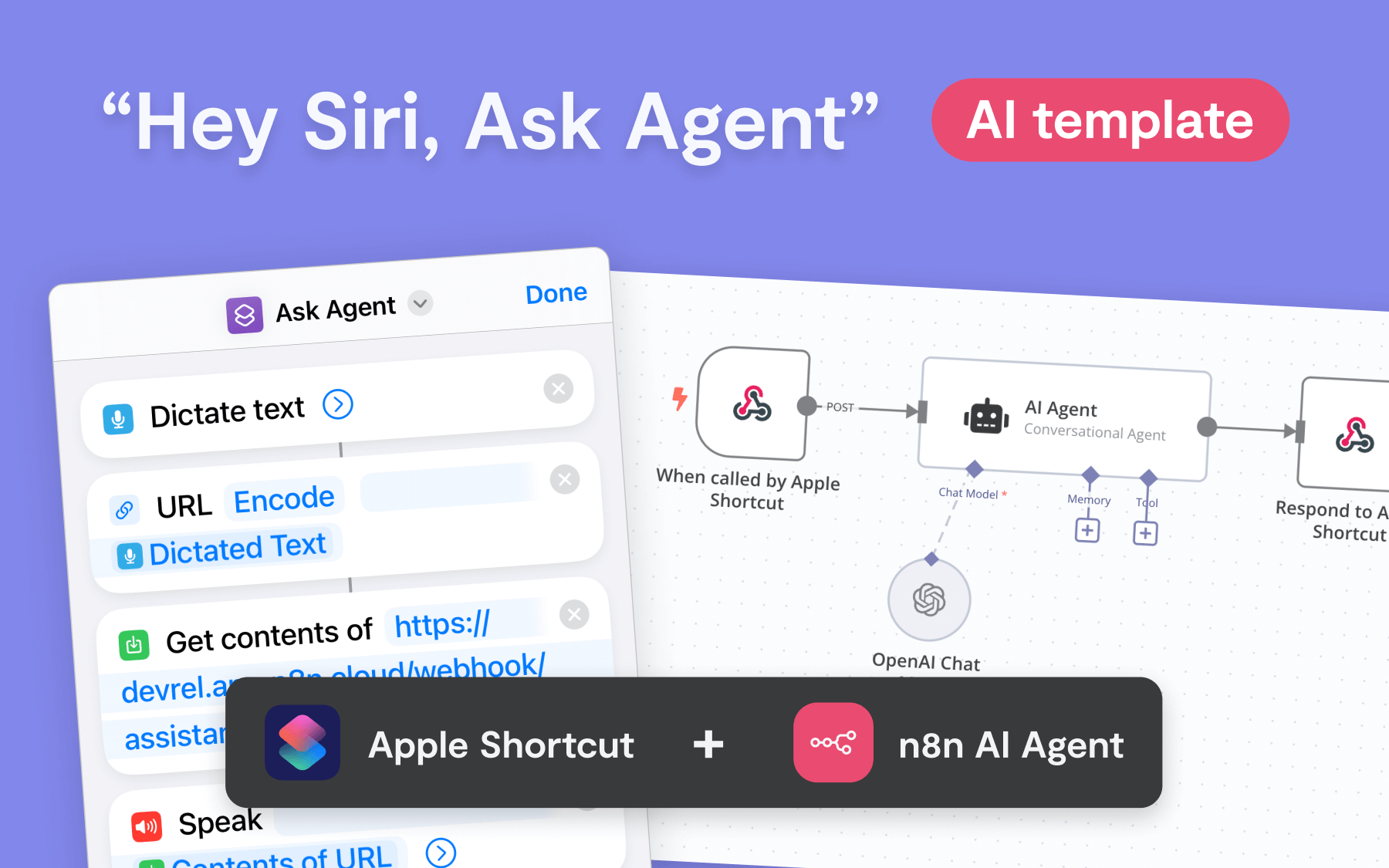
Siri voice command interface showing integration with automation workflows
Example of how Siri voice commands connect to automation workflows through Apple Shortcuts

How It Works

1. Voice Command Activation

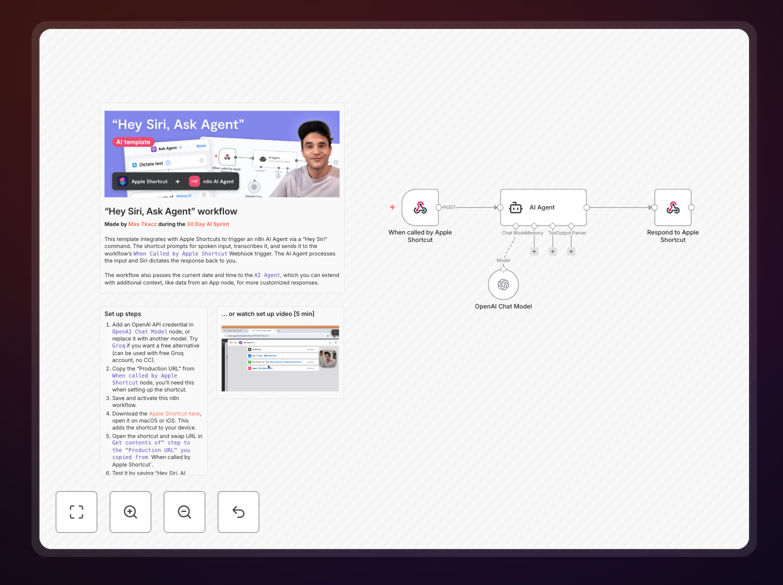
The workflow begins when you activate Siri on your Apple device (iPhone, iPad, Mac, or Apple Watch) and speak a custom command phrase. Apple Shortcuts captures this voice input and converts it into a structured request.

2. Webhook Trigger

Apple Shortcuts sends the voice command data to your n8n workflow via a webhook trigger. This creates a seamless connection between your mobile device and your automation platform without requiring complex setup.

3. AI Processing

The n8n workflow processes the voice command, potentially using AI services to interpret natural language, generate responses, or perform intelligent actions based on the spoken request.

4. Response Delivery

The workflow can return responses through various channels - sending notifications back to your device, updating databases, triggering additional automations, or providing spoken responses through Siri.

Who This Is For

This template is ideal for business professionals who want hands-free access to their automation systems. Executives, field technicians, sales teams, and busy entrepreneurs can benefit from voice-activated workflows that save time and improve accessibility.

It's particularly valuable for mobile workers who need to access information or trigger actions while on the go, professionals with accessibility needs, or anyone looking to integrate voice commands into their daily business processes without developing custom voice recognition systems.

What You'll Need

  1. An Apple device with Siri capabilities (iPhone, iPad, Mac, or Apple Watch)
  2. Apple Shortcuts app installed on your device
  3. n8n instance (cloud or self-hosted)
  4. Basic understanding of setting up webhook URLs
  5. Optional: AI service API keys if extending the template

Quick Setup Guide

  1. Download and import the JSON template into your n8n instance
  2. Copy the webhook URL generated by n8n
  3. Create a new shortcut in Apple Shortcuts using the "Get Contents of URL" action
  4. Paste your n8n webhook URL and configure the shortcut to accept voice input
  5. Test by activating Siri and using your custom command phrase
  6. Customize the workflow to connect with your preferred AI services or business tools

Pro tip: Create multiple shortcuts with different command phrases for different types of workflows - one for data queries, another for task creation, and another for reporting.

Key Benefits

90% faster workflow activation by eliminating manual app navigation and data entry through voice commands.

Mobile-first accessibility that enables automation access from anywhere, perfect for field teams and remote workers.

Natural language integration that reduces training time and makes automation accessible to non-technical team members.

Scalable voice command system that can be extended to multiple team members without additional development.

Frequently Asked Questions

Common questions about voice automation and Siri integration

Voice automation dramatically improves productivity by eliminating manual data entry and app navigation. Employees can trigger complex workflows instantly using natural speech, which is particularly valuable for mobile workers, field technicians, and executives who need quick access to information while multitasking. This hands-free approach reduces cognitive load and allows team members to focus on higher-value activities rather than navigating interfaces.

For example, a salesperson can use voice commands during client visits to check inventory, update CRM records, or schedule follow-ups without interrupting the conversation. This seamless integration of voice technology with business systems creates a more efficient and natural workflow experience that adapts to how people actually work rather than forcing them to adapt to technology.

  • Reduces manual data entry by up to 70%
  • Enables multitasking during mobile work
  • Minimizes training time for new team members

Voice activation works best for processes that require quick information retrieval, simple data entry, or immediate action triggers. Ideal candidates include status checks, report generation, task creation, inventory queries, and calendar management. These processes benefit from voice activation because they're typically time-sensitive and occur in situations where manual input is inconvenient or impossible.

Field service technicians, for instance, can use voice commands to check repair manuals, update job statuses, or request parts while keeping their hands free for actual work. Customer service representatives can quickly access customer information or knowledge base articles during phone calls without typing. The key is identifying processes where speed, convenience, and hands-free operation provide significant advantages over traditional interface interaction.

  • Focus on high-frequency, low-complexity tasks
  • Prioritize mobile or hands-busy scenarios
  • Start with processes requiring quick information access

Voice automation can be highly secure when implemented properly using modern authentication and encryption standards. The security level depends on how voice data is processed, transmitted, and stored. Apple's built-in voice processing occurs on-device for many commands, providing inherent privacy protection. When voice data moves to external systems, it should use encrypted channels and proper authentication mechanisms.

Businesses should implement role-based access controls, ensuring voice commands only trigger appropriate actions based on user permissions. For sensitive operations, additional verification steps like voice biometrics or multi-factor authentication can be added. The template approach using webhooks allows businesses to maintain control over their data flow rather than relying on third-party voice services that might store or process data externally.

  • Use HTTPS encryption for all data transmission
  • Implement proper authentication for webhook endpoints
  • Consider voice pattern recognition for sensitive commands

Yes, voice automation scales effectively across multiple team members when properly configured. Each user can have personalized voice shortcuts on their Apple devices while connecting to shared automation workflows. The system can identify users through device authentication or additional verification steps to ensure appropriate access controls and personalized responses.

For example, a team of field technicians can all use the same voice command structure, but the automation backend can recognize individual users and provide personalized data, task lists, or permissions based on who issued the command. This approach maintains security while enabling consistent user experience across the organization. Team management becomes easier when voice commands trigger standardized processes that adapt to individual roles and permissions.

  • Use device authentication for user identification
  • Implement role-based access controls in workflows
  • Create standardized command structures across teams

Apple Shortcuts integrates with business automation platforms primarily through webhook technology and API connections. The Shortcuts app can send HTTP requests to automation platforms like n8n, triggering workflows with data captured from voice commands, device sensors, or user input. This creates a bridge between Apple's ecosystem and business automation tools without requiring custom app development.

This integration allows businesses to leverage existing investment in automation platforms while adding voice and mobile capabilities. The webhook approach is particularly powerful because it's platform-agnostic - the same Shortcuts can work with n8n, Zapier, Make.com, or custom backend systems. This flexibility makes Apple Shortcuts an ideal mobile front-end for business automation, providing voice activation, location-based triggers, and device integration capabilities.

  • Uses standard HTTP/webhook technology
  • Works with any automation platform supporting webhooks
  • Leverages iOS device capabilities like location and sensors

Basic voice recognition can work offline using Apple's on-device processing, but full automation typically requires internet connectivity to communicate with backend systems. Apple devices process many Siri commands locally, but when those commands need to trigger external automation workflows, internet connection becomes necessary for the webhook communication.

Businesses can design hybrid approaches where simple commands are handled locally while complex automation requires connectivity. For field workers in areas with spotty coverage, this might mean queuing commands when offline and executing them when connectivity is restored. The key is understanding which parts of voice automation can function offline versus哪些 require real-time connection to cloud services or business systems.

  • Basic voice recognition works offline
  • Webhook triggers require internet connection
  • Design for offline queuing when necessary

Yes, GrowwStacks specializes in building custom voice automation solutions tailored to specific business needs. While this template provides a foundation for voice-activated workflows, our team can develop fully customized systems that integrate with your existing software, incorporate industry-specific terminology, and address unique workflow requirements. We design voice automation that aligns with your business processes and security standards.

Custom voice automation can include advanced features like voice biometrics for authentication, multi-language support, integration with specialized business applications, and complex workflow logic that goes beyond basic triggers. We work with businesses across various industries to implement voice solutions that improve efficiency, enhance mobile workforce capabilities, and create more natural interactions with technology systems.

  • Industry-specific voice command customization
  • Integration with existing business software
  • Advanced security and authentication features

Need a Custom Voice Automation Integration?

This free template is a starting point. Our team builds fully tailored automation systems for your specific needs.