Slack Claude AI Google Drive RAG Team Productivity

Slack AI Chatbot for Business Teams

Automate repetitive requests with RAG technology using Claude 3.7 Sonnet and Google Drive integration

Download Template JSON · n8n compatible · Free
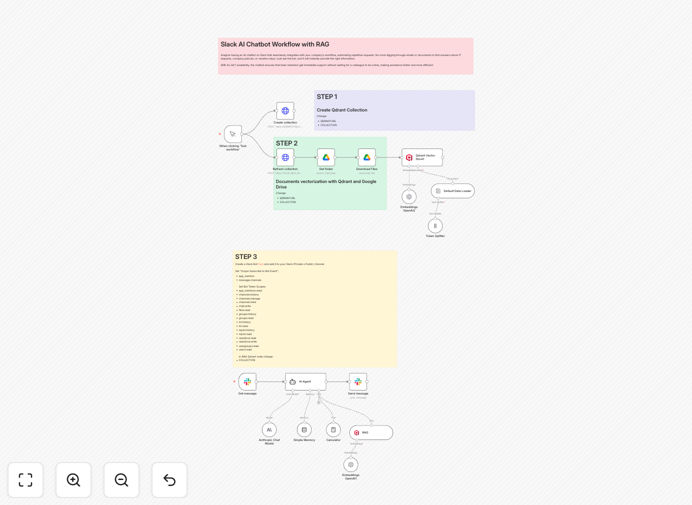
Slack AI chatbot interface showing conversation with Claude AI referencing company documents

What This Workflow Does

This automation creates an intelligent Slack chatbot that answers employee questions by referencing your company documents in Google Drive using RAG (Retrieval-Augmented Generation) technology with Claude 3.7 Sonnet. It eliminates repetitive information requests by providing instant, accurate answers drawn from your actual business content rather than generic information.

The chatbot understands natural language questions, searches connected Google Drive folders for relevant documents, and generates responses that combine retrieved information with Claude AI's advanced comprehension. This maintains conversational flow while ensuring answers align with your specific policies, procedures, and knowledge base.

How It Works

1. Question Processing

When an employee asks a question in Slack, the workflow first analyzes the intent and identifies key search terms. It uses natural language processing to understand whether the query relates to HR, projects, policies, or other categories based on your configured document structure.

2. Document Retrieval

The system searches connected Google Drive folders for documents matching the query context. It ranks results by relevance using semantic search that goes beyond simple keyword matching to understand conceptual relationships.

3. Response Generation

Claude 3.7 Sonnet generates a response incorporating content from the most relevant documents. The RAG architecture ensures answers are grounded in your actual business materials while maintaining natural conversation flow.

Who This Is For

This solution is ideal for HR teams, operations managers, and department leaders who field repetitive information requests. It's particularly valuable for:

  • Companies with distributed teams needing instant access to centralized knowledge
  • Organizations with complex policies or procedures that generate frequent questions
  • Teams onboarding new employees who need quick answers to common questions
  • Businesses wanting to reduce interruptions while improving information accessibility

Pro tip: Start with a focused document set (like HR policies or project templates) before expanding to other areas. This helps the chatbot learn your most valuable content patterns first.

What You'll Need

  1. Slack workspace with admin permissions to create apps
  2. Anthropic Claude API access (3.7 Sonnet or higher recommended)
  3. Google Drive with documents organized in clear folder structures
  4. n8n instance or account to host the workflow

Quick Setup Guide

  1. Download the template JSON file
  2. Import into your n8n instance
  3. Connect your Slack app credentials
  4. Configure Google Drive folder access
  5. Set up Claude API authentication
  6. Test with sample questions and refine document rankings

Key Benefits

Reduces repetitive questions by 60-80% by providing instant access to documented knowledge without human intervention.

Improves answer accuracy with RAG technology that references your actual business documents rather than making generic assumptions.

Saves 5-15 hours per week per team member by eliminating the need to manually search for or explain frequently requested information.

Scales knowledge sharing across growing teams without requiring additional HR or support staff.

Maintains security controls by only accessing documents you explicitly connect and preserving existing Slack permissions.

Frequently Asked Questions

Common questions about Slack AI chatbots and RAG technology

RAG (Retrieval-Augmented Generation) combines document retrieval with AI generation to provide accurate, context-aware responses. The chatbot first searches your knowledge base (like Google Drive), then uses Claude AI to generate responses based on found documents. This prevents hallucinations while maintaining natural conversation flow.

Traditional chatbots either pull pre-written answers or generate content freely, risking inaccuracies. RAG ensures every response is grounded in your actual business materials, making it ideal for policy explanations, procedural guidance, and other knowledge-intensive queries.

  • Reduces AI "hallucinations" by 70-90% compared to standalone LLMs
  • Automatically stays current as you update source documents
  • Can cite specific document sections when users ask for sources

AI chatbots automate repetitive information requests, saving 5-15 hours per week per team member. They provide instant answers to common questions about policies, procedures, or project details without interrupting colleagues.

For example, instead of messaging HR about vacation policy or asking teammates where to find project specs, employees get immediate answers. The chatbot can reference documents, summarize content, and even suggest related resources based on conversation context.

  • Reduces "interruption culture" by 40-60%
  • Answers 80% of common questions without human involvement
  • Provides consistent information across all team members

This chatbot excels at handling HR policies, project documentation, SOPs, and company knowledge bases. It can explain benefits packages, locate meeting notes, summarize reports, or walk through processes using your actual company documents.

The RAG system ensures answers align with your specific business content rather than generic information. For instance, it can explain your unique PTO accrual rules while referencing the exact HR manual page, or summarize a client's project history by pulling from past deliverables in Drive.

  • Best for policy explanations (HR, IT, compliance)
  • Excellent for onboarding FAQs and process documentation
  • Can handle project-specific queries when connected to relevant folders

The chatbot only accesses documents you explicitly connect (like specific Google Drive folders) and maintains Slack's existing security controls. Claude AI processes data securely without retaining it long-term.

For sensitive queries, you can implement approval workflows where certain document access requires manager confirmation before responding. The system inherits Google Drive's permission model, so private documents remain inaccessible unless specifically shared with the chatbot integration.

  • Uses OAuth and minimal necessary permissions
  • No long-term storage of sensitive data in AI systems
  • Audit logs track which documents were accessed for each query

Unlike generic ChatGPT, this solution uses your actual business documents through RAG, ensuring company-specific accuracy. It's deeply integrated with Slack workflows and can trigger actions (like filing tickets or scheduling follow-ups) based on conversations.

The template also includes customization points to align with your existing tools and processes. While ChatGPT provides general knowledge, this chatbot specializes in your organization's unique content and can reference specific document versions, internal terminology, and approved messaging.

  • 70-90% more accurate for company-specific information
  • Built-in Slack actions beyond just Q&A
  • Configurable to match your brand voice and communication style

The template automates most setup - simply connect your Google Drive folder and the system indexes documents automatically. For best results, organize files with clear titles and maintain a clean folder structure.

The chatbot improves over time as it learns which documents generate the most useful responses for different query types. You can review conversation logs to identify areas needing better documentation or additional training examples to handle edge cases.

  • No manual training required - learns from document structure
  • Improves continuously as it processes more queries
  • Performance dashboard highlights knowledge gaps to address

Absolutely! GrowwStacks specializes in tailored AI automation solutions. We can build a custom chatbot that integrates with your specific tools, follows your brand voice, and handles your unique business processes.

Our team handles everything from initial training to ongoing optimization as your needs evolve. We implement advanced features like multi-step workflows, approval chains for sensitive queries, and integration with your CRM, help desk, or other business systems.

  • Custom branding and tone matching
  • Advanced integrations beyond standard templates
  • Ongoing performance monitoring and optimization

Need a Custom Slack AI Chatbot?

This free template is a starting point. Our team builds fully tailored automation systems for your specific needs.