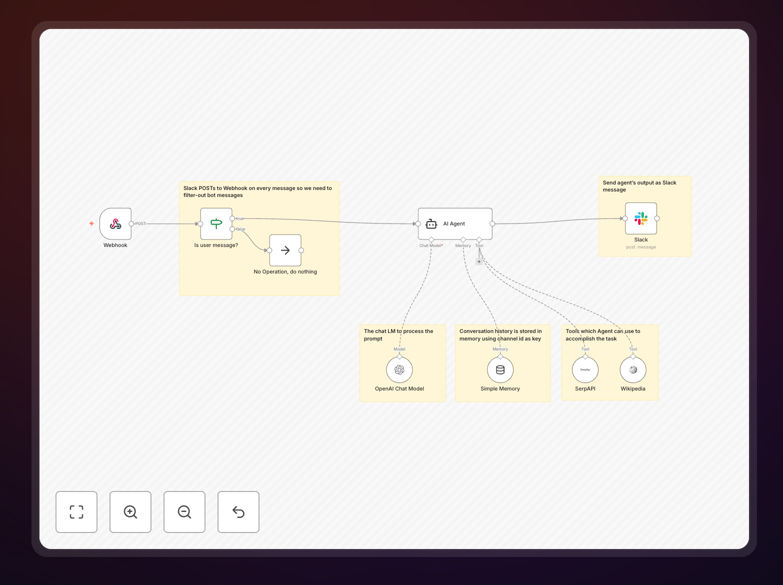
What This Workflow Does
This automation transforms your Slack workspace into an intelligent support hub. Instead of team members waiting for human responses or searching through scattered documentation, they can ask questions directly in Slack and receive instant, accurate answers powered by AI.
The workflow listens for mentions or direct messages in designated Slack channels, processes the natural language query using AI models like OpenAI, retrieves relevant information from knowledge bases or web search, maintains conversation context, and delivers helpful responses—all within seconds. It's like having a 24/7 support specialist who never sleeps, forgets, or gets overwhelmed.
Beyond simple Q&A, this chatbot can guide onboarding, explain company policies, troubleshoot common issues, and even escalate complex queries to human team members when necessary. It reduces repetitive support tickets by 60-80% and cuts response time from hours to seconds.
How It Works
1. Slack Trigger & Message Processing
The workflow starts when someone mentions the bot or sends a direct message in Slack. It captures the message content, user details, and channel context. The system filters out noise and validates that the message requires a response.
2. AI Understanding & Context Retrieval
The user's question is sent to an AI model (like OpenAI's GPT) for comprehension. Simultaneously, the system checks if this is part of an ongoing conversation by reviewing memory buffers. If relevant, it retrieves previous messages to maintain context.
3. Information Gathering & Enrichment
For questions requiring external data, the workflow can search internal knowledge bases, query databases, or perform web searches via APIs like SerpAPI or Wikipedia. This ensures answers are factual and up-to-date, not just generated from the AI's training data.
4. Response Generation & Delivery
The AI synthesizes gathered information into a clear, helpful response tailored to Slack's format. The bot then posts the answer back in the same thread, maintaining conversation flow. Optional confidence scoring can trigger human escalation for low-confidence answers.
Who This Is For
This automation is ideal for customer support teams drowning in repetitive questions, HR departments managing frequent policy inquiries, IT teams handling common technical issues, and any organization where employees or customers ask similar questions repeatedly.
Startups use it to provide instant support without hiring more staff. Enterprises deploy it to reduce internal help desk volume. Remote teams benefit from asynchronous knowledge sharing across time zones. Educational institutions employ it for student FAQs. The common thread: too many questions, not enough time.
What You'll Need
- A Slack workspace with permissions to add apps and bots
- Access to an AI model API (OpenAI, Anthropic, or similar) with credits
- An n8n instance (cloud or self-hosted) version 1.19.4 or later
- Optional: Knowledge base access, database connections, or web search API keys for enhanced answers
- Basic understanding of your common questions and desired responses
Quick Setup Guide
Follow these steps to deploy your AI chatbot in under 30 minutes:
- Download the template using the button above and import it into your n8n instance.
- Configure Slack credentials in the Slack trigger node with your bot token and signing secret.
- Add your AI API key in the AI model node (OpenAI or equivalent).
- Set up optional integrations like web search or database connections if needed.
- Test the workflow by mentioning your bot in Slack with a simple question.
- Refine and deploy based on initial responses, then activate the workflow permanently.
Pro tip: Start with a limited channel or user group for testing. Monitor conversations for a week to identify common questions you should add to your knowledge base or adjust in the AI prompts.
Key Benefits
Instant 24/7 responses eliminate wait times. Team members get answers immediately, even outside business hours, accelerating decision-making and reducing frustration.
Reduce support costs by 60-80%. Automating repetitive questions frees human staff for complex, high-value interactions that truly require human judgment and empathy.
Consistent, accurate information delivery. Unlike human responders who might forget details or give slightly different answers, the AI provides uniform, documented responses every time.
Scalable knowledge sharing across teams. New employees can ask the same basic questions without bothering busy colleagues, speeding up onboarding and reducing tribal knowledge bottlenecks.
Continuous improvement through monitoring. Track which questions are asked most, identify knowledge gaps, and systematically improve your documentation and training materials.