What This Workflow Does
Slack imposes a technical limitation: each Slack app can only have one webhook URL. Meanwhile, n8n generates unique webhooks for every workflow you create. This mismatch forces teams to create multiple Slack apps to trigger different automations—a messy, unsustainable approach.
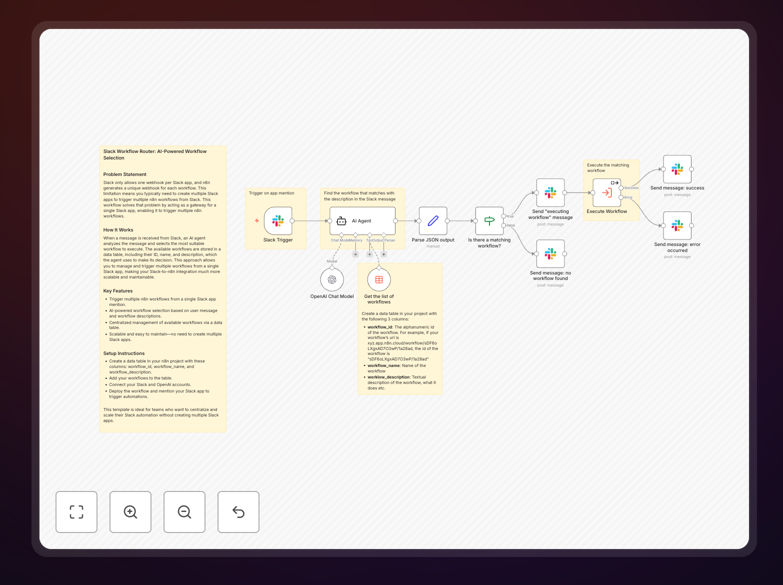
This workflow solves that problem by acting as a central gateway. It receives all Slack messages through a single webhook, then uses an AI agent to analyze the message content and intelligently select the most appropriate n8n workflow to execute. Instead of managing multiple Slack apps, you manage a single entry point that scales with your automation needs.
The system maintains a data table of available workflows—each with an ID, name, and description—which the AI agent references to make its decision. This creates a scalable, maintainable Slack-to-automation bridge that grows with your business without increasing complexity.
How It Works
Step 1: Slack Message Reception
When someone mentions your Slack app or sends a message to a configured channel, Slack sends that message to the single webhook endpoint configured in this workflow. The message content, user information, and channel details are captured as input data.
Step 2: AI Analysis & Workflow Selection
An AI agent (typically OpenAI) analyzes the message text against the descriptions of available workflows stored in a data table. The agent determines which workflow best matches the user's intent based on semantic understanding, not just keyword matching.
Step 3: Workflow Execution
The selected workflow ID is retrieved, and the workflow is triggered via n8n's internal execution mechanism. The original Slack message data is passed to the chosen workflow, ensuring context preservation.
Step 4: Response & Logging
The system can optionally send a confirmation back to Slack and log the selection decision for auditing and improvement. This creates a transparent automation chain where teams can see which workflows were triggered by which messages.
Who This Is For
This template is ideal for teams that rely heavily on Slack for internal operations and want to scale their automation without technical overhead. Development teams can trigger deployment pipelines, support teams can automate ticket creation, sales teams can enrich leads, and operations teams can manage alerts—all through simple Slack messages.
Businesses experiencing "Slack app sprawl"—where they've created multiple apps for different automations—will benefit significantly from centralizing their approach. IT administrators who manage automation infrastructure will appreciate the reduced maintenance burden and clearer audit trail.
What You'll Need
- A Slack app with webhook permissions configured.
- An n8n instance (cloud or self-hosted) with workflow execution capabilities.
- Access to an AI model service (OpenAI, Anthropic, or similar) for intelligent routing.
- A data table within n8n containing workflow IDs, names, and descriptions.
- The target n8n workflows you want to trigger, each with their own logic and integrations.
Pro tip: Start with a small set of clearly differentiated workflows (e.g., "create ticket," "generate report," "notify team") to train the AI agent effectively. Clear workflow descriptions in your data table dramatically improve selection accuracy.
Quick Setup Guide
- Import this template JSON into your n8n instance.
- Create a Slack app in your workspace and configure its webhook to point to this workflow's webhook trigger node.
- Set up your AI agent credentials (OpenAI API key or equivalent) in the AI node configuration.
- Create a data table in n8n with columns: workflow_id, workflow_name, workflow_description. Populate it with your available workflows.
- Connect the data table node to reference your newly created table.
- Test by mentioning your Slack app with a message that should trigger one of your workflows.
Key Benefits
Scalability without complexity: Add new workflows by simply updating the data table—no new Slack apps, no webhook reconfiguration. Your automation system grows cleanly.
Intelligent routing reduces errors: AI-driven selection understands context better than static rules, directing requests to the correct workflow even when user language is ambiguous.
Centralized management and auditing: One gateway means one place to monitor, log, and secure all Slack-triggered automations. Visibility improves dramatically.
Time savings for technical teams: Eliminating the need to create and maintain multiple Slack apps saves IT hours monthly, freeing them for more valuable work.
Improved user experience: Team members get faster, more accurate automation responses because the system intelligently interprets their requests rather than relying on rigid command syntax.