AI Support Gmail Slack Google Drive GPT-4o

Smart Customer Support System with GPT-4o, Gmail, Slack & Drive Knowledge Base

Automate email support, classify queries, generate AI replies from your docs, and escalate urgent issues to Slack—all in one seamless workflow.

Download Template JSON · n8n compatible · Free
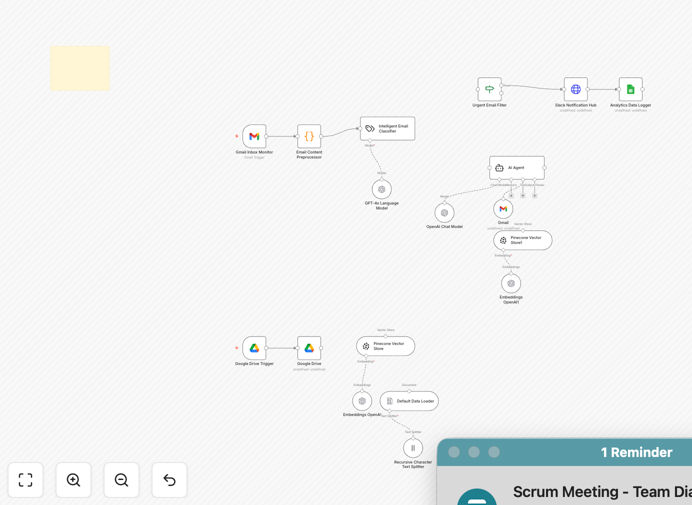
Smart Customer Support System workflow diagram showing Gmail, Slack, Google Drive, GPT-4o, and Pinecone integration

What This Workflow Does

Customer support teams are overwhelmed. Emails pile up, responses take hours, and repetitive questions drain your team's time. This AI-powered support system solves that by automating the entire process.

The workflow connects Gmail, Slack, Google Drive, GPT-4o, and Pinecone into a single intelligent pipeline. When a customer email arrives, it's automatically categorized (billing, support, spam, urgent). GPT-4o then drafts a personalized reply using your company's knowledge base stored in Google Drive and Pinecone. If the issue requires human help, Slack gets an instant alert. Every interaction is logged in Google Sheets for analysis.

This isn't just a chatbot—it's a full support automation system that learns from your documents, maintains context, and escalates smartly. It reduces response time from hours to minutes, cuts support costs, and lets your team focus on complex cases while AI handles the routine.

How It Works

1. Email Monitoring & Trigger

The workflow starts by monitoring your Gmail inbox every minute for new support emails. It captures the sender, subject, body, and any attachments.

2. AI Classification

Each email is analyzed by GPT-4o to determine its category: billing inquiry, technical support, spam, or urgent human-needed. This step ensures the right handling path.

3. Knowledge-Based Reply Generation

For non-urgent queries, the system searches your Google Drive folder (synced to Pinecone) for relevant documents. GPT-4o generates a reply that's personalized, accurate, and uses your brand's tone.

4. Automated Response & Logging

The AI reply is sent back to the customer via Gmail, keeping the thread intact. All details—email, category, reply, timestamp—are logged in Google Sheets for transparency and audit.

5. Slack Escalation Alert

If the email is flagged as urgent or requires human judgment, a notification is instantly posted to your designated Slack channel with the customer's details and context.

6. Continuous Knowledge Sync

Any new document added to your Google Drive folder is automatically processed and added to Pinecone, keeping your AI knowledge base up-to-date without manual intervention.

Who This Is For

This workflow is ideal for small to medium businesses, SaaS companies, e‑commerce stores, and professional service firms that receive consistent customer inquiries via email.

Teams drowning in support tickets, startups without dedicated support staff, companies with documented FAQs and policies, and any business looking to reduce response time while maintaining quality will benefit massively. If you have a Google Drive full of support docs but no way to leverage them automatically, this system turns that content into an AI‑powered assistant.

What You'll Need

  1. A Gmail account (or Google Workspace) for receiving support emails.
  2. A Slack workspace and webhook URL for escalation alerts.
  3. A Google Drive folder containing your support documents (PDFs, TXTs, DOCX).
  4. A Google Sheet for logging interactions.
  5. An OpenAI API key for GPT‑4o access.
  6. A Pinecone account and index for vector storage.
  7. Basic familiarity with n8n to configure connection credentials.

Pro tip: Start with a small, curated set of documents in your Drive folder—FAQ pages, policy documents, and common solution guides. The AI will perform better with focused, high‑quality knowledge.

Quick Setup Guide

  1. Import the template into your n8n instance using the downloaded JSON file.
  2. Connect your apps—set up OAuth2 for Gmail, Google Drive, and Google Sheets; add your OpenAI API key; configure Pinecone index; add your Slack webhook URL.
  3. Update IDs—replace the sample Google Drive folder ID, Google Sheet ID, and Pinecone index name with your own.
  4. Customize the prompt in the “Response Agent” node to match your brand voice (e.g., “We’re here to help and reply fast.”).
  5. Upload your docs to the designated Drive folder. The system will auto‑sync them to Pinecone.
  6. Test the flow by sending a test email from another account. Watch the reply arrive, check Slack for alerts, and verify the Google Sheets log.

Key Benefits

Cut response time from hours to minutes. AI drafts replies instantly based on your knowledge base, eliminating manual research and typing.

Reduce support costs by up to 70%. Automating routine inquiries means your team can handle more volume without adding staff.

Improve customer satisfaction with consistent, accurate answers. Every reply is grounded in your official documents, ensuring reliability.

Full audit trail and insights. Google Sheets logs every interaction, giving you data to optimize support processes and identify common issues.

Scalable support without hiring. As your customer base grows, the AI system scales effortlessly, handling increased email volume seamlessly.

Frequently Asked Questions

Common questions about AI customer support automation and integration

An AI-powered customer support system uses artificial intelligence to automate email responses, classify incoming queries, and provide instant answers using a knowledge base. It reduces manual workload, speeds up response times, and ensures consistent, accurate replies based on your company's documentation.

Instead of a human reading every email, the AI reads, categorizes, and drafts a reply using your stored documents. It can escalate complex cases to your team while handling routine questions automatically.

AI improves support efficiency by instantly categorizing emails (billing, technical, urgent), drafting personalized replies using your stored documents, and logging every interaction. It eliminates repetitive manual tasks, allowing human agents to focus on complex issues while AI handles routine inquiries.

The system reduces response time from hours to minutes, ensures answers are consistent and accurate, and provides a complete audit log in Google Sheets. This lets your team scale support without hiring more staff.

Yes. This workflow automatically syncs your Google Drive folder with Pinecone vector storage. Any PDF, TXT, or DOCX file you add becomes part of the AI's knowledge base. The system reads and indexes your support docs, FAQs, and policies to generate context-aware replies.

You don't need to reformat or manually upload documents. Just place them in the designated Drive folder. The workflow processes them, extracts text, and stores them as vectors for fast AI retrieval.

The workflow includes an escalation detection step. If the AI identifies an email as urgent, complex, or requiring human judgment, it instantly sends a notification to your Slack channel. Your team can then take over while the customer receives an automated acknowledgment.

You can configure the escalation rules based on keywords, sentiment analysis, or confidence scores. This ensures sensitive or high‑priority cases never get an automated reply.

Yes, with proper configuration. The AI uses your curated knowledge base, so replies are based on your official content. You can set confidence thresholds and review logs in Google Sheets. For sensitive topics, you can configure the system to always escalate or require human approval.

The workflow logs every reply, allowing you to audit accuracy. Over time, you can refine the knowledge base and escalation rules to improve safety and performance.

Gmail triggers the workflow when a new support email arrives. Google Drive provides the knowledge base. Slack receives alerts for urgent cases. The automation orchestrates data flow between these apps, ensuring seamless information transfer without manual copying or switching between tabs.

This integration creates a closed‑loop system: email input, AI processing using Drive docs, automated reply via Gmail, Slack alert for escalation, and logging in Sheets. It eliminates manual handoffs and data silos.

Automating support reduces response time from hours to minutes, cuts operational costs by up to 70%, improves customer satisfaction with consistent answers, provides full audit logs, and allows your team to scale support without hiring more staff. It turns support into a proactive, data‑driven function.

Beyond efficiency, automation gives you insights into common questions, customer sentiment, and support trends via the logged data. You can optimize your knowledge base and processes based on real‑time feedback.

Absolutely. GrowwStacks specializes in building tailored automation systems. We can adapt this template to your specific tools, knowledge base structure, escalation rules, and brand voice. We'll integrate with your CRM, helpdesk, internal databases, and unique workflows to create a fully custom AI support agent.

Whether you need multi‑language support, complex approval chains, integration with proprietary tools, or specialized logging, we can design and deploy a system that fits your exact business needs.

  • Custom integration with your existing CRM or helpdesk software.
  • Brand‑specific tone and reply templates.
  • Advanced escalation logic based on your business rules.
  • Enhanced reporting and analytics dashboards.

Need a Custom AI Customer Support Automation?

This free template is a starting point. Our team builds fully tailored automation systems for your specific business needs.