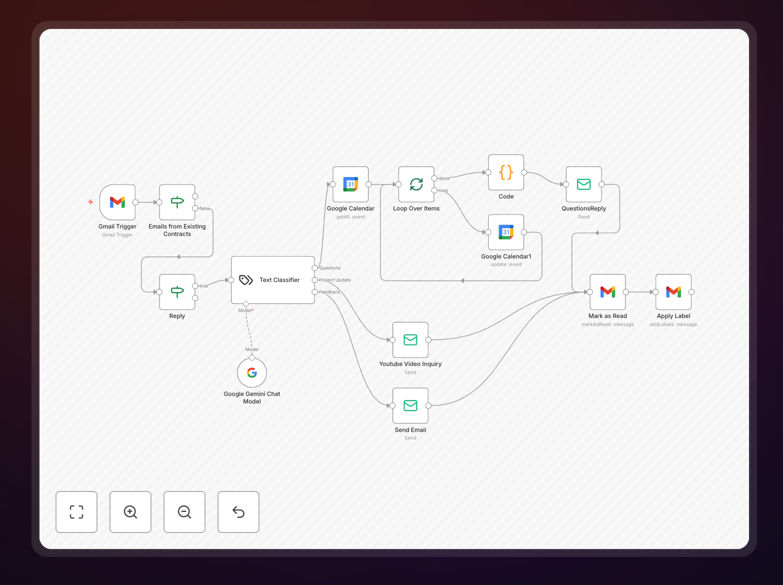
What This Workflow Does
This intelligent email management system solves the common business problem of email overload. Instead of manually reading and responding to every incoming message, this workflow uses Google's Gemini 2.0 AI to automatically process emails as they arrive.
The system categorizes emails into three main types: customer queries, project updates, and feedback. For each category, it generates appropriate, context-specific responses that maintain your brand voice and professional standards. Beyond just replying, it can schedule calendar invitations for meetings, mark emails as read, apply organizational labels, and log correspondence—all without human intervention.
The result is a significant reduction in manual email workload while ensuring timely, consistent communication with clients, partners, and team members. It transforms email from a time-consuming administrative task into an automated business process that enhances operational productivity.
How It Works
1. Email Trigger & Capture
The workflow starts by monitoring your connected email account (Gmail, Outlook, etc.) for new messages. When an email arrives, it captures the full content including subject, body, sender information, and any attachments.
2. AI Analysis & Categorization
The email content is sent to Google's Gemini AI model, which analyzes the intent, tone, and key elements. The AI categorizes the email into predefined types: queries (questions needing answers), project updates (status reports), or feedback (comments/suggestions).
3. Response Generation
Based on the category and specific content, the AI generates an appropriate response. For queries, it provides helpful information; for updates, it acknowledges receipt; for feedback, it thanks the sender and notes the input. The response maintains professional tone and can include personalized elements.
4. Action Execution
The workflow then executes appropriate actions: sending the generated reply, scheduling calendar events if meetings are requested, applying organizational labels, marking the email as processed, and logging the interaction for tracking purposes.
Who This Is For
This workflow is ideal for small to medium businesses, solopreneurs, customer support teams, project managers, and anyone who spends significant time on routine email communication. It's particularly valuable for:
- Customer support teams handling common inquiries and FAQ responses
- Consultants and freelancers managing client communication and scheduling
- Project managers coordinating updates across multiple stakeholders
- Sales professionals following up on leads and scheduling meetings
- Executives and busy professionals needing to manage high email volume efficiently
What You'll Need
- An n8n instance (cloud or self-hosted) with workflow execution capabilities
- Access to Google's Gemini AI API (available through Google AI Studio)
- Email account credentials (Gmail, Outlook, or other supported email service)
- Calendar access if you want meeting scheduling functionality
- Basic understanding of n8n interface for configuration and testing
Pro tip: Start by testing the workflow with a small subset of non-critical emails to refine the AI's response quality before full implementation. Provide clear examples of your preferred communication style to improve accuracy.
Quick Setup Guide
Follow these steps to implement this AI email responder in your business:
- Download and import the template JSON file into your n8n instance using the import function
- Configure email credentials in the email trigger node with your account details
- Set up Google Gemini API connection by adding your API key to the AI node
- Customize response templates to match your brand voice and communication style
- Test with sample emails to verify categorization accuracy and response quality
- Activate the workflow and monitor initial interactions before full automation
Key Benefits
Save 10-20 hours monthly per team member on routine email management. This workflow automates the most time-consuming aspects of email communication, freeing your staff for higher-value activities that directly impact revenue and growth.
Ensure 24/7 response capability even outside business hours. The AI system can process and respond to emails anytime, improving customer satisfaction with faster reply times and demonstrating your business's responsiveness.
Maintain consistent communication quality across all interactions. Unlike human responses that vary with mood, time pressure, or fatigue, the AI delivers consistently professional, on-brand communication that represents your business well.
Reduce human error in email handling and scheduling. The automated system follows precise rules, never forgets to reply, always applies correct labels, and accurately schedules meetings based on available slots.
Scale customer communication without proportional staffing increases. As your business grows and email volume rises, this workflow handles the increased load without requiring additional human resources, supporting efficient scaling.