What This Workflow Does
Going on vacation, attending a conference, or simply needing a break from email overload? Traditional out-of-office replies are generic, often ignored, and don't help the sender move forward. This workflow solves that by automating intelligent, context-aware responses using AI.
Instead of a blanket "I'm away" message, this system checks if you're actually out, scans incoming Gmail messages, uses AI to decide if a reply is appropriate (skipping newsletters and spam), and generates a short, polite, personalized response. It can include your return date, an alternate contact, and a friendly tone—making sure urgent matters get attention while you're offline.
For freelancers, consultants, small business owners, and teams, this automation reduces the anxiety of missing important emails. It maintains professionalism, saves hours of manual email management, and ensures you don't return to a chaotic inbox.
How It Works
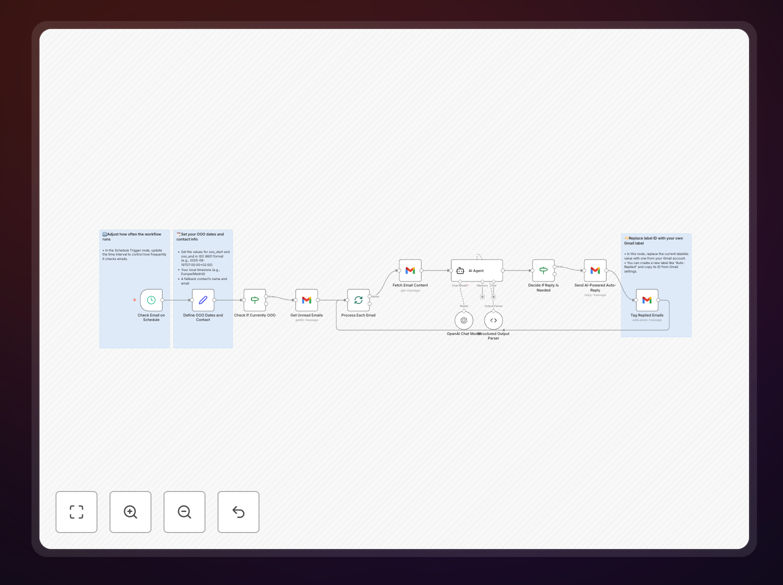
1. Schedule Trigger Checks Your Status
The workflow runs on a schedule (e.g., every 15 minutes). It first checks if you are currently out of office based on your predefined start and end dates and timezone.
2. Gmail Fetch & Filter
If you're away, it fetches unread emails from your Gmail account. It can filter by sender, subject keywords, or labels to avoid replying to automated mail, spam, or internal notifications.
3. AI Decision & Reply Generation
Each email is passed to an AI Agent node (like OpenAI or Google AI). The AI analyzes the content and decides if a reply is needed. If yes, it generates a concise, friendly out-of-office message using your configured tone, return date, and backup contact details.
4. Send & Label
The crafted reply is sent via Gmail back to the original sender. The email is then labeled (e.g., "Auto-Replied") to prevent duplicate responses and keep your inbox organized.
Who This Is For
This template is ideal for professionals who rely on email communication but need uninterrupted downtime. Freelancers who can't afford to lose client inquiries. Small business owners managing customer support solo. Teams coordinating holidays where someone must handle inquiries. Anyone who wants to maintain responsiveness without being glued to their inbox.
It's particularly valuable for consultants, agency owners, remote workers, and solopreneurs who juggle multiple projects and need a smart system to handle communication gaps during travel, sick days, or focused work sessions.
What You'll Need
- A Gmail account with OAuth2 access enabled.
- Access to an AI service (OpenAI API, Google AI, or similar) for generating replies.
- An n8n instance (cloud or self-hosted) to run the workflow.
- Basic understanding of your out-of-office schedule (start/end dates, timezone).
- A backup contact (name and email) for urgent matters.
Quick Setup Guide
1. Import the downloaded JSON template into your n8n workspace.
2. In the Set node, configure your out-of-office start/end times in ISO format (e.g., 2025-08-19T07:00:00+02:00), set your timezone (Europe/Madrid), and add your backup contact details.
3. Connect the Gmail node using OAuth2 credentials. Update the label ID in the final Gmail node to your own label (like "Auto-Replied").
4. Configure the AI Agent node with your preferred AI service and customize the prompt to match your desired tone and information.
5. Set the Schedule Trigger interval (e.g., every 15 minutes) and activate the workflow.
6. Test by sending yourself an email while the workflow is active to ensure replies are generated correctly.
Pro tip: Adjust the AI prompt to include specific phrases like "I'll respond upon return" or "For urgent matters, contact [name] at [email]." This personalization makes replies more helpful and reduces follow-up emails.
Key Benefits
Save 2–3 hours per week manually managing email during absences. The workflow handles replies automatically, freeing you to focus on your break or other work.
Improve sender experience with personalized, actionable responses. Recipients get clear information about your return and an alternate contact, reducing frustration and follow-ups.
Maintain professionalism even when offline. AI-generated replies are polite, context-aware, and avoid the robotic feel of traditional autoresponders.
Filter out noise. The workflow can skip replying to newsletters, promotional emails, and spam, ensuring only genuine inquiries get attention.
Scalable for teams. Adapt the workflow for team-wide outages by sharing schedules and backup contacts, ensuring unified communication during holidays or company events.