Google Sheets Gmail OpenAI Financial Automation n8n

Smart Invoice Collection System with GPT-4.1, Gmail & Google Sheets

Automate overdue invoice follow-ups with AI to recover $10-15K annually in lost payments. Zero manual work, professional communication.

Download Template JSON · n8n compatible · Free
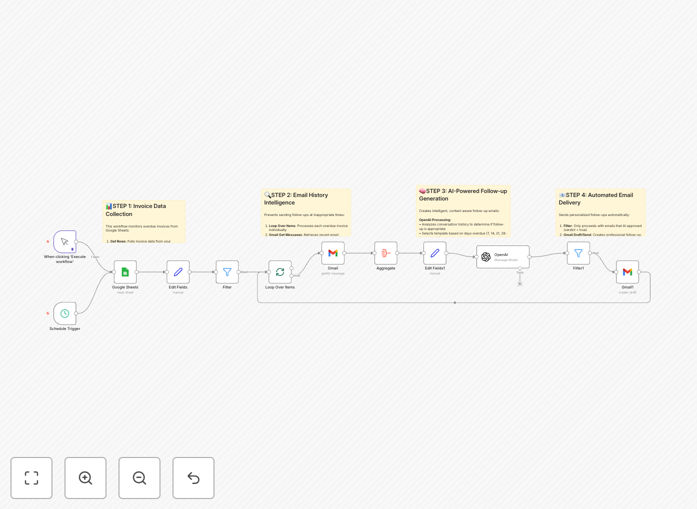
Visual diagram of smart invoice collection system connecting Google Sheets, Gmail, and OpenAI

What This Workflow Does

Late payments are one of the biggest cash flow killers for small businesses and freelancers. Manually tracking overdue invoices and sending follow-up emails consumes valuable time and often gets neglected during busy periods. This creates a vicious cycle where forgotten invoices lead to revenue leakage and strained client relationships.

This intelligent invoice collection system solves this problem completely. It automatically monitors your invoice database in Google Sheets, calculates which invoices are overdue at specific intervals (7, 14, 21, 28 days), analyzes recent email conversations to avoid inappropriate follow-ups, and sends professionally crafted reminders using AI-powered personalization. The system maintains business relationships while ensuring payments are collected, potentially recovering $10,000 to $15,000 annually in previously forgotten revenue.

How It Works

1. Invoice Monitoring & Filtering

The workflow connects to your Google Sheets invoice database and runs on a daily schedule. It calculates days overdue for each invoice and filters them based on your escalation timeline—only processing invoices that have reached specific follow-up milestones.

2. Email History Intelligence

Before sending any reminder, the system checks your Gmail for recent conversations with each client. Using AI analysis, it determines if there's been relevant communication about the invoice within the last 72 hours, preventing awkward or redundant follow-ups during active payment discussions.

3. AI-Powered Message Generation

OpenAI analyzes the context and generates personalized email content. The system selects from four escalating template levels—from gentle reminders to firm collection notices—adapting tone based on how overdue the invoice has become while maintaining professionalism.

4. Automated Delivery & Tracking

Personalized emails are sent through Gmail with proper formatting, clear subject lines, and payment instructions. The system can create drafts for review or send automatically, and all actions are logged for complete transparency.

Who This Is For

This automation is ideal for service-based businesses, agencies, consultants, freelancers, B2B companies with recurring invoice cycles, accounting firms offering premium services, and small business owners tired of manual collections. If you bill clients with NET30/60 payment terms and want to eliminate the administrative burden of chasing payments while improving cash flow, this system delivers immediate value.

What You'll Need

  1. A Google Sheets document with invoice data (Client Name, Email, Date Sent, Invoice ID, Amount, Status)
  2. Google Workspace account with Gmail and Sheets API access
  3. OpenAI API key (GPT-4.1 or similar model)
  4. n8n instance (cloud or self-hosted)
  5. Basic understanding of connecting APIs (we provide setup instructions)

Pro tip: Start with "draft mode" enabled for the first week to review AI-generated emails before they're sent. This builds confidence in the system's output quality before full automation.

Quick Setup Guide

1. Download the template and import it into your n8n workspace. 2. Create your Google Sheets invoice tracker with the required columns. 3. Set up OAuth connections for Google Sheets and Gmail in n8n. 4. Add your OpenAI API credentials. 5. Configure the schedule trigger (daily at 9 AM recommended). 6. Test with a small batch of overdue invoices, then scale to full automation.

Key Benefits

Recover Lost Revenue: Automatically capture $10,000-$15,000 annually in payments that would otherwise be forgotten or delayed indefinitely.

Eliminate Manual Work: Replace hours of tedious follow-up work with zero-touch automation that runs consistently regardless of your workload.

Maintain Professional Relationships: AI ensures communications are appropriate, personalized, and never awkward—preserving client trust while securing payments.

Improve Cash Flow Predictability: Reduce accounts receivable aging by 40-60% and create more consistent revenue streams.

Scalable Business Offering: Accounting firms and automation agencies can implement this for clients as a high-value service with clear ROI demonstration.

Frequently Asked Questions

Common questions about invoice collection automation and integration

AI can analyze email history to prevent sending follow-ups during active payment discussions, personalize reminder messages based on client context, and determine the appropriate urgency level for each overdue invoice. This prevents awkward communication and maintains professional relationships while ensuring payments are collected.

For example, if a client emailed yesterday saying "payment is processing," AI will recognize this and pause automated reminders. It also adapts tone from friendly to firm based on how overdue an invoice becomes, something manual processes often handle inconsistently.

Businesses typically recover $10,000 to $15,000 annually in previously forgotten payments through automated follow-ups. The system eliminates manual work, reduces accounts receivable aging by 40-60%, and improves cash flow predictability with zero ongoing labor costs after setup.

Consider a small agency with $200,000 in annual invoices. Even a 5% recovery rate on overdue invoices amounts to $10,000. The system pays for itself many times over while freeing up 5-10 hours monthly that were previously spent on manual collections.

Google Sheets serves as your central invoice database, while Gmail integration allows the system to read recent email conversations and send personalized follow-ups. This connection enables context-aware automation that knows when invoices were sent, which clients to contact, and what communication has already occurred.

The workflow pulls invoice data from Sheets, uses Gmail to check conversation history, then sends reminders through the same Gmail account. This creates a closed-loop system where all communication is tracked in one place, preventing duplicate efforts and ensuring consistent messaging.

Automated reminders are consistently sent at optimal intervals (7, 14, 21, 28 days), never get forgotten, apply graduated urgency based on actual overdue duration, and maintain professional tone regardless of staff workload. They also track all communications systematically for better client relationship management.

Manual follow-ups often suffer from inconsistency—some clients get contacted immediately while others slip through cracks. Automation ensures every overdue invoice receives appropriate attention according to a predefined strategy that balances persistence with professionalism.

Yes, the system can be configured for NET30, NET60, or custom payment terms, adapt messaging for B2B vs B2C clients, handle multiple currencies, and incorporate different escalation rules based on client importance or historical payment behavior.

You can create client segments in your Google Sheets (e.g., "VIP," "New Client," "International") and modify the workflow to apply different follow-up strategies. The AI can even adjust language formality and cultural nuances for global clients.

  • Different reminder schedules per client tier
  • Multi-currency amount formatting
  • Localized payment instruction links

The system includes intelligence to pause follow-ups when it detects recent relevant email conversations. For advanced implementations, you can add nodes to parse responses and route them to appropriate staff or trigger different workflow branches based on client replies.

Basic version: Stops reminders for 72 hours after detecting any email from the client. Advanced version: Uses AI to classify responses as "payment sent," "dispute," or "request for information" and triggers appropriate actions like updating Sheets, notifying accounting, or sending clarification emails.

Yes, GrowwStacks specializes in building tailored invoice collection systems that match your specific business processes, integrate with your existing CRM or accounting software, and incorporate your company's communication style and escalation policies.

We can create systems that connect to QuickBooks, Xero, or Salesforce, implement custom approval workflows for large invoices, add payment portal integrations, and build comprehensive dashboards to track collection performance across your entire client portfolio.

  • CRM integration (HubSpot, Salesforce)
  • Accounting software connections
  • Custom escalation rules and approval flows
  • Performance analytics and reporting

Need a Custom Invoice Collection Automation?

This free template is a starting point. Our team builds fully tailored automation systems for your specific business needs.