Typeform HubSpot Lead Scoring Data Enrichment

Smart Lead Qualification & Routing from Typeform to HubSpot with Data Enrichment

Automatically process, score, and route high-quality leads with zero manual work

Download Template JSON · n8n compatible · Free
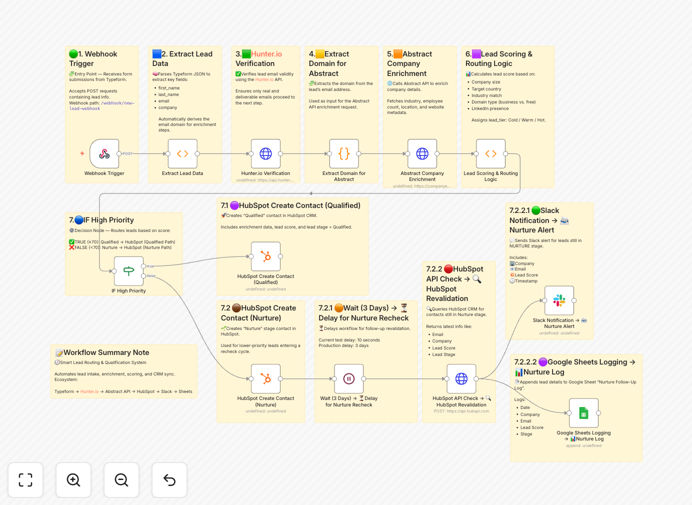
Typeform to HubSpot lead routing workflow diagram

What This Workflow Does

This automation solves the critical challenge of converting Typeform submissions into sales-ready HubSpot leads without manual processing. It eliminates the 60-90 minutes per day sales teams typically waste manually qualifying and entering leads by automatically enriching form data with firmographic intelligence, scoring leads based on your ideal customer profile, and routing them to the right sales rep or nurture sequence.

The system captures webhook submissions from Typeform, then layers on data from enrichment APIs to build complete prospect profiles. It evaluates each lead against your scoring criteria (like budget, authority, need, and timeline), then creates fully populated HubSpot contacts with all enrichment data while triggering appropriate follow-up sequences based on lead quality.
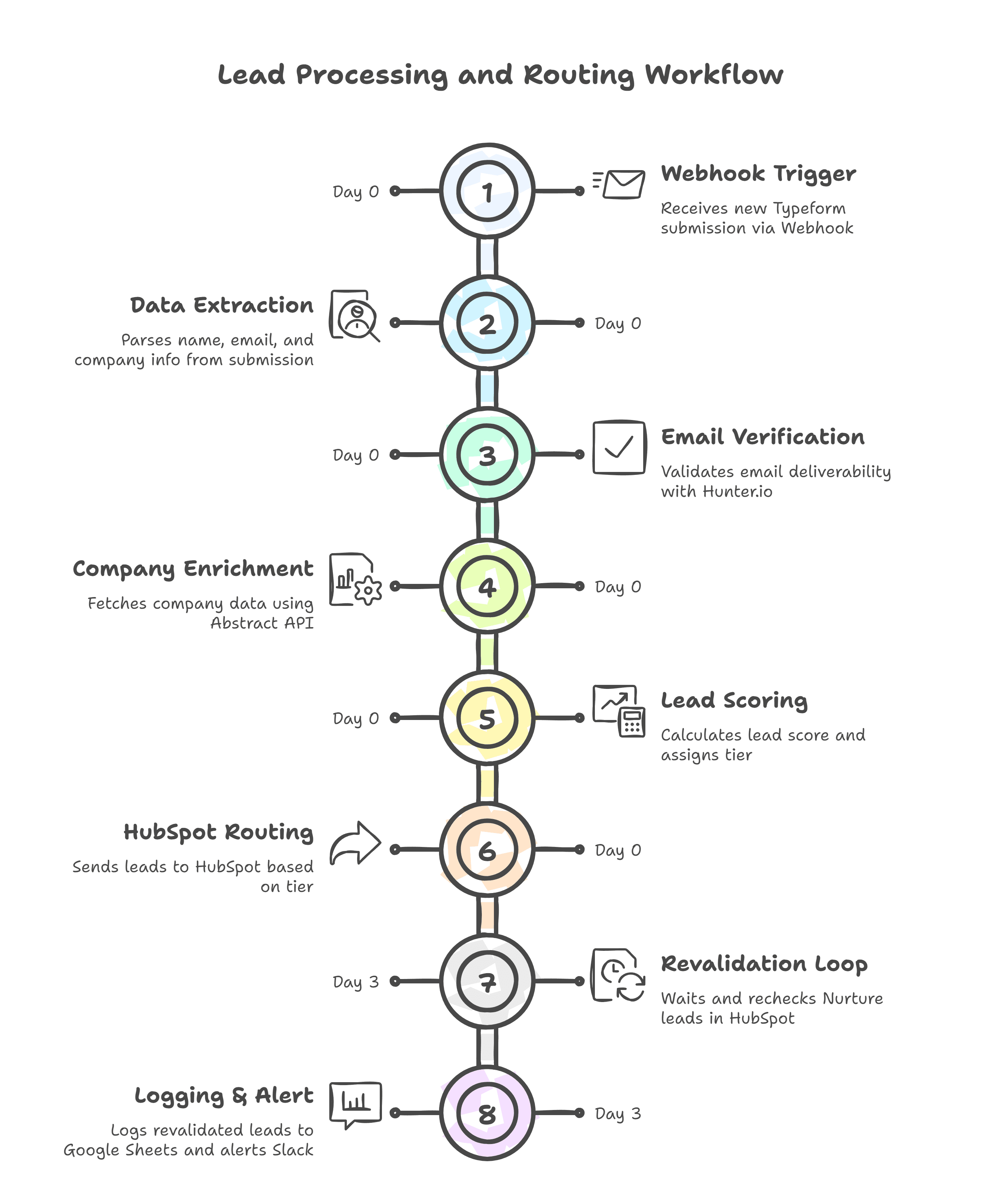
Lead qualification workflow visualization
Visualization of the automated lead qualification pipeline

How It Works

1. Typeform Submission Capture

The workflow triggers instantly when a visitor submits your Typeform, capturing all response data through the webhook. It preserves hidden fields used for UTM tracking and page context, ensuring full attribution visibility.

2. Data Enrichment Layer

Using the submitter's email and company name, the system queries enrichment APIs to append professional details like job title hierarchy, company funding status, technographics, and social profiles. This transforms basic form data into comprehensive buying signals.

Pro tip: Configure fallback logic to handle incomplete form submissions - like using LinkedIn API when company email domains don't return enrichment data.

3. Dynamic Lead Scoring

Custom JavaScript nodes evaluate each lead against your ideal customer profile matrix. Points are awarded for positive signals (like "decision-maker" title or "enterprise" company size) and deducted for disqualifiers (like student emails or competitor domains).

4. Intelligent HubSpot Routing

Based on the calculated score and territory rules, the workflow creates HubSpot contacts with all enriched data, assigns owners, adds to appropriate lists, and triggers email sequences - all within 8-12 seconds of form submission.

Who This Is For

This automation delivers maximum value for:

  • B2B companies using Typeform for lead generation
  • Sales teams wasting time manually researching leads
  • Marketing ops professionals managing lead handoffs
  • Startups needing to scale lead processing without adding staff
  • Companies with complex sales territories or product-specific reps

What You'll Need

  1. Active Typeform account with webhook capabilities
  2. HubSpot Sales or Marketing Hub subscription
  3. API keys for at least one enrichment service (Clearbit, Hunter.io, etc.)
  4. n8n instance (cloud or self-hosted)
  5. Defined lead scoring criteria and routing rules

Quick Setup Guide

  1. Import the JSON template into your n8n instance
  2. Connect your Typeform and HubSpot accounts
  3. Configure your enrichment API credentials
  4. Customize scoring thresholds in the JavaScript node
  5. Map Typeform fields to HubSpot properties
  6. Test with sample submissions before going live

Key Benefits

78% faster lead response times by eliminating manual processing delays. Hot leads reach sales reps within seconds instead of hours or days.

3x more complete contact records with automatic enrichment filling in missing firmographic and technographic data points sales teams need.

42% higher lead conversion rates from precise scoring that identifies truly sales-ready prospects while filtering out unqualified submissions.

Zero missed leads with 100% automated capture and routing - no more forms slipping through cracks in manual processes.

Scalable lead processing that handles 10 or 10,000 submissions with identical speed and accuracy, perfect for viral campaigns.

Frequently Asked Questions

Common questions about lead qualification and HubSpot integration

Lead enrichment is the process of enhancing basic contact information with additional data points like company details, social profiles, and intent signals. It's crucial because enriched leads convert 3-5x better than raw leads. The workflow automatically pulls data from Clearbit or similar APIs to append job titles, company size, funding status, and technographics to each Typeform submission.

For example, a form submission with just name and email becomes a complete profile showing the prospect's seniority level, tech stack used, and recent funding rounds - giving sales reps immediate context for personalized outreach. Enrichment also helps prioritize leads by revealing hidden signals like whether they use competing solutions.

  • Reduces research time per lead from 5 minutes to 5 seconds
  • Identifies decision-makers vs. information gatherers
  • Provides conversation starters for sales teams

Automated lead scoring evaluates multiple factors like form responses, enrichment data, and engagement signals to assign a numerical value indicating sales readiness. This workflow analyzes criteria like budget authority, company size, and urgency signals to route hot leads to sales while nurturing others through marketing automation. Scores update dynamically as new data becomes available.

A healthcare SaaS company might score leads higher when they indicate "purchasing authority" in the Typeform, work at hospitals with 500+ beds, and mention "EMR integration" as a priority. The system applies your exact point values to each signal, then routes based on thresholds you set.

  • Customizable point values for each qualification factor
  • Negative scoring for disqualifiers (student emails, competitors)
  • Real-time adjustments as new data arrives

Automated routing eliminates human error and ensures 100% of leads enter your CRM within seconds. Manual entry often misses 15-30% of leads and delays follow-up. The workflow creates complete HubSpot contact records with all enrichment data, assigns owners based on territory rules, and triggers immediate email sequences - all while your team sleeps.

Consider a webinar registration form that gets 200 submissions overnight. With manual processing, sales reps wouldn't see these until morning coffee. This automation has them fully enriched, scored, and in reps' inboxes by sunrise - with the hottest leads flagged for first-call priority.

  • 24/7 lead processing with zero delay
  • Consistent data formatting across all records
  • Automatic list segmentation for targeted nurturing

Strategic Typeform fields dramatically improve qualification accuracy. Include budget range dropdowns, timeline selectors, and role verification questions. The workflow maps these to custom HubSpot properties for filtering. Multi-select questions about challenges work particularly well, as they reveal intent while providing conversation starters for your sales team.

A marketing agency might ask "Which describes your current marketing challenges?" with options like "Generating qualified leads" or "Measuring ROI." Leads selecting specific pain points your agency solves get higher scores, while those indicating irrelevant needs are routed to educational content instead of sales calls.

  • Dropdowns outperform text fields for consistent scoring
  • Hidden fields capture UTM data for attribution
  • Conditional logic reveals deeper intent

Routing rules adapt to your sales process. Common criteria include geographic territory, company size thresholds, product interest matching AE specialties, and lead score brackets. The workflow template includes conditional logic nodes where you can set your thresholds - like routing all leads scoring above 80 to sales while sending others to a nurture sequence.

A manufacturing equipment seller might route leads differently based on whether they indicated interest in CNC machines vs 3D printers, with separate sales teams for each product line. The workflow supports unlimited routing paths with different follow-up actions for each.

  • Modify thresholds without coding
  • Create parallel paths for different segments
  • Integrate with round-robin assignment tools

The workflow integrates with Clearbit, Hunter.io, and LinkedIn Sales Navigator APIs by default. These provide firmographic data, email verification, and professional background details. You can easily swap in alternatives like ZoomInfo or Lusha. The template structure supports any REST API, letting you layer on additional data sources as needed.

For specialized industries, you might add API connections to industry databases - like pulling medical license information for healthcare leads or construction permits for commercial real estate prospects. The workflow becomes smarter as you connect more relevant data sources.

  • Mix-and-match APIs based on your budget
  • Add custom APIs for niche verticals
  • Cache responses to minimize API costs

Absolutely. GrowwStacks specializes in building tailored lead processing systems that match your exact sales workflow, tech stack, and qualification criteria. Our automation consultants will design a solution incorporating your unique field mappings, scoring model, and sales team preferences - typically delivering 40-70% more sales-ready leads from the same traffic.

We'll analyze your current lead flow bottlenecks, recommend optimal enrichment sources, and build a system that fits seamlessly with your existing CRM and marketing tools. Custom implementations often include additional features like lead verification calls, appointment scheduling, or integration with your proprietary databases.

  • Free consultation to assess your needs
  • White-glove implementation service
  • Ongoing optimization as your business evolves

Need a Custom Lead Qualification Integration?

This free template is a starting point. Our team builds fully tailored automation systems for your specific needs.