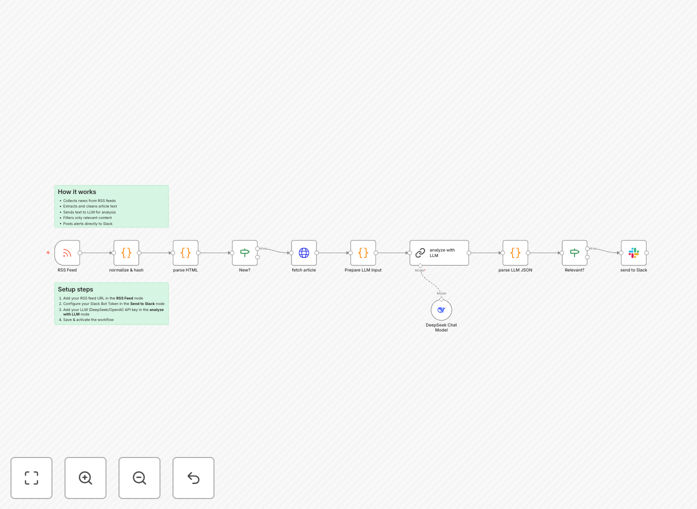
What This Workflow Does
Information overload is a real business problem. Manually scanning dozens of news sites, blogs, and industry feeds to stay updated on competitors, market trends, or technology shifts consumes valuable hours each week. This intelligent automation solves that by acting as your 24/7 research assistant.
The workflow connects to any RSS feed you specify, fetches new articles automatically, and uses an AI model (DeepSeek) to read, understand, and evaluate each piece. It doesn't just forward links—it extracts the core message, assesses sentiment (positive, negative, neutral), flags key topics, and determines relevance based on your criteria. Only the articles that pass this intelligent filter are transformed into concise, actionable alerts and sent directly to a designated Slack channel.
This transforms a flood of potential information into a curated stream of intelligence, ensuring your team is informed, not overwhelmed, and can react swiftly to meaningful developments.
How It Works
The automation follows a logical, multi-stage process to ensure quality and relevance.
1. RSS Feed Trigger & Data Collection
The workflow is triggered on a schedule (e.g., every hour) or by a webhook. It connects to your pre-configured RSS feed URLs, fetching the latest articles. It normalizes the data, handling different feed formats and deduplicating entries to avoid repeat alerts.
2. Content Extraction & Cleaning
For each article, the system extracts the full text, stripping away HTML, ads, and navigation elements to isolate the core content. This clean text is what the AI will analyze, ensuring the model works with clear information.
3. AI Analysis & Intelligence Layer
This is the core differentiator. The clean text is sent to the DeepSeek AI model with specific instructions. The AI generates a concise summary (2-3 sentences), classifies the overall sentiment, identifies key entities (companies, people, technologies), and tags the article with relevant categories (e.g., "Funding Round," "Product Launch," "Security Breach").
4. Smart Filtering & Decision Logic
Based on the AI's output, the workflow applies your rules. You can filter out articles with neutral/negative sentiment, require specific keywords, or ignore certain sources. Articles that don't meet your threshold are silently archived. Only the relevant ones proceed.
5. Alert Formatting & Slack Delivery
The final step formats the AI's summary, sentiment, and key tags into a clean, readable Slack message. It includes the original link, the summary, and visual indicators (like emojis for sentiment). This alert is posted to your chosen Slack channel, giving your team instant, digestible insights.
Who This Is For
This automation delivers disproportionate value to roles and industries where timely information is a competitive advantage.
Executives & Strategy Teams: Stay on top of market shifts, competitor moves, and macroeconomic news without daily briefings.
Marketing & PR Professionals: Monitor brand mentions, industry trends, and campaign coverage in real-time.
Investors & Analysts: Track portfolio companies, sector news, and emerging technologies to inform investment decisions.
Product & R&D Teams: Follow technology blogs, academic publications, and competitor product announcements.
Consultants & Agencies: Maintain deep client industry knowledge to provide proactive, informed advice.
Any business that relies on being the first to know will find this system transformative.
What You'll Need
- An n8n Instance: A self-hosted n8n setup or an n8n.cloud account to import and run the workflow.
- Slack Workspace: Admin access to a Slack workspace where you can create a dedicated channel for alerts and set up a Slack Bot.
- Slack Bot Token: A "Bot User OAuth Token" generated via the Slack API to allow the workflow to post messages.
- DeepSeek API Key: An API key from DeepSeek (or another compatible LLM provider like OpenAI) to power the AI analysis.
- Target RSS Feeds: The URLs of the news sites, blogs, or industry feeds you want to monitor.
Pro tip: Start with 2-3 high-value RSS feeds to fine-tune your AI filtering rules before scaling to a larger list. This ensures your alerts remain high-signal from day one.
Quick Setup Guide
You can have this intelligence system running in under 30 minutes.
- Download & Import: Click the "Download Template" button above to get the JSON file. In your n8n instance, go to "Workflows" > "Import from file" and select the downloaded JSON.
- Configure Slack Credentials: In the workflow, find the "Slack" node. Click to edit its credentials, and add your Slack Bot OAuth Token. Test the connection.
- Set Up AI API: Locate the "DeepSeek Chat Model" node (or equivalent). Edit its credentials to add your DeepSeek API Key. Ensure the model parameters match your needs.
- Input Your RSS Feeds: Find the "RSS Feed Read" node. Replace the placeholder feed URL with your target RSS feed(s). You can add multiple URLs.
- Customize Filter Rules (Optional): Review the "IF" nodes that handle filtering. Adjust the conditions (e.g., required keywords, sentiment scores) to match what's relevant for your business.
- Activate & Test: Turn the workflow ON. It will run on its schedule. Trigger a manual test run to see an alert appear in your designated Slack channel. Adjust as needed.
Key Benefits
Eliminate Manual Scrolling & Save 5-10 Hours Weekly: Replace the daily ritual of checking multiple websites with an automated system that works while you focus on high-value tasks. This recovers significant time for strategic work.
Move from Noise to Signal with AI-Powered Filtering: Go beyond basic keyword matching. The AI understands context, sentiment, and relevance, ensuring your team only sees alerts that genuinely matter, dramatically improving information quality.
Enable Faster, More Informed Decision-Making: Receive curated intelligence in real-time directly in Slack. This shortens the time between a market event and your team's awareness, allowing for quicker strategic responses and capitalizing on opportunities.
Build a Centralized Knowledge Stream in Slack: Consolidate critical industry news into a single, searchable Slack channel. This creates a living archive of relevant developments that the entire team can reference, fostering better alignment and shared context.
Gain a Scalable Competitive Intelligence Operation: The system scales effortlessly. Monitoring 5 feeds or 50 requires the same setup effort. This allows you to expand your intelligence gathering as your business grows without adding proportional overhead.