What This Workflow Does
Creating social media banners is a time-consuming task that often delays marketing campaigns. This automation solves that problem by combining AI image generation with BannerBear's template system to produce professional banners automatically.
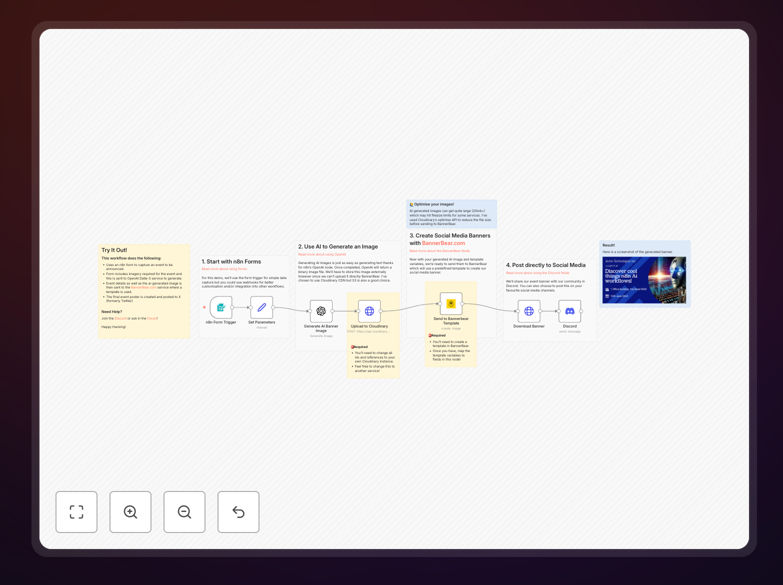
The workflow starts with a simple form where users input event details and image preferences. It then uses OpenAI's DALL-E 3 to generate custom images based on those prompts, uploads them to BannerBear, and creates perfectly formatted banners for different social platforms. What used to take hours of designer time now happens in minutes without manual intervention.
How It Works
1. Form Trigger & Data Collection
The workflow begins with a form trigger where marketing teams or event organizers input banner requirements: event title, date, description, color preferences, and image style suggestions.
2. AI Image Generation
The system sends the image description to OpenAI's DALL-E 3 API, which generates a unique, high-quality image matching the requested style and theme. This eliminates the need for stock photos or custom photography.
3. BannerBear Template Processing
The generated image and form data are sent to BannerBear, where they populate a pre-designed template. BannerBear handles all the complex layout, text positioning, and platform-specific sizing automatically.
4. Output & Distribution
The final banners are generated in multiple sizes (Instagram, Facebook, Twitter, LinkedIn) and can be automatically saved to cloud storage, sent to team members for approval, or posted directly to social media scheduling tools.
Who This Is For
This automation is ideal for marketing teams, digital agencies, event companies, SaaS businesses, and content creators who regularly need social media graphics. It's particularly valuable for businesses running weekly promotions, product launches, webinars, or seasonal campaigns that require multiple banner variations across different platforms.
Small businesses without dedicated design resources benefit enormously, as do larger organizations looking to scale their content production while maintaining brand consistency. The workflow reduces dependency on graphic designers for routine banner creation.
What You'll Need
- BannerBear Account: You'll need a BannerBear.com account with at least one template set up for your banner designs.
- OpenAI API Key: Access to OpenAI's DALL-E 3 image generation service with an active API key.
- n8n Instance: A running n8n instance (cloud or self-hosted) to import and run the workflow.
- Basic Form Interface: A simple way to trigger the workflow - this could be an n8n form, webhook, or integration with your existing systems.
Pro tip: Start with 2-3 BannerBear templates for your most common banner types (event promotion, product launch, weekly special). Once the automation is working smoothly, expand to cover all your regular content needs.
Quick Setup Guide
- Download and Import: Download the template file and import it into your n8n instance using the workflow import feature.
- Configure Credentials: Set up credentials for OpenAI (DALL-E 3) and BannerBear in n8n's credentials management.
- Update Template IDs: Replace the placeholder BannerBear template ID with your actual template ID from your BannerBear account.
- Test with Sample Data: Run the workflow manually with test data to ensure all connections work correctly.
- Set Up Trigger: Configure your preferred trigger method - this could be an n8n form, schedule, or webhook from your marketing tools.
- Configure Output Destinations: Set where completed banners should go - Google Drive, Dropbox, or directly to your social media scheduling tool.
Key Benefits
Save 5-10 hours weekly on design work by automating routine banner creation. What used to require back-and-forth with designers or searching for stock images now happens automatically.
Maintain perfect brand consistency across all platforms. Every banner follows your exact template specifications, ensuring colors, fonts, and layouts match your brand guidelines perfectly.
Scale content production without adding staff by handling increased banner needs through automation rather than hiring additional designers.
Enable rapid campaign testing by generating multiple banner variations quickly to test different designs, messages, and images for optimal performance.
Reduce campaign launch time from days to minutes. When opportunities arise, you can create and deploy professional banners immediately rather than waiting for designer availability.