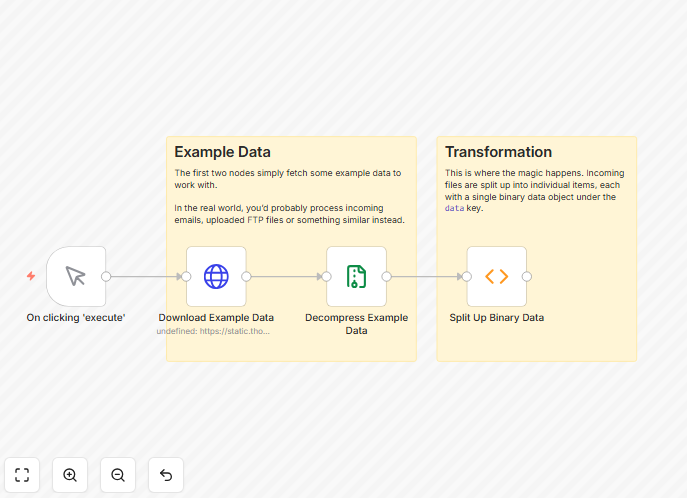
What This Workflow Does
This automation solves a common but frustrating problem: dealing with binary file attachments that arrive in unpredictable formats. When you receive emails with attachments like attachment_0, attachment_1, etc., or process form submissions with multiple files, manually extracting and organizing these documents wastes valuable time and creates organizational chaos.
The workflow automatically processes incoming binary data, extracts all files regardless of their naming convention, and outputs clean, individual file items ready for further processing. It transforms messy, hard-to-handle attachment collections into structured data that can be easily routed to cloud storage, databases, or other business systems.
By automating this process, businesses eliminate hours of manual file management while ensuring consistency, reducing errors, and accelerating document processing times from days to minutes.
How It Works
Step 1: Receive Binary Data
The workflow starts by receiving data containing binary attachments. This could come from email triggers, webhook submissions, API calls, or form uploads. The system accepts data in any format and prepares it for processing.
Step 2: Extract and Identify Attachments
A custom function node scans the incoming data structure to identify all binary objects. It intelligently recognizes attachment patterns regardless of naming conventions—whether they're labeled sequentially, by timestamp, or with random identifiers.
Step 3: Normalize File Structure
Each identified file is extracted and transformed into a standardized format. The workflow creates individual data items for each file, ensuring consistent metadata, proper file type detection, and clean naming that follows your business rules.
Step 4: Output Processed Files
The final output delivers each file as a separate, well-structured item with all binary data intact and ready for the next step in your automation chain. Files can now be easily routed to storage, analysis, or notification systems.
Who This Is For
This automation is ideal for businesses that regularly receive files through digital channels. Customer support teams handling email attachments, marketing departments processing form submissions, operations teams managing document uploads, and IT departments integrating file-based APIs will find immediate value.
Companies transitioning from manual file handling to automated processes, teams experiencing growth in document volume, and organizations needing better audit trails for file movements benefit most. The workflow is particularly valuable for regulated industries where document processing consistency and traceability are essential.
What You'll Need
- An active n8n instance (cloud or self-hosted)
- Source of binary data (email, webhook, API, or form submissions)
- Destination systems for processed files (cloud storage, database, CRM, etc.)
- Basic understanding of your current file handling processes
- File naming and organization standards for your business
Quick Setup Guide
Follow these steps to implement this binary data processing automation in your n8n environment:
- Download the template using the button above and save the JSON file to your computer.
- Import into n8n by navigating to your n8n dashboard, clicking "Workflows" → "Import from file" and selecting the downloaded JSON.
- Configure your trigger by replacing the sample trigger with your actual data source (email, webhook, or API connection).
- Test with sample data by running the workflow with example attachments to ensure files are properly extracted.
- Connect your destinations by adding nodes to route processed files to your preferred storage or business systems.
- Activate and monitor by turning on the workflow and checking initial processing to confirm everything works as expected.
Pro tip: Before going live, test the workflow with various file types and sizes to ensure your destination systems can handle the volume. Set up error handling nodes to catch and alert on processing failures.
Key Benefits
Eliminate manual file handling that consumes 2-5 hours per week per employee. This automation processes hundreds of files simultaneously without human intervention, freeing your team for higher-value work.
Ensure consistent file organization across all incoming documents. Every file follows the same naming conventions, metadata standards, and storage patterns regardless of source, creating a reliable document management system.
Accelerate processing time from hours to seconds. What previously required manual downloading, renaming, and filing now happens automatically, dramatically speeding up business processes that depend on these files.
Reduce errors and lost documents by eliminating human mistakes in file handling. Automated processing ensures every attachment is captured, processed, and stored according to predefined rules.
Create audit trails for compliance and tracking. The workflow can log every file processed, including source, processing time, and destination, providing complete visibility into document movements.