AI Analysis HR Analytics DEI Monitoring Data Scraping Statistical Reporting

Spot Workplace Discrimination Patterns with AI

Automate the detection of bias in employee reviews using AI-powered text analysis and statistical modeling.

Download Template JSON · n8n compatible · Free
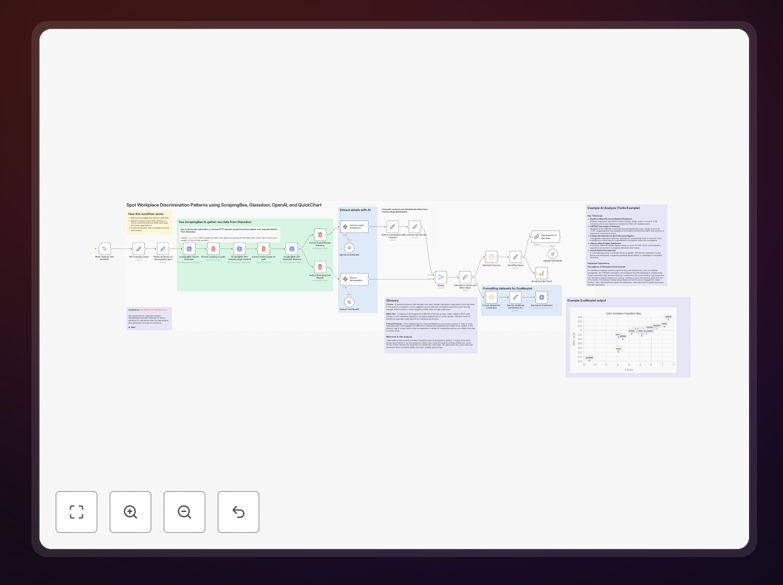
AI workflow analyzing workplace discrimination patterns from review data

What This Workflow Does

Workplace discrimination often goes undetected because patterns are hidden across thousands of employee reviews and feedback points. Manual analysis is time-consuming, subjective, and rarely scales. This automation solves that by systematically identifying bias indicators using AI and statistical methods.

The workflow scrapes public review data from platforms like Glassdoor, uses AI to extract demographic-based ratings and sentiment, then calculates statistical disparities (z-scores, effect sizes, p-values) to highlight potential discrimination patterns. It generates visual reports that help HR teams, DEI officers, and company leadership make data-driven decisions to improve workplace equity.

How It Works

Step 1: Data Collection

The workflow uses ScrapingBee to gather company review data from Glassdoor. It extracts ratings, text reviews, job titles, locations, and dates—creating a structured dataset for analysis while respecting rate limits and terms of service.

Step 2: AI-Powered Analysis

OpenAI's models process review text to identify mentions of demographic factors (gender, race, age, etc.) and associated sentiment. The AI classifies reviews by potential bias categories and extracts quantitative ratings for different demographic groups.

Step 3: Statistical Calculation

Custom code nodes calculate z-scores to show how far each group's ratings deviate from company averages. Effect size measures the magnitude of differences, while p-values assess statistical significance. This transforms subjective impressions into objective metrics.

Step 4: Visualization & Reporting

The workflow generates scatter plots showing rating distributions, bar charts comparing group averages, and summary tables highlighting the most significant disparities. Reports are compiled into formatted documents or dashboards for stakeholder review.
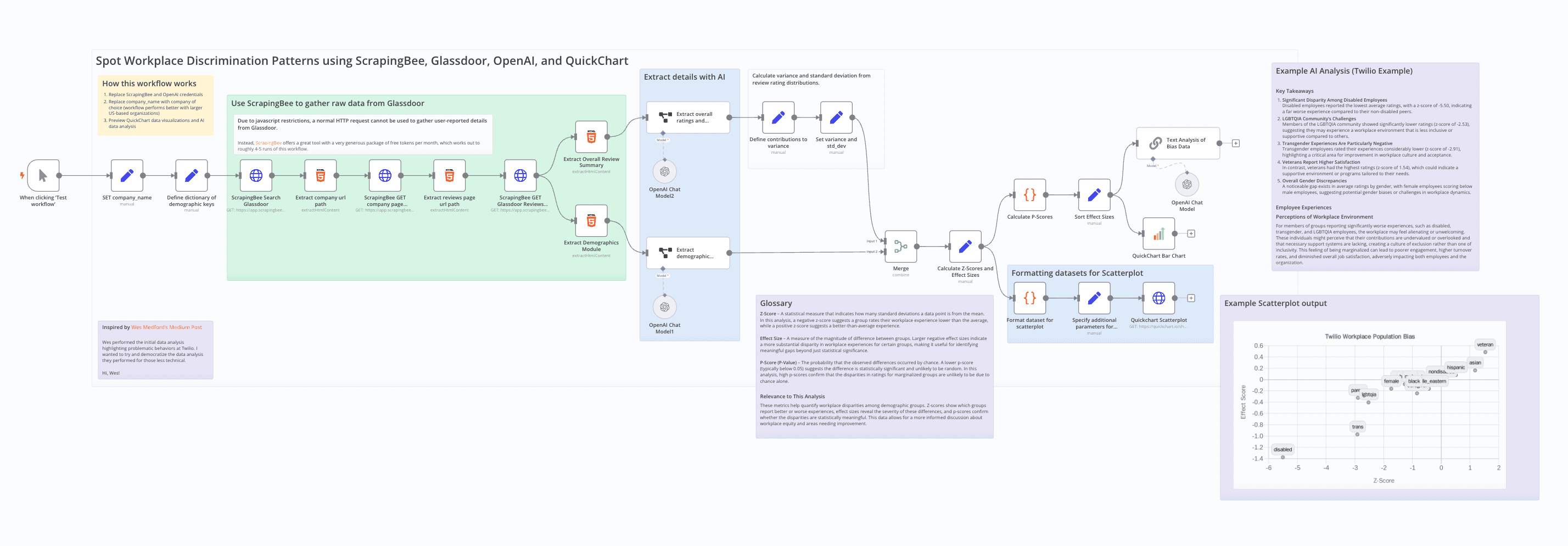
Screenshot of the n8n workflow for discrimination pattern analysis
The complete n8n workflow for scraping, analyzing, and reporting workplace discrimination patterns.

Who This Is For

This template is ideal for HR departments, Diversity & Inclusion teams, organizational psychologists, management consultants, and employee advocacy groups. Companies with 100+ employees, especially those in regulated industries or with public diversity commitments, will find immediate value. Researchers studying workplace dynamics and journalists investigating corporate culture can also use this for evidence-based reporting.

What You'll Need

  1. n8n instance (cloud or self-hosted)
  2. ScrapingBee account for web scraping (or alternative like ScrapingDog)
  3. OpenAI API key for text analysis (GPT-3.5 or GPT-4)
  4. Basic understanding of statistical concepts (z-scores, p-values)
  5. Target company names for analysis (publicly traded companies work best)

Pro tip: Start with large, well-known companies that have thousands of Glassdoor reviews. The statistical analysis becomes more reliable with larger sample sizes (100+ reviews per demographic group).

Quick Setup Guide

  1. Import the template: Download the JSON file and import it into your n8n instance.
  2. Configure credentials: Add your ScrapingBee and OpenAI API keys to the respective nodes.
  3. Set target company: Modify the "Company Name" parameter in the HTTP Request node to analyze your chosen organization.
  4. Adjust parameters: Review the statistical thresholds (z-score > 2.0, p-value < 0.05) and modify if needed for your sensitivity requirements.
  5. Test run: Execute the workflow with a small sample first to verify data collection and analysis logic.
  6. Schedule automation: Set the workflow to run monthly to track changes in discrimination patterns over time.
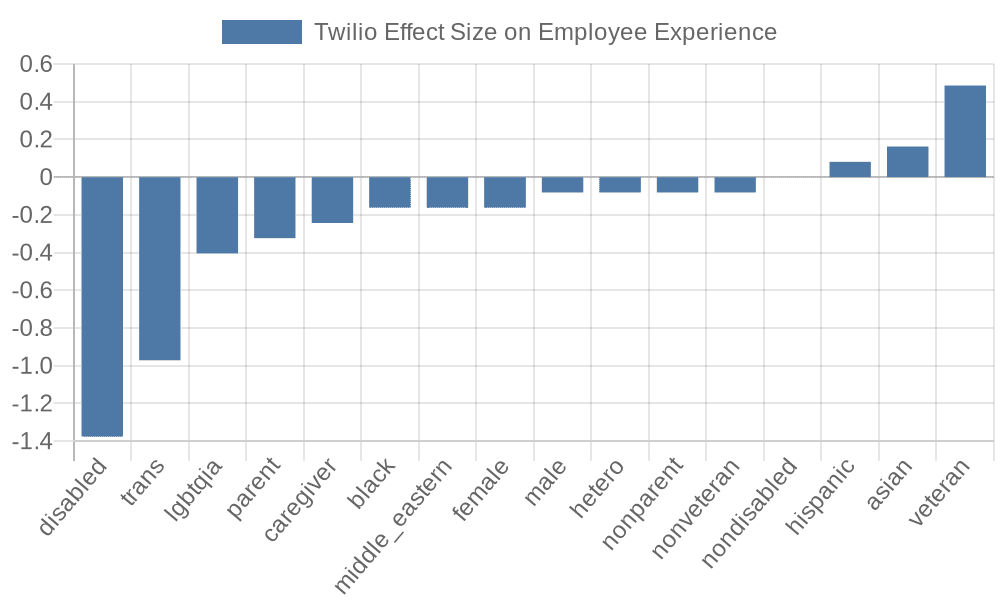
Statistical effect size visualization from discrimination analysis
Example visualization showing effect size differences in workplace satisfaction across demographic groups.

Key Benefits

Save 80+ hours per analysis compared to manual review of employee feedback. What traditionally takes weeks of HR team time completes automatically in hours.

Objective, data-driven insights replace subjective interpretations. Statistical measures provide defensible evidence for policy changes and intervention programs.

Proactive risk mitigation helps identify discrimination patterns before they escalate to lawsuits or public relations crises, protecting both employees and company reputation.

Benchmarking capability allows comparison across departments, locations, or time periods to measure the impact of diversity initiatives and track progress toward equity goals.

Scalable to entire organization—once configured, the same workflow can analyze multiple companies, business units, or review periods with minimal additional effort.
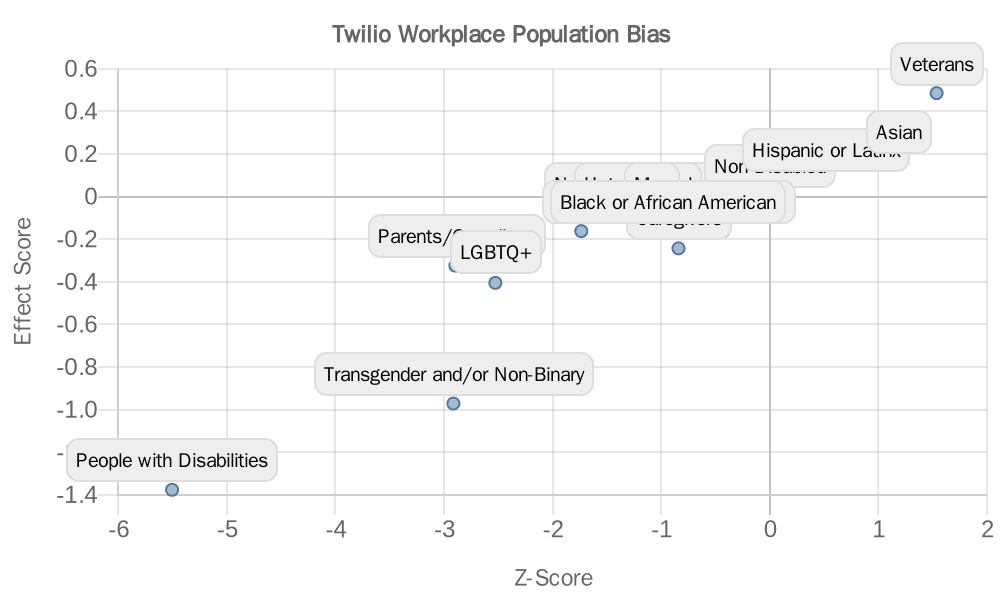
Scatter plot visualization of rating distributions
Scatter plot showing distribution of workplace ratings, highlighting potential outlier groups.

Frequently Asked Questions

Common questions about workplace discrimination analysis and AI automation

AI can analyze large volumes of unstructured employee feedback, like Glassdoor reviews, to detect patterns in sentiment and ratings across different demographic groups. It processes text for mentions of bias, calculates statistical disparities in satisfaction scores, and visualizes trends that might be invisible to manual review.

For example, AI might detect that reviews from employees in a specific age group consistently mention "promotion barriers" with negative sentiment, while statistical analysis shows their average rating for career advancement is 1.5 points lower than other groups—a pattern human reviewers could miss across thousands of reviews.

Automating bias detection saves hundreds of manual hours, ensures consistent and unbiased analysis, scales to analyze thousands of reviews, and provides objective statistical evidence. It transforms a qualitative, subjective process into a quantitative, repeatable one.

Organizations using automated detection can monitor workplace culture continuously rather than through annual surveys, identify issues before they escalate, and measure the impact of diversity initiatives with concrete data. This proactive approach improves employee retention and reduces legal risks.

Scraping publicly available review data for internal analysis and research purposes is generally permissible, but you must comply with Glassdoor's terms of service, respect robots.txt directives, and ensure data is used ethically—not for identifying individuals.

Best practices include: using professional scraping services that handle rate limiting, anonymizing all personal data immediately after collection, aggregating results to group level (never individual), and consulting legal counsel for compliance with data privacy regulations like GDPR or CCPA in your jurisdiction.

This workflow uses z-scores to measure deviation from average ratings, effect size to quantify the magnitude of differences between groups, and p-values to assess statistical significance. These metrics provide a robust, multi-dimensional view of potential discrimination.

For instance, a z-score of 2.3 for women's compensation ratings indicates their scores are 2.3 standard deviations below the company average—a statistically significant disparity. An effect size of 0.8 would show a large practical difference, while a p-value < 0.05 confirms the finding is unlikely due to random chance.

Modern LLMs like GPT-4 achieve 85-95% accuracy on sentiment analysis and topic extraction tasks when properly prompted. However, accuracy depends on review clarity, sample size, and prompt engineering.

The workflow mitigates accuracy concerns by combining AI text analysis with statistical validation. Even if the AI misclassifies some individual reviews, statistical patterns across hundreds of reviews remain reliable. Regular validation against human-coded samples and prompt refinement further improve accuracy over time.

Yes, the same workflow logic can be adapted to analyze reviews from Indeed, Google Reviews, Trustpilot, or internal employee surveys. The core analysis engine—AI text processing followed by statistical calculation—remains applicable across data sources.

You would modify the data scraping step to match each platform's structure and adjust AI prompts to extract platform-specific rating categories. The statistical reporting and visualization components work identically regardless of source, making this a versatile framework for workplace analysis.

Risks include misinterpretation of statistical noise as discrimination, privacy violations if reviews are linked to individuals, and potential bias in the AI's own analysis. These risks require careful mitigation strategies.

To address them: use large sample sizes (100+ per group), always anonymize data, validate findings with multiple statistical methods, involve human experts in interpreting results, and establish clear protocols for how findings will be used—focusing on systemic improvements rather than individual actions.

Yes, GrowwStacks specializes in building custom automation solutions for DEI monitoring, employee sentiment analysis, and compliance reporting. We can tailor workflows to your specific data sources, integrate with your HR systems, and create dashboards for ongoing monitoring.

Our team will work with you to understand your unique requirements—whether you need to analyze internal survey data, monitor multiple review platforms, generate compliance reports for regulators, or create executive dashboards. We handle the technical implementation so you can focus on acting on the insights.

  • Integration with your existing HRIS (Workday, BambooHR, etc.)
  • Custom statistical models for your industry and company size
  • Scheduled reporting and alerting for concerning patterns
  • Secure, compliant data handling tailored to your regulations

Need a Custom Workplace Discrimination Analysis Automation?

This free template is a starting point. Our team builds fully tailored automation systems for your specific business needs.