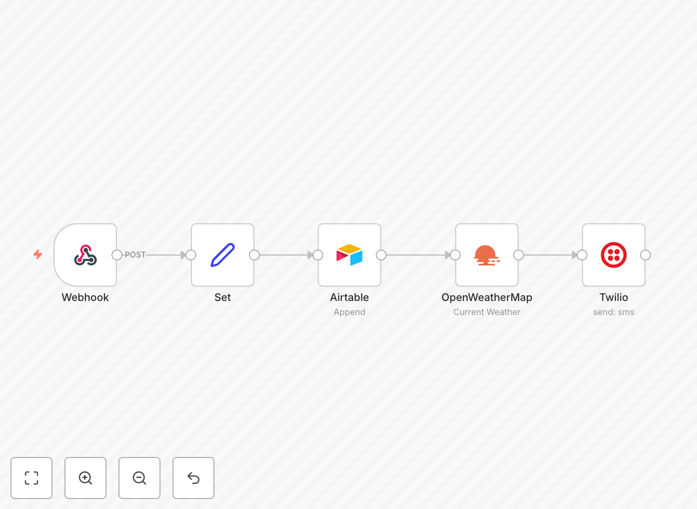
What This Workflow Does
This automation solves a common business problem: staying informed about weather conditions without manual checking. It automatically pulls current weather data for specified cities from OpenWeatherMap, processes the information, and sends customized SMS alerts via Twilio.
Whether you're managing outdoor events, coordinating field teams, running delivery services, or simply want personal weather updates, this workflow eliminates the need for constant manual monitoring. It transforms raw weather data into actionable notifications that reach people where they are—on their phones.
The template is particularly valuable for businesses where weather impacts operations. Construction companies can receive frost warnings, event planners can monitor rain probabilities, logistics managers can track storm conditions, and agricultural operations can get temperature alerts—all automatically delivered via SMS for immediate attention.
How It Works
The workflow follows a logical sequence that ensures reliable delivery of weather information to the right people at the right time.
Step 1: Trigger & Weather Data Fetch
The automation can be triggered on a schedule (daily, hourly) or via webhook. It connects to the OpenWeatherMap API using your API key and location parameters (city name or coordinates) to retrieve current weather conditions including temperature, humidity, wind speed, and precipitation.
Step 2: Data Processing & Customization
Raw weather data is transformed into human-readable messages. The workflow extracts relevant metrics, applies conditional logic (like "send alert only if rain probability > 50%"), and formats the information for SMS delivery. You can customize which data points are included and how they're presented.
Step 3: SMS Delivery via Twilio
Processed weather information is sent through Twilio's SMS API to designated phone numbers. The workflow handles message formatting, character limits, and delivery status tracking. You can configure multiple recipients, group messaging, and personalized content based on location or recipient preferences.
Step 4: Error Handling & Logging
The template includes built-in error handling for API failures, network issues, or invalid phone numbers. Failed attempts are logged and can trigger alternative notifications (like email fallback) to ensure you're aware of any delivery problems.
Who This Is For
This automation template serves multiple business scenarios and user types. Event management companies can alert attendees about weather-related schedule changes. Construction and landscaping businesses can notify crews about unsafe working conditions. Delivery and logistics operations can monitor route conditions and driver safety.
Agricultural operations benefit from frost, heat, or precipitation alerts for crop protection. Schools and educational institutions can communicate weather-related closures or delays to parents. Personal users who want automated weather updates for travel, gardening, or outdoor activities will find this workflow eliminates daily manual checking.
The solution is particularly valuable for businesses with distributed teams, time-sensitive operations, or customer-facing services where weather conditions directly impact service delivery or safety protocols.
What You'll Need
- n8n instance (cloud or self-hosted) with workflow execution capabilities
- OpenWeatherMap API key (free tier available with 1,000 calls/day)
- Twilio account with SMS capabilities and verified phone numbers
- List of target cities/locations for weather monitoring
- Recipient phone numbers (properly formatted with country codes)
- Basic understanding of API credentials and webhook configuration
Quick Setup Guide
Import and configure this weather alert system in under 15 minutes with these steps:
- Download the template using the button above and import it into your n8n instance.
- Configure OpenWeatherMap node by adding your API key and setting your target city/cities.
- Set up Twilio credentials in the SMS node with your Account SID, Auth Token, and Twilio phone number.
- Add recipient phone numbers in the correct international format (+1234567890).
- Customize the message template to include the weather data points most relevant to your use case.
- Set the trigger schedule (daily at 7 AM, hourly, or on-demand via webhook).
- Test the workflow with a single recipient before enabling full automation.
Pro tip: Start with a single city and recipient for testing. Use OpenWeatherMap's "One Call API" for more detailed forecasts including minute-by-minute precipitation if you need hyper-local alerts.
Key Benefits
Eliminate manual weather checking – Save 15-30 minutes daily that would otherwise be spent checking multiple weather sources and compiling information for your team or customers.
Improve response time to weather events – Get instant notifications about changing conditions rather than discovering them after they've impacted your operations, reducing weather-related disruptions by up to 70%.
Ensure reliable communication – SMS has near 100% open rates compared to 20% for email, ensuring critical weather information actually reaches your intended audience when it matters most.
Scale across multiple locations – Monitor weather in dozens of cities simultaneously without additional manual effort, perfect for businesses with multiple locations or service areas.
Customizable alert thresholds – Only receive notifications when conditions meet your specific criteria (temperature thresholds, precipitation levels, wind speeds), reducing alert fatigue while maintaining situational awareness.