Gmail MySQL Email Archiving

Store Gmail Email Details in MySQL Database

Automatically archive email metadata for compliance, analytics, and integration with other business systems. This n8n workflow captures sender details, subjects, dates, and more.

Download Template JSON · n8n compatible · Free
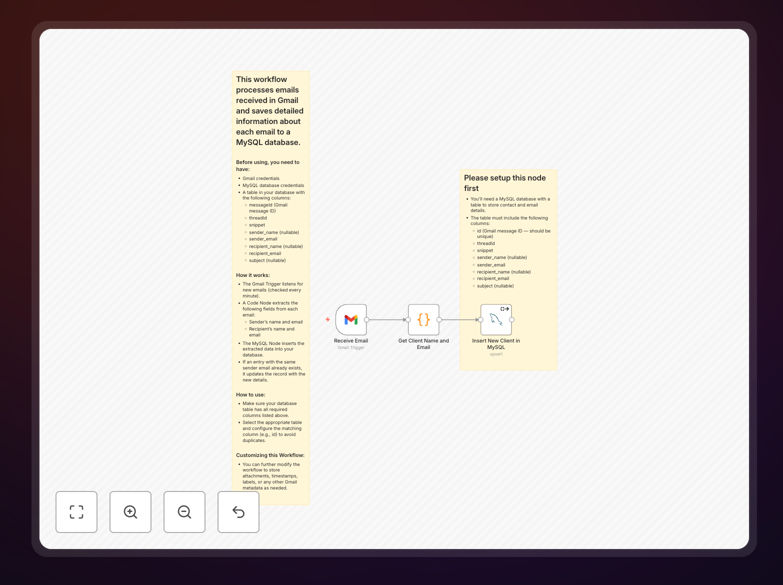
Gmail to MySQL workflow diagram showing email data being extracted and stored in database tables

What This Workflow Does

This automation solution bridges the gap between your Gmail communications and database storage. It systematically extracts valuable metadata from incoming and existing emails, then organizes this information in a structured MySQL database format. Unlike manual methods that are time-consuming and error-prone, this workflow ensures consistent, complete data capture without human intervention.

The stored email data becomes a powerful resource for business intelligence, customer service tracking, and compliance documentation. You'll gain the ability to query email history using SQL, generate reports on communication patterns, and integrate this data with other business systems - capabilities that aren't possible when emails remain solely in Gmail.

How It Works

1. Email Retrieval

The workflow connects to your Gmail account via API, either checking at regular intervals or responding to push notifications for real-time processing. It can process both new incoming emails and historical messages based on your configuration.

2. Data Extraction

For each email, the workflow extracts all relevant metadata including sender, recipients, subject, date/time stamps, labels, and message IDs. It can optionally process the message body and attachment information as well.

3. Database Storage

The extracted data is transformed into the appropriate format and inserted into your MySQL database tables. The workflow handles all the database connections and SQL operations automatically.

Pro tip: Consider adding a timestamp field to track when each email was processed by your workflow, which helps with debugging and incremental updates.

Who This Is For

This solution is ideal for businesses that need systematic email archiving beyond what Gmail provides. Customer support teams can track all client communications. Sales organizations can maintain complete prospect interaction histories. Legal and compliance departments can ensure proper documentation. Any team that values data-driven insights from their email communications will benefit.

What You'll Need

  1. A Gmail or Google Workspace account with API access enabled
  2. A MySQL database (local or cloud-hosted) with appropriate permissions
  3. n8n instance (self-hosted or cloud version)
  4. Basic understanding of database schemas for email data

Quick Setup Guide

  1. Download the workflow JSON file
  2. Import it into your n8n instance
  3. Configure your Gmail API credentials in the first node
  4. Set up your MySQL database connection parameters
  5. Adjust the email processing rules and database schema as needed
  6. Test with sample emails before enabling full automation

Key Benefits

Comprehensive email tracking: Never lose important email details again. Every communication is systematically recorded in your database with all relevant metadata.

Enhanced search and reporting: Query your email history using SQL for powerful analysis that Gmail's interface can't provide. Generate custom reports on response times, communication frequency, and more.

System integration: Connect your email data with other business systems like CRMs, support ticketing, or analytics platforms through the centralized MySQL database.

Compliance readiness: Maintain organized email archives that meet regulatory requirements for data retention and auditability.

Frequently Asked Questions

Common questions about Gmail to MySQL integration and automation

Storing email details in a database creates a searchable archive for compliance, customer service, and analytics. It allows businesses to track communication history, analyze response times, and maintain records without relying solely on Gmail's interface.

This is particularly valuable for customer support teams documenting interactions, sales teams tracking prospect communications, and organizations needing to meet legal documentation requirements. Database storage also enables integration with other business systems.

  • Enables SQL queries against email history
  • Creates permanent records independent of employee accounts
  • Facilitates integration with CRM and analytics tools

The workflow captures comprehensive email metadata including sender/recipient addresses, subject line, date/time, message ID, labels, and attachment information. The body content can be stored as plain text or HTML depending on configuration.

For example, a customer support email would store who sent it, when it arrived, the subject ("Order #12345 issue"), and the full message content. You can customize which fields to store based on your specific business needs and compliance requirements.

  • Standard fields: From, To, Subject, Date, Message ID
  • Optional fields: CC/BCC, Labels, Body content, Headers
  • Attachment metadata: Filenames, types, sizes

Automating email archiving eliminates manual data entry errors and saves significant employee time. It creates structured data from unstructured emails, enabling powerful reporting and analysis that isn't possible with Gmail alone.

Sales teams can track prospect interactions across multiple touchpoints. Support teams can analyze response patterns and identify training opportunities. Managers gain visibility into communication workflows without digging through individual inboxes.

  • Reduces manual data entry by 80-90%
  • Enables cross-system reporting and dashboards
  • Provides audit trails for compliance purposes

Always encrypt sensitive email content in the database and implement proper access controls. The workflow should use secure connections (SSL/TLS) for both Gmail API and MySQL connections to prevent interception.

Consider GDPR and other compliance requirements for email storage. For highly sensitive information, implement additional measures like field-level encryption or data masking. Establish clear data retention policies to avoid storing unnecessary personal data indefinitely.

  • Use SSL/TLS for all connections
  • Implement database encryption at rest
  • Create role-based access controls

Yes, the workflow can be configured to store attachment metadata (filename, type, size) in the database. For the actual file content, it's recommended to save attachments to cloud storage and store reference links in MySQL.

For example, invoice attachments could be saved to Google Drive with the database recording the file location and metadata. This approach prevents bloating your database while maintaining easy access to attachments when needed.

  • Stores attachment metadata in database
  • Saves files to cloud storage for better performance
  • Maintains links between emails and their attachments

The workflow can be scheduled to run at any interval - from real-time (using Gmail push notifications) to daily batches. Most businesses find checking every 15-60 minutes provides timely updates without excessive API calls.

For high-priority communications like customer support emails, real-time processing ensures immediate database updates. For less critical emails, daily batches may suffice. The optimal frequency depends on your email volume and business requirements.

  • Real-time possible with push notifications
  • Typical interval: 15-60 minutes
  • Balance timeliness with API rate limits

Absolutely! Our team specializes in building tailored email automation solutions that match your specific business processes and integration needs. We can create custom workflows with advanced filtering, enhanced security, and specialized reporting.

Whether you need integration with your existing CRM, custom dashboards for email analytics, or specialized compliance features, we can design a solution that fits your requirements perfectly. Book a free consultation to discuss your needs.

  • Custom filtering and processing rules
  • Integration with your existing systems
  • Tailored security and compliance features

Need a Custom Gmail to MySQL Integration?

This free template is a starting point. Our team builds fully tailored automation systems for your specific needs.