n8n Notion Supabase OpenAI Vector Search

Store Notion's Pages as Vector Documents into Supabase with OpenAI

Automatically convert Notion content into searchable vector embeddings for powerful semantic search capabilities

Download Template JSON · n8n compatible · Free
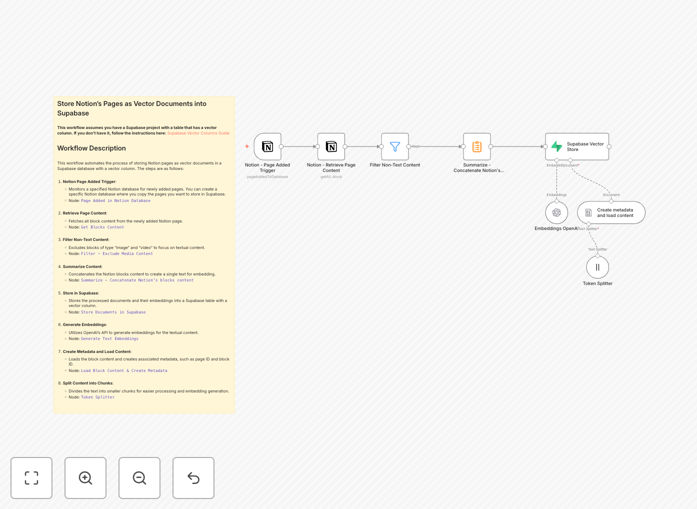
Notion to Supabase vector storage workflow diagram

What This Workflow Does

This n8n workflow solves the challenge of making Notion content searchable at a semantic level. While Notion has basic search functionality, it can't understand the meaning behind your queries or find conceptually related content. This automation extracts text from Notion pages, processes it with OpenAI to generate vector embeddings, and stores these in Supabase with the original content.

The result is a powerful search system that understands what your content means, not just what words it contains. When integrated with a frontend, this enables features like "find documents similar to this one" or "show me all notes related to machine learning" - even if those exact terms don't appear in the documents.

How It Works

1. Notion Page Retrieval

The workflow starts by connecting to your Notion account and retrieving the specified pages. It handles authentication and pagination to ensure all content is captured, including nested blocks within pages.

2. Content Processing

Each page's content is extracted and cleaned, removing formatting while preserving the textual meaning. The workflow now includes a summarization step to consolidate content blocks into coherent documents before vectorization.

3. OpenAI Embedding Generation

The processed text is sent to OpenAI's embedding API, which converts it into a high-dimensional vector representation. These vectors capture semantic relationships between concepts in the text.

4. Supabase Storage

The original content, along with its vector embedding and metadata, is stored in a Supabase table configured with the pgvector extension. This enables efficient similarity searches later.

Who This Is For

This workflow is ideal for teams using Notion as their knowledge base who need better search capabilities. It's particularly valuable for:

  • Engineering teams maintaining technical documentation
  • Research groups collecting and analyzing information
  • Product teams managing customer insights and feedback
  • Any organization with growing Notion content that's becoming hard to navigate

What You'll Need

  1. An n8n instance (cloud or self-hosted)
  2. Notion integration with API access to your pages
  3. Supabase account with pgvector extension enabled
  4. OpenAI API key with access to the embeddings endpoint
  5. Basic familiarity with n8n workflow configuration

Quick Setup Guide

  1. Download the JSON template and import it into your n8n instance
  2. Configure the Notion node with your integration token and page IDs
  3. Set up the OpenAI node with your API key and preferred model
  4. Configure the Supabase connection with your project details
  5. Test with a single page before processing your entire knowledge base

Key Benefits

Transform Notion into a semantic search platform - Find content based on meaning rather than just keyword matching, dramatically improving discoverability.

Reduce time spent searching - Team members can find relevant information 3-5x faster compared to basic Notion search.

Future-proof your knowledge base - Vector embeddings enable advanced AI features like recommendation systems and smart content organization.

Centralize knowledge without migration - Keep using Notion as your authoring interface while gaining Supabase's search capabilities.

Scale with your content - The automated workflow handles growing documentation without additional manual effort.

Pro tip: Start with your most valuable or frequently accessed Notion pages first. Monitor search performance and refine your content structure based on what works best for semantic search.

Frequently Asked Questions

Common questions about Notion to vector database integration

Vector embeddings are numerical representations of text that capture semantic meaning. They allow you to search content based on conceptual similarity rather than just keywords. For Notion pages, embeddings enable semantic search across all your documents, making it easier to find relevant information even if you don't remember the exact wording.

Unlike traditional search that matches exact words, vector search understands that "canine" and "dog" are related concepts. This is particularly valuable for knowledge bases where information might be expressed differently across documents. The embeddings create a mathematical space where related ideas are positioned close together.

  • Enables "search by meaning" not just keywords
  • Handles synonyms and related concepts naturally
  • Scales better than manual tagging systems

Supabase provides a scalable database with built-in vector search capabilities through pgvector. By storing Notion content as vector embeddings in Supabase, you can perform fast similarity searches across all your documents. This creates a powerful internal search system that understands the meaning behind queries rather than just matching keywords.

For example, a product team could search for "user pain points" and find all related customer feedback, feature requests, and support tickets - even if those exact words aren't used. Supabase's indexing makes these searches efficient even with thousands of documents, something Notion's native search can't achieve.

  • pgvector enables efficient nearest-neighbor searches
  • Combine vector search with traditional filtering
  • Build custom search interfaces on top of your data

This workflow works best with text-heavy Notion pages like documentation, meeting notes, research, and knowledge bases. Pages with structured tables or databases may need additional processing. The system automatically handles formatting removal and text extraction before generating embeddings, making it ideal for long-form written content.

Technical documentation benefits particularly well, as the embeddings capture conceptual relationships between terms. Meeting notes become more valuable when you can find all discussions related to a topic across months of notes. The workflow can be adjusted to handle different content types by modifying the preprocessing steps.

  • Best for paragraphs of text, not isolated bullet points
  • Works well with interconnected knowledge bases
  • May need customization for highly structured data

Update embeddings whenever content changes significantly. For frequently edited pages, consider running this workflow daily or weekly. For static reference material, monthly updates may suffice. The workflow can be scheduled to run automatically, ensuring your vector database stays current without manual intervention.

An effective strategy is to track page modification dates and only reprocess changed content. This saves API costs and processing time. For collaborative knowledge bases, consider triggering the workflow after major edits or at regular intervals that match your team's update cadence.

  • Balance freshness with computational cost
  • Prioritize frequently accessed documents
  • Monitor search quality to determine optimal frequency

OpenAI's embeddings capture deep semantic relationships between concepts. They outperform simpler methods by understanding context, synonyms, and related ideas. This means searches return more relevant results, even when using different terminology than the original documents. OpenAI's models also handle varied writing styles and technical jargon effectively.

For technical teams, this means code documentation remains searchable using natural language queries. Support teams can find relevant troubleshooting notes using customer-reported symptoms rather than internal terminology. The embeddings create a shared understanding across different vocabularies used within an organization.

  • State-of-the-art semantic understanding
  • Handles domain-specific terminology well
  • Consistent performance across document types

Yes, the n8n workflow can be extended to process content from other sources like Google Docs, Confluence, or web pages. The output can also connect to additional tools like chatbots or recommendation systems. The modular design allows adding preprocessing steps or connecting to different vector databases as needed.

Many teams use this as part of a larger knowledge management system. For example, combining Notion documentation with support tickets from Zendesk and community forum posts. The unified vector store then provides comprehensive search across all information sources, breaking down data silos.

  • Add preprocessing for different content formats
  • Connect multiple knowledge sources to one vector store
  • Build custom interfaces on top of the unified data

Absolutely! Our team specializes in building tailored knowledge management systems. We can create custom workflows that match your specific Notion structure, add preprocessing for your content types, integrate with your existing tools, and optimize the search experience for your team's needs. Book a free consultation to discuss your requirements.

We've helped companies implement solutions ranging from simple document search to complex AI-powered knowledge graphs. Whether you need to handle specialized content formats, scale to millions of documents, or integrate with proprietary systems, we can design a solution that fits your exact use case and infrastructure.

  • Custom preprocessing for your content structure
  • Integration with your existing tech stack
  • Performance optimization for your scale

Need a Custom Notion Integration?

This free template is a starting point. Our team builds fully tailored automation systems for your specific needs.