n8n Client Onboarding Trello Airtable Automation

Streamline Client Onboarding with PDF, Trello, Slack, Gmail & Airtable

Automate your entire client onboarding process from initial contact to first deliverable

Download Template JSON · n8n compatible · Free
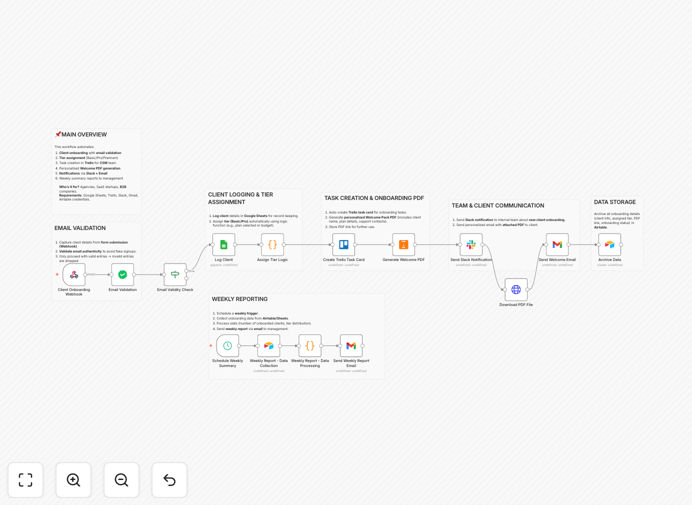
Client onboarding workflow diagram showing connections between PDF, Trello, Slack, Gmail and Airtable

What This Workflow Does

This automation transforms chaotic client onboarding into a streamlined process. When a new client signs up, the workflow automatically captures their information, validates email addresses, generates personalized PDF documents, creates Trello cards for task tracking, adds records to Airtable, and notifies your team via Slack—all without manual intervention.

Traditional onboarding often involves copying data between 5+ systems, sending repetitive emails, and losing track of progress. This workflow eliminates those pain points by connecting your tools into one cohesive system that handles the entire process from first contact to first deliverable.

How It Works

1. Client Submission

The workflow triggers when a client submits information through your form, email, or CRM. It immediately validates the email address and checks for duplicate entries.

2. Document Generation

The system generates personalized PDF contracts, proposals, or welcome packets using the client's information. These are automatically attached to emails or made available through a client portal.

3. Trello Task Creation

For each new client, the workflow creates a Trello card with all relevant details and pre-populated checklist items for your onboarding process.

4. Airtable Record Sync

Client information is automatically added to your Airtable base with proper categorization and relationship fields to other records.

5. Team Notifications

Slack notifications alert your team immediately when new clients come in or complete key onboarding steps, enabling real-time collaboration.

Pro tip: Add a manual approval step before contract generation for high-value clients to ensure personalized attention where it matters most.

Who This Is For

This workflow benefits service businesses that onboard multiple clients per month, including agencies, consultants, law firms, and healthcare providers. It's especially valuable for teams using Trello for task management and Airtable as their client database.

The automation scales perfectly whether you onboard 5 clients or 500 per month. It eliminates the most time-consuming parts of onboarding while ensuring no client falls through the cracks.

What You'll Need

  1. n8n account (free or paid)
  2. Trello account with board for client onboarding
  3. Airtable base with client records table
  4. Slack workspace for team notifications
  5. Gmail or other email service for communications
  6. PDF generation tool (like PDF.co or DocRaptor)

Quick Setup Guide

  1. Download the JSON template file
  2. Import into your n8n instance
  3. Connect your Trello, Airtable, Slack, and email accounts
  4. Customize PDF templates with your branding
  5. Test with a sample client record
  6. Activate the workflow for live use

Key Benefits

80% faster onboarding: Clients complete the process in hours instead of days, improving satisfaction and time-to-value.

Zero data entry errors: Automated syncing between systems eliminates manual copying mistakes.

360° client visibility: Your team has instant access to all client information and onboarding status from one dashboard.

Scalable operations: Handle 10x more clients without adding administrative staff.

Professional first impression: Automated but personalized communications make your business appear polished and responsive.

Frequently Asked Questions

Common questions about client onboarding automation

Automated client onboarding reduces manual data entry by 70-90% while improving accuracy. The system automatically captures client information, validates emails, creates records across platforms, and triggers follow-ups.

This eliminates repetitive tasks like copying data between systems, manually sending welcome emails, or tracking onboarding progress in spreadsheets. Teams report gaining 5-15 hours per week previously spent on administrative work.

  • Automated validation prevents incorrect data entry
  • Systematic tracking ensures no client gets overlooked
  • Standardized processes improve compliance and reporting

Trello provides visual task management while Airtable offers structured data storage. The integration automatically creates Trello cards from new Airtable records, ensuring tasks are assigned and tracked without manual work.

This combination gives teams both workflow visibility and detailed client records in one synchronized system. For example, when a client completes onboarding in Airtable, their Trello card automatically moves to the "Onboarded" list with all relevant documentation attached.

  • Trello's kanban view shows pipeline status at a glance
  • Airtable maintains searchable, reportable client records
  • Changes sync bidirectionally between both platforms

PDF automation generates personalized contracts, proposals, or welcome packets instantly when a new client is added. This eliminates manual document creation and ensures consistent branding.

Clients receive professional documents within minutes instead of waiting hours or days for manual preparation. The system can even generate different document sets based on client type or service package selected during signup.

  • Dynamic fields personalize each document automatically
  • Version control ensures only current templates are used
  • Digital signatures can be integrated for paperless approvals

Slack notifications alert teams instantly when new clients sign up or complete onboarding steps. This enables real-time collaboration instead of checking multiple systems.

Teams can celebrate new clients immediately and address any issues before they become problems. Notifications can include client details, next steps, and even prompt specific team members to take action directly from Slack.

  • Reduce response time from hours/days to minutes
  • Create dedicated channels for different client types
  • Use emoji reactions to assign tasks or confirm completion

Always encrypt sensitive client data in transit and at rest. Implement role-based access controls so only authorized personnel see sensitive information.

Regularly audit automation permissions and include manual approval steps for high-risk actions like contract generation or payment processing. For regulated industries, ensure your automation complies with relevant data protection laws (GDPR, HIPAA, etc.).

  • Mask sensitive fields in notifications and logs
  • Set up audit trails for all automated actions
  • Include data retention policies in your workflow

Track metrics like time-to-first-contact (aim for under 1 hour), onboarding completion rate (target 90%+), and client satisfaction scores. Compare these against pre-automation benchmarks to demonstrate ROI.

The best systems reduce onboarding time by 50-80% while improving client experience. Also monitor operational metrics like support tickets related to onboarding and team hours spent per client to quantify efficiency gains.

  • Set up automated dashboards in Airtable or your analytics tool
  • Survey clients after onboarding completes
  • Track referral rates from recently onboarded clients

Yes! GrowwStacks specializes in tailored onboarding solutions. Our team will analyze your current process, identify automation opportunities, and build a system that integrates with your exact tech stack.

We handle everything from initial consultation to implementation and training. Custom solutions typically deliver 3-5x ROI within the first year by eliminating inefficiencies and improving client retention.

  • No-code solutions that grow with your business
  • Seamless integration with your existing tools
  • Ongoing support and optimization

Need a Custom Client Onboarding Automation?

This free template is a starting point. Our team builds fully tailored automation systems for your specific needs.