What This Workflow Does
Every business conversation contains valuable information—action items, client needs, decisions, and opportunities. But manually transcribing calls, extracting key points, and sharing them with the right teams is time-consuming and error-prone. This workflow solves that problem completely.
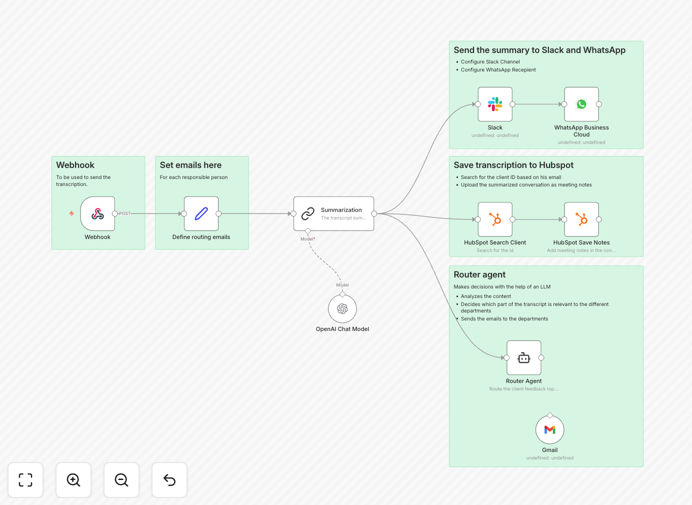
When a call or meeting ends, the transcription is automatically sent to this workflow. AI analyzes the conversation, identifies critical information like departments involved, action items, and client details, then routes summarized versions to specific teams via their preferred channels. The summary is saved to the relevant contact in HubSpot for future reference, while instant notifications go to Slack, Email, and WhatsApp to ensure immediate follow-up.
This creates a seamless information flow where nothing gets lost in translation between departments. Sales teams can focus on selling instead of note-taking, support teams receive clear context about customer issues, and leadership gains visibility into client conversations without attending every meeting.
How It Works
1. Trigger & Transcription Input
The workflow starts when a webhook receives a conversation transcription from your call recording system, meeting platform, or transcription service. This could be from Zoom, Google Meet, or any other source that provides text output.
2. AI-Powered Analysis & Summarization
Using OpenAI or another AI/NLP service, the workflow analyzes the transcription to extract key information: action items, departments mentioned, client details, decisions made, and sentiment. It creates a concise, actionable summary that highlights what matters most.
3. Department Classification & Routing
Based on content analysis, the workflow identifies which departments need the information (sales, support, product, etc.) and prepares customized versions for each audience with only the relevant details they require.
4. Multi-Channel Distribution
The summarized information is simultaneously sent through multiple channels: saved to the associated contact in HubSpot for CRM visibility, posted to relevant Slack channels for immediate team awareness, emailed to department leads for formal documentation, and sent via WhatsApp for urgent alerts.
5. Follow-up Automation
Based on extracted action items, the workflow can trigger follow-up tasks, schedule next steps, or update deal stages in your CRM—ensuring promises made during conversations are automatically tracked and executed.
Who This Is For
This workflow is ideal for sales teams who conduct numerous client calls and need to document conversations accurately. Customer success departments managing support interactions will benefit from automated note-taking and cross-team alerts. Consulting firms and agencies billing by time can capture billable insights automatically. Legal and healthcare practices requiring accurate conversation records for compliance will appreciate the automated documentation. Any business with distributed teams needing real-time visibility into client conversations will find this automation transformative.
What You'll Need
- n8n instance (cloud or self-hosted) with workflow execution capabilities
- HubSpot account with API access for contact/company/deal management
- Slack workspace with appropriate channel permissions for posting messages
- Email service (SMTP or transactional email API like SendGrid, Mailgun)
- WhatsApp Business API access or integration via Twilio/MessageBird
- AI/NLP service (OpenAI API key or alternative like Anthropic, Google AI)
- Source of transcriptions (call recording system, meeting platform with export capabilities)
Pro tip: Start with a single channel (like Slack) to validate the summarization quality before expanding to multiple distribution points. This lets you refine the AI prompts and output format without overwhelming your team with notifications.
Quick Setup Guide
- Download the template using the button above and import it into your n8n instance.
- Configure your webhook trigger by copying the unique URL and setting it up in your transcription source.
- Download the template using the button above and import it into your n8n instance
- Configure the webhook trigger by copying the unique URL and setting it up in your transcription source
- Connect your apps by adding credentials for HubSpot, Slack, Email, WhatsApp, and your chosen AI service in their respective nodes
- Customize AI prompts in the summarization node to match your industry terminology and desired output format
- Set up distribution channels by specifying which Slack channels, email addresses, and WhatsApp numbers should receive which types of summaries
- Test with a sample transcription to verify the workflow extracts and distributes information correctly
- Activate the workflow and connect it to your live transcription source to begin automating
Key Benefits
Save 10-15 hours per week per team member by eliminating manual note-taking, transcription review, and information sharing. What used to take 30 minutes per call now happens automatically in seconds.
Improve follow-up accuracy by 90% with AI-extracted action items that don't rely on human memory or interpretation. Every commitment made during conversations is captured and tracked systematically.
Accelerate cross-departmental alignment by distributing the same information simultaneously to sales, support, product, and leadership teams—eliminating information silos and miscommunication.
Enhance CRM data quality with automatically populated conversation summaries that provide rich context for every contact and deal, improving forecasting accuracy and customer understanding.
Scale client communication efficiently as your team grows without losing visibility into conversations. New hires immediately access historical context, and managers maintain oversight without micromanaging.