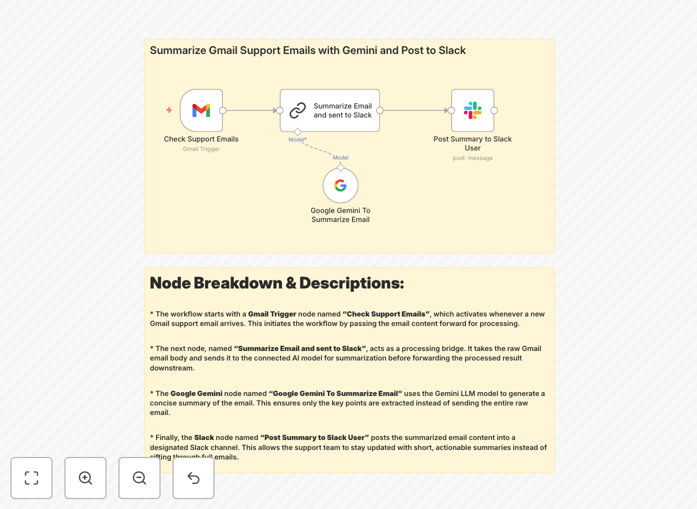
What This Workflow Does
Customer support teams often drown in lengthy email threads, wasting valuable time parsing repetitive information before addressing actual customer needs. This workflow solves that problem by automating the entire email processing pipeline.
The system monitors your Gmail inbox for new support emails, uses Google's Gemini AI to generate concise summaries that capture the essence of each message, and posts these summaries directly to your designated Slack channels. This creates instant visibility across your team without requiring everyone to access the email inbox.
How It Works
1. Email Monitoring
The workflow continuously checks your Gmail account for new messages matching your support email criteria (specific labels, senders, or subjects). It processes only unread emails to avoid duplicates.
2. AI-Powered Summarization
Each email passes through Gemini AI, which extracts key details like customer concerns, urgency indicators, and specific requests. The AI is configured to maintain neutral tone while highlighting actionable items.
3. Slack Integration
Formatted summaries post to your pre-configured Slack channels with relevant metadata (sender info, priority flags). Team members can react with emojis to claim responsibility or comment directly on the summary thread.
Who This Is For
This workflow benefits:
- Customer support teams handling high email volumes
- SaaS companies tracking feature requests via email
- Ecommerce businesses managing order-related inquiries
- Distributed teams needing shared visibility into support issues
What You'll Need
- Gmail account with support emails
- Google Cloud project with Gemini API access
- Slack workspace with appropriate channel permissions
- n8n instance (cloud or self-hosted)
- Basic understanding of API connections
Quick Setup Guide
- Download and import the JSON template into your n8n instance
- Connect your Gmail account via OAuth
- Configure your Gemini API credentials
- Set up Slack webhook for your desired channel
- Adjust email filtering criteria as needed
- Test with sample emails before going live
Key Benefits
Reduce email processing time by 70%: Agents spend seconds reviewing summaries instead of minutes reading full threads.
Improve response consistency: Standardized summaries ensure all team members work from the same understanding of each issue.
Enhance cross-team visibility: Product and engineering teams gain valuable insights from summarized customer feedback.
Scale support operations: Handle increasing email volumes without proportionally growing your team.
Create searchable knowledge base: Slack becomes an archive of customer concerns and solutions.