What This Workflow Does
This automation solves the time-consuming problem of manually reading news articles, creating summaries, and posting them across multiple social media platforms. Businesses, content creators, and media organizations spend hours daily on these repetitive tasks, often missing opportunities for timely posting or struggling with consistency.
The workflow automatically processes news articles from various sources, extracts key information using AI summarization, formats content appropriately for different social platforms, and schedules posts for optimal engagement. It transforms raw news content into polished social media-ready posts without manual intervention.
By automating this process, you can maintain an active, informed social media presence while freeing up valuable time for strategic activities. The system ensures your audience receives timely, relevant content while you focus on higher-value work.
How It Works
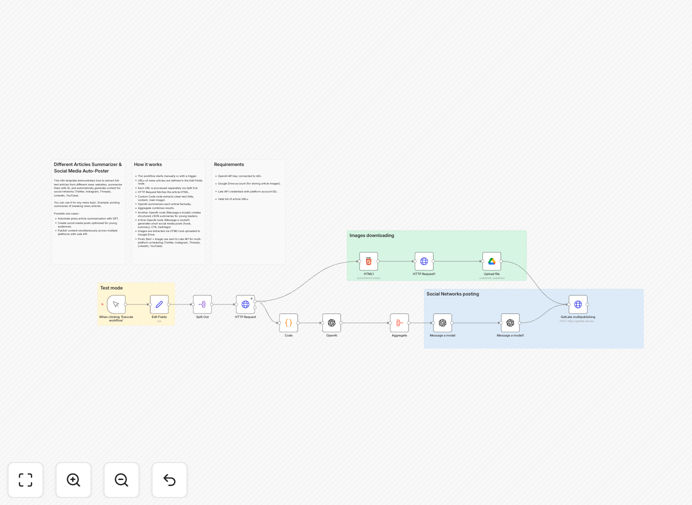
Step 1: Article Collection & Processing
The workflow begins by collecting article URLs from your predefined sources. Each URL is processed individually through a split-out operation to handle multiple articles simultaneously. The system fetches the complete HTML content using HTTP requests.
Step 2: Content Extraction & Cleaning
A custom code node extracts clean text, including titles, main content, and featured images from the article HTML. This step removes advertisements, navigation elements, and other irrelevant content to isolate the core article material for processing.
Step 3: AI-Powered Summarization
The extracted content is sent to OpenAI's GPT-4 model, which creates factual, concise summaries. The AI is configured to maintain key information while adapting the tone for your target audience—whether professional, casual, or educational.
Step 4: Social Media Formatting
Another AI processing step transforms the summaries into platform-specific formats. It generates hooks for Twitter/X, longer explanations for LinkedIn, visual descriptions for Instagram, and comprehensive posts for Facebook or Threads.
Step 5: Image Processing & Storage
Featured images from articles are extracted and uploaded to Google Drive for reliable storage and access. This ensures visual content is preserved and available for social media posts that benefit from accompanying imagery.
Step 6: Multi-Platform Distribution
The formatted content and images are sent to the GetLate API, which handles scheduling and posting across all connected social media accounts. Posts can be scheduled immediately or queued for optimal posting times.
Who This Is For
This automation is ideal for media companies and journalists who need to share breaking news quickly across platforms. Marketing agencies managing multiple client accounts will find it invaluable for maintaining consistent content calendars. Thought leaders and industry experts can use it to share relevant insights with their followers without daily content creation effort.
Educational institutions can automate sharing of relevant research and news with their communities. News aggregators and content curators benefit from streamlined processing of multiple sources. Even small businesses in information-sensitive industries can maintain an informed social presence without dedicating staff hours to manual posting.
What You'll Need
- OpenAI API key connected to your n8n instance for AI summarization capabilities
- Google Drive account configured in n8n for storing extracted article images
- GetLate API credentials with connected social media platform accounts (Twitter, LinkedIn, Instagram, etc.)
- Valid list of article URLs or RSS feeds from your preferred news sources
- n8n instance (cloud or self-hosted) with appropriate API connection capabilities
Pro tip: Start with 2-3 reliable news sources that consistently publish quality content in your niche. This ensures your automated posts maintain relevance and value for your specific audience before scaling to more sources.
Quick Setup Guide
- Download the template file using the button above
- Import the JSON file into your n8n instance via the workflow import function
- Configure the OpenAI node with your API key and preferred model settings
- Set up Google Drive credentials for image storage in the corresponding node
- Connect your GetLate account and link your social media platforms
- Update the "Edit Fields" node with your preferred article URLs or RSS feeds
- Test the workflow with a single article URL to verify all connections work
- Activate the workflow and monitor initial posts for quality assurance
Key Benefits
Save 10-15 hours weekly on manual content reading, summarization, and posting tasks. This time can be redirected to strategy, engagement, or other business priorities.
Ensure consistent posting across all platforms, even during weekends, holidays, or busy periods. Maintain audience engagement without constant manual attention.
Improve content relevance with AI-powered summarization that captures key points accurately and adapts tone for different platforms and audiences.
Scale content operations without proportional increases in staff time. Process dozens of articles daily with the same efficiency as handling just a few.
Multi-platform distribution ensures your message reaches audiences wherever they prefer to consume content, maximizing visibility and engagement.