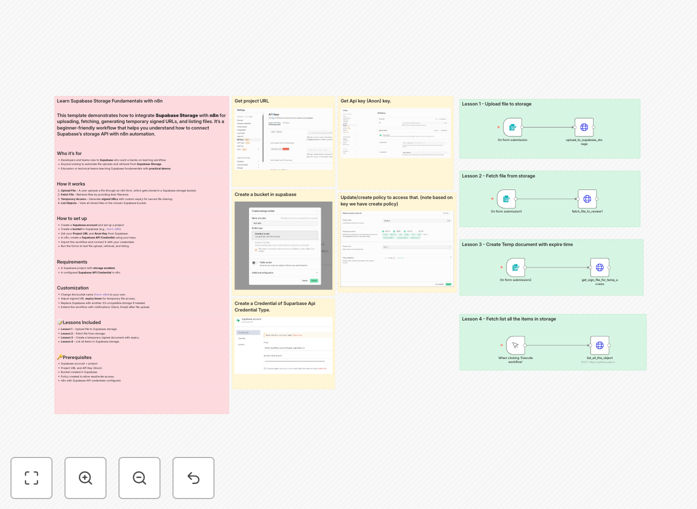
What This Workflow Does
Manual file management is time-consuming and error-prone. This tutorial workflow solves that by teaching you how to automate Supabase Storage operations using n8n. You'll learn to handle four essential file operations automatically: uploading files from forms or other sources, retrieving specific files by name, generating secure signed URLs with custom expiration times, and listing all files in a storage bucket for auditing or management purposes.
The template serves as both a learning tool and a production-ready starting point. It demonstrates how to connect n8n's visual automation platform with Supabase's developer-friendly storage API, enabling you to build custom file workflows without writing backend code. Whether you're processing user uploads, managing document archives, or creating secure file sharing systems, this workflow provides the foundation.
How It Works
Step 1: File Upload Automation
The workflow begins with a manual trigger or webhook that captures file data. It then authenticates with your Supabase project using API credentials and uploads the file to a specified bucket. You can configure file naming conventions, path structures, and metadata storage during this process.
Step 2: File Retrieval & Processing
Once files are stored, the workflow demonstrates how to fetch them by filename or path. This is useful for downstream processing like image resizing, document conversion, or data extraction. The retrieved file data can be passed to other n8n nodes for further automation.
Step 3: Secure URL Generation
For secure file sharing, the workflow generates signed URLs with configurable expiration times (from minutes to days). These temporary links can be sent to users via email or messaging apps without granting permanent storage access, perfect for customer portals or confidential document delivery.
Step 4: Storage Management & Listing
The final operation lists all files in a bucket, showing metadata like file size, last modified date, and content type. This enables automated storage auditing, cleanup of old files, or synchronization with external databases for asset management.
Who This Is For
This tutorial is ideal for developers, product managers, and business owners who use Supabase for their applications and want to automate file operations. It's particularly valuable for SaaS companies handling user uploads, educational platforms managing course materials, e-commerce sites processing product images, or any business that needs secure document sharing with clients.
Teams building applications with Supabase will find this workflow accelerates development by providing ready-made file automation patterns. Educators and technical trainers can use it as a hands-on teaching tool for demonstrating cloud storage integration concepts. Even solo entrepreneurs can implement professional file management without hiring backend developers.
What You'll Need
- A Supabase account with a project created (free tier works perfectly)
- Storage enabled in your Supabase project with at least one bucket created
- Supabase Project URL and Anon Key from your project API settings
- n8n instance (cloud or self-hosted) with Supabase credentials configured
- Basic understanding of how to import JSON workflows into n8n
Pro tip: Create a dedicated "automation" bucket in Supabase for testing this workflow. Use separate buckets for production vs. testing to avoid accidental data mixing.
Quick Setup Guide
Follow these steps to get the workflow running in under 10 minutes:
- Download the template using the button above and save the JSON file locally.
- In your n8n instance, go to Workflows → Import from file and select the downloaded JSON.
- Create Supabase API credentials in n8n using your Project URL and Anon Key from the Supabase dashboard.
- In the imported workflow, update the "Bucket Name" parameter to match your Supabase bucket (default is "test-n8n").
- Test each operation manually using the workflow trigger nodes to verify connections work.
- Replace the manual triggers with actual triggers (webhooks, schedules, or app events) for production use.
Key Benefits
Save 5-10 hours weekly on manual file management by automating uploads, organization, and sharing. What used to require manual drag-and-drop, naming conventions, and link sharing now happens automatically with consistent results.
Eliminate security risks with temporary signed URLs instead of permanent storage links. Control exactly how long users can access files and automatically revoke access after expiration without manual intervention.
Scale file operations without additional development as your user base grows. The same workflow that handles 10 files daily can process 10,000 with minimal adjustments, thanks to n8n's robust execution engine.
Integrate file management with your entire tech stack by connecting Supabase Storage to CRM, communication, database, and notification tools. Create end-to-end processes like "upload → process → notify → log" without switching between platforms.
Gain visibility into storage usage and file activity through automated listing and reporting. Schedule regular audits of bucket contents, identify unused files for cleanup, and maintain optimal storage costs.