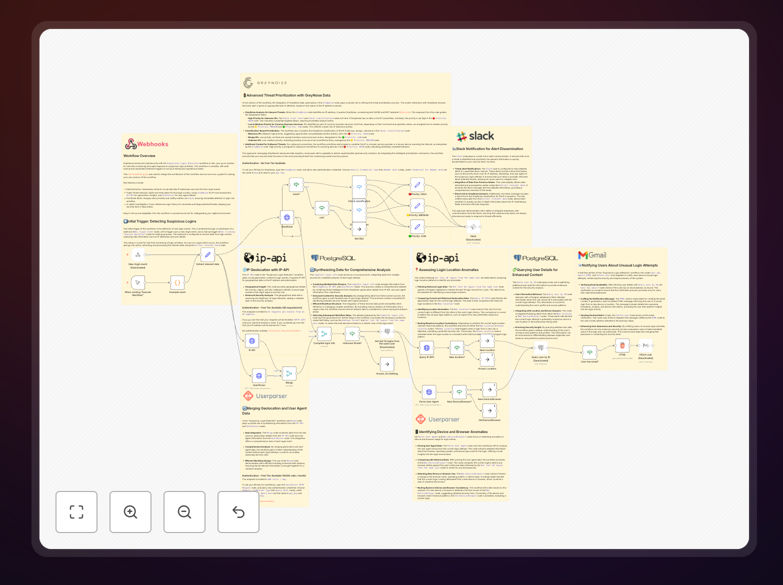
What This Workflow Does
Security teams are overwhelmed with login events across multiple applications. Manually investigating each suspicious login is impossible at scale, leaving businesses vulnerable to account takeovers, data breaches, and compliance violations. This automation solves that by creating a real-time security monitoring system.
The workflow automatically processes every login attempt, enriches it with threat intelligence from multiple sources, scores the risk, and takes appropriate action—from simple logging to immediate account lockdown. It transforms reactive security into proactive protection, catching threats before they cause damage.
By automating the entire detection and initial response chain, you eliminate the time gap between a suspicious login and your team's awareness. What used to take hours of manual investigation now happens in milliseconds, dramatically reducing your attack surface and meeting compliance requirements for security monitoring.
How It Works
1. Login Event Capture
The workflow triggers via webhook whenever a login occurs in your applications. It extracts critical data: IP address, user agent, timestamp, user ID, and location. This data forms the foundation for all subsequent analysis.
2. Parallel Threat Intelligence Gathering
Three analysis paths run simultaneously. The first queries GreyNoise's API to check if the IP is known for malicious activity. The second fetches geolocation data to identify impossible travel scenarios. The third analyzes the user agent for suspicious patterns or outdated browsers.
3. Risk Scoring & Decision Making
Data from all sources merges into a risk score. The workflow applies business rules: Is this IP on threat lists? Is the location unusual for this user? Is the device new? Based on the score, it categorizes the event as Low, Medium, or High risk.
4. Automated Response Actions
For High-risk events: immediate Slack alert to security team, temporary account lock, and email to user. Medium-risk: notification and MFA requirement. Low-risk: detailed logging for audit trails. All actions are documented in Postgres for compliance reporting.
5. Historical Analysis & Pattern Detection
The workflow checks the user's last 10 logins from your database. It looks for patterns: new locations, device changes, or unusual login times. This context turns isolated events into meaningful security intelligence.
Who This Is For
SaaS companies protecting customer accounts from credential stuffing attacks. Financial institutions needing real-time fraud detection for compliance. Healthcare organizations securing patient data under HIPAA. E-commerce platforms preventing account takeovers and fraudulent purchases.
IT departments of any size business that lacks dedicated security staff but needs enterprise-grade protection. Developers building applications who want security monitoring baked in from day one. Compliance officers who need audit trails and demonstrable security controls.
If you have users logging into your systems—whether employees, customers, or partners—and you're concerned about security, this automation provides immediate value. It's particularly valuable for businesses experiencing growth where manual security review no longer scales.
What You'll Need
- n8n instance (cloud or self-hosted) with webhook capability
- Slack workspace for security alerts and notifications
- Postgres database to store login history and audit logs
- GreyNoise API key (free community tier available) for IP threat intelligence
- IP-API access (free for limited use) for geolocation data
- Your application configured to send login webhooks to n8n
- Email service (like Gmail or SendGrid) for user notifications
Pro tip: Start with the free tiers of external APIs. GreyNoise Community API provides sufficient data for most businesses. Only upgrade to paid plans when your volume exceeds free limits—usually at thousands of logins per day.
Quick Setup Guide
1. Download and import the JSON template into your n8n instance. The workflow will appear with all nodes configured but disabled.
2. Configure credentials for each service: Slack, Postgres, GreyNoise, and your email provider. n8n's credential management keeps API keys secure.
3. Adjust threshold values in the "If" nodes. Customize what constitutes High vs. Medium risk based on your business tolerance.
4. Test with sample data using n8n's manual trigger. Simulate both normal and suspicious logins to verify alerts work correctly.
5. Connect your application by pointing its login webhooks to n8n's webhook URL. Start with a small user group first.
6. Monitor and refine for the first week. Adjust scoring based on false positives/negatives. Add whitelists for trusted IPs.
Key Benefits
Reduce incident response time by 80%. Automated detection means threats are identified and acted upon in seconds, not hours. Your security team learns about suspicious activity immediately via Slack, not during tomorrow's log review.
Cut false positives by 60% with multi-source correlation. Single indicators often mislead. By correlating IP reputation, geolocation, device history, and user behavior, you get accurate alerts worth investigating.
Achieve 24/7 security coverage without staffing costs. The automation works while your team sleeps, during weekends, and through holidays. It provides enterprise-grade monitoring that would otherwise require multiple security analysts.
Create compliance-ready audit trails automatically. Every decision, alert, and action is logged with timestamps and evidence. Generate reports for auditors in minutes instead of scrambling through disparate logs.
Scale protection as you grow. The system handles 10 logins or 10,000 with equal efficiency. Add new applications by simply sending their webhooks to the same workflow—no re-engineering needed.