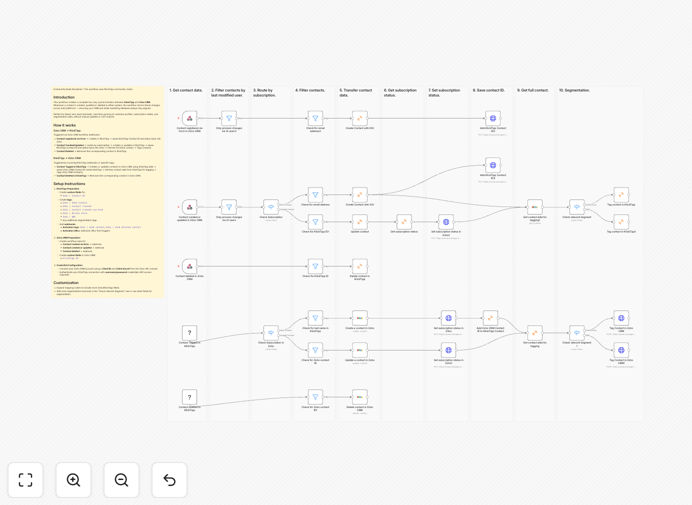
What This Workflow Does
This automation solves a critical business problem: disconnected customer data between your sales CRM (Zoho) and email marketing platform (KlickTipp). When these systems aren't synchronized, sales teams work with outdated contact information while marketing sends emails to incorrect segments, leading to missed opportunities and poor customer experience.
The workflow creates a complete bi-directional synchronization that mirrors contact changes in real-time. Whenever a contact is created, updated, or deleted in either system, the change automatically propagates to the other platform. This ensures your sales pipeline and email marketing campaigns are always aligned with the most current customer data.
Beyond basic contact details, the sync includes subscription statuses, segmentation tags, and custom field data, creating a unified customer profile that both sales and marketing teams can trust.
How It Works
Step 1: Trigger Detection
The workflow monitors both Zoho CRM and KlickTipp for changes. Webhooks capture contact events in real-time, while scheduled checks ensure no updates are missed. This dual-trigger approach provides comprehensive coverage.
Step 2: Data Processing & Mapping
When a change is detected, the workflow extracts relevant contact information and maps fields between the two systems. Custom field mappings ensure data structure compatibility while preserving all important information.
Step 3: Conflict Resolution
Before syncing, the workflow checks for potential data conflicts using intelligent logic. Business rules determine which system's data takes precedence based on the type of information and timing of updates.
Step 4: Bi-Directional Sync
The processed data is pushed to the target system via API. The workflow maintains reference IDs to track relationships between records in both platforms, enabling accurate updates rather than duplicate creations.
Step 5: Status Verification & Logging
After each sync operation, the workflow verifies success and logs the transaction. Failed syncs trigger automatic retries with exponential backoff, while comprehensive logging provides audit trails for troubleshooting.
Pro tip: Start with syncing only essential fields (name, email, status) before adding custom fields. This simplifies initial setup and troubleshooting while still delivering immediate value.
Who This Is For
This automation is ideal for businesses using Zoho CRM for sales management and KlickTipp for email marketing. It's particularly valuable for marketing agencies managing client campaigns, SaaS companies with lead nurturing sequences, e-commerce businesses with customer lifecycle emails, and B2B companies with complex sales cycles requiring coordinated communication.
Teams experiencing data entry duplication, marketing-sales alignment issues, or manual import/export processes will see immediate productivity gains. The workflow scales from small businesses with hundreds of contacts to enterprises with complex data structures.
What You'll Need
- Active Zoho CRM account with API access enabled and custom field creation permissions
- KlickTipp account with API credentials (username/password or API key)
- n8n instance (self-hosted or cloud) with webhook capabilities
- Custom fields created in both systems to store cross-platform reference IDs
- Webhook configuration access in both Zoho CRM workflows and KlickTipp settings
- Basic understanding of your contact data structure and field mappings
Quick Setup Guide
- Download and import the template JSON file into your n8n instance
- Configure credentials for both Zoho CRM and KlickTipp in n8n
- Create custom fields in both platforms for storing cross-reference IDs
- Set up webhooks in Zoho CRM workflows pointing to your n8n webhook URLs
- Configure KlickTipp tags and webhooks as specified in the workflow documentation
- Test with sample data before enabling full production sync
- Monitor initial sync and adjust field mappings as needed for your data structure
Pro tip: Run the workflow in "test mode" with a small subset of contacts first. This allows you to verify field mappings and data transformations without affecting your entire database.
Key Benefits
Eliminate 5-10 hours of weekly manual data entry previously spent on CSV exports, imports, and duplicate checking between systems. Your team can focus on revenue-generating activities instead of administrative tasks.
Improve marketing campaign effectiveness by 30-50% through accurate segmentation based on real-time CRM data. Emails reach the right people with the right message at the right time in their customer journey.
Reduce data errors by 95% compared to manual processes. Automated validation and conflict resolution ensure data integrity across both platforms.
Accelerate sales follow-up with immediate addition of new leads to email nurturing sequences. No more waiting for weekly batch updates.
Maintain compliance with automatic propagation of unsubscribe requests and GDPR preferences between systems, reducing legal risk.