What This Workflow Does
For nonprofits running face-to-face fundraising campaigns, collecting donor data offline is common—using tablets, paper forms, or spreadsheets. The challenge comes afterward: manually transferring hundreds of donor details into your CRM (SinergiaCRM) is time-consuming, error-prone, and delays critical follow-up.
This automation workflow solves that by creating a seamless bridge between your field data collection in Google Sheets and your central donor database in SinergiaCRM. It automatically detects new entries, validates the data, checks for existing donors, creates or updates records, logs pledges, and marks entries as processed—all without manual intervention.
The result is a reliable, real-time sync that ensures your fundraising team has immediate visibility into campaign performance and donor relationships, while your administrative staff is freed from tedious data entry tasks.
How It Works
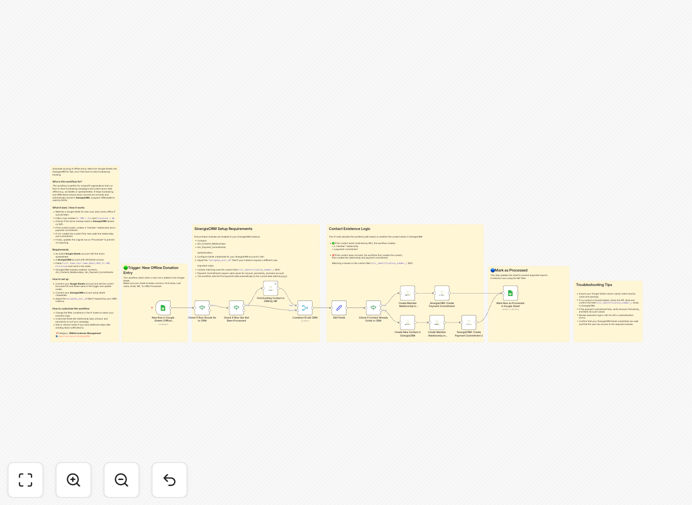
The workflow follows a logical sequence to ensure data accuracy and completeness.
Step 1: Trigger on New Google Sheet Rows
The automation monitors a specific Google Sheet for new rows. It can be set to run on a schedule (e.g., every 15 minutes) or triggered by a webhook if you're using a form submission add-on. This captures data as soon as fundraisers submit their collection sheets.
Step 2: Filter for Unprocessed Donor Records
It filters rows based on two key columns: "To CRM" (marked "Yes") and "Processed" (marked "No"). This ensures only new, approved donor data moves forward, preventing duplicates or re-processing of old entries.
Step 3: Check for Existing Donor in SinergiaCRM
Using a unique identifier like NIF (Tax ID) or email, the workflow queries SinergiaCRM to see if this donor already exists. This duplicate check is critical for maintaining a clean database and linking new pledges to the correct contact.
Step 4: Create or Update Donor Record
If the donor is new, the workflow creates a full contact record in SinergiaCRM with all collected details (name, email, contact info). If the donor exists, it proceeds to the next step without creating a duplicate.
Step 5: Create Member Relationship & Payment Commitment
For all donors (new or existing), the automation creates a "member" relationship record and a corresponding payment commitment (pledge) with the specified amount, frequency, and campaign details. This fully logs the fundraising interaction.
Step 6: Mark Row as Processed
Finally, the workflow updates the original Google Sheet row, changing the "Processed" column to "Yes". This provides a clear audit trail and prevents the same data from being imported again.
Who This Is For
This template is specifically designed for nonprofit organizations, NGOs, and charitable institutions that use SinergiaCRM for donor management and engage in face-to-face or event-based fundraising.
Ideal users include: Fundraising managers overseeing field campaigns, CRM administrators tired of manual data imports, operations directors seeking process efficiency, and nonprofit executives wanting real-time donor analytics. It's perfect for organizations running regular street fundraising, door-to-door campaigns, or event-based donation drives where data is collected offline before needing centralization.
What You'll Need
- Google Sheets Access: A Google account with edit permissions to the donor collection spreadsheet.
- SinergiaCRM Account: An active SinergiaCRM instance with API/OAuth access enabled (check with your CRM administrator).
- Structured Google Sheet: Your donor sheet must include specific columns: First Name, Last Name, Email, NIF/ID, Donation Amount, Pledge Frequency, To CRM (Yes/No), and Processed (Yes/No).
- CRM Module Permissions: Ensure the SinergiaCRM modules for Contacts, Relationships (stic_Contacts_Relationships), and Payment Commitments (stic_Payment_Commitments) are enabled for API access.
- n8n Instance: A self-hosted n8n installation or n8n.cloud account to run the workflow.
Pro tip: Before going live, run a test with 5-10 sample donor records in a separate sheet. This validates your field mappings and CRM configurations without risking your live data.
Quick Setup Guide
Follow these steps to implement this automation in under 30 minutes:
- Download & Import: Click the download button above to get the JSON file. In your n8n instance, go to Workflows → Import from File and select the downloaded template.
- Connect Google Sheets: Click the Google Sheets trigger node and authenticate with your Google account. Enter the Document ID and Sheet name of your donor collection spreadsheet.
- Connect SinergiaCRM: Click any SinergiaCRM node (like "Create Contact") and authenticate using OAuth. You'll need your CRM URL and API credentials from your SinergiaCRM administrator.
- Map Your Fields: Review the "Create Contact" and "Create Payment Commitment" nodes. Ensure the field mappings (like `first_name`, `last_name`, `email`) match the column names in your Google Sheet exactly.
- Test & Activate: Turn on the workflow and add a test row to your Google Sheet with "To CRM = Yes" and "Processed = No". Watch the workflow run and verify the donor appears correctly in SinergiaCRM.
Key Benefits
Eliminate 5-10 hours of manual data entry per week. For a medium-sized campaign collecting 200 donor records weekly, staff typically spend hours copying data. This automation reduces that effort to zero, reallocating valuable human resources to donor stewardship and strategy.
Reduce data entry errors by over 95%. Manual transcription mistakes—wrong amounts, misspelled names, incorrect emails—damage donor relationships and reporting accuracy. Automated sync ensures what's collected is exactly what enters your CRM.
Accelerate donor follow-up from days to minutes. When a donor signs up, immediate CRM entry allows your team to send welcome emails, thank-you notes, and payment instructions the same day, significantly improving conversion and retention rates.
Gain real-time campaign visibility. With data flowing automatically into SinergiaCRM, managers can view up-to-the-minute dashboards on funds raised, donor acquisition rates, and fundraiser performance, enabling faster strategic decisions.
Ensure consistent data structure across all fundraisers. The automation enforces standard field formats and required data points, improving data quality for segmentation, reporting, and regulatory compliance.