n8n Facebook Ads Google Ads Salesforce Google Sheets

Sync Facebook/Google lead ads to Google Sheets & Salesforce CRM

Stop wasting time on manual data entry and instantly engage with your new leads!

Download Template JSON · n8n compatible · Free
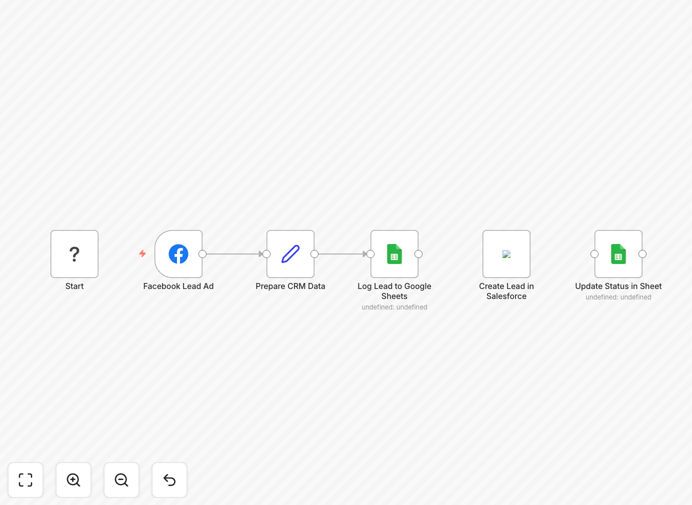
n8n workflow diagram syncing lead ads to Google Sheets and Salesforce

What This Workflow Does

This n8n workflow solves the critical challenge of lost leads and delayed follow-ups from Facebook and Google lead ads. Instead of manually downloading CSV files or checking multiple platforms, the automation instantly captures every lead form submission and syncs it to both Google Sheets for tracking and Salesforce CRM for immediate sales action.

Marketing teams waste countless hours transferring lead data between systems, while sales teams often receive stale leads days after submission. This workflow eliminates both problems by creating a real-time pipeline from your ad platforms to your CRM and analytics tools, ensuring no lead falls through the cracks.

How It Works

Step 1: Lead Capture Trigger

The workflow monitors your Facebook Lead Ads and Google Lead Form extensions for new submissions. Using each platform's API, it detects new leads the moment they're submitted, before they ever hit your email inbox.

Step 2: Data Standardization

Incoming lead data is cleaned and standardized - normalizing phone numbers, formatting names consistently, and mapping custom form fields to your CRM's expected structure. This prevents messy data from polluting your systems.

Step 3: Dual Destination Sync

Each lead is simultaneously written to both a Google Sheet (for marketing analytics and team visibility) and Salesforce CRM (for immediate sales follow-up). The workflow handles all field mappings and format conversions automatically.

Step 4: Notification & Follow-up

Optionally, the workflow can trigger instant notifications to sales reps via Slack or email, ensuring hot leads get contacted within minutes rather than hours or days.

Who This Is For

This workflow is ideal for:

  • Digital marketing agencies running lead gen campaigns for clients
  • B2B companies with high-value leads needing immediate follow-up
  • Sales teams tired of manual data entry from multiple ad platforms
  • Marketing ops professionals needing better lead tracking
  • Businesses running simultaneous campaigns across Facebook and Google

What You'll Need

  1. Active Facebook Business Manager account with lead ads running
  2. Google Ads account with lead form extensions
  3. Google Sheets with write permissions
  4. Salesforce CRM account with API access
  5. n8n instance (cloud or self-hosted)

Quick Setup Guide

  1. Download the JSON template file
  2. Import into your n8n instance
  3. Connect your Facebook and Google Ads accounts
  4. Configure your Google Sheets and Salesforce credentials
  5. Map form fields to your CRM fields
  6. Test with sample lead data
  7. Activate the workflow

Key Benefits

Never miss a hot lead again with instant transfer from ad click to CRM - leads reach your sales team in seconds, not days.

Eliminate 5-10 hours weekly of manual data entry and spreadsheet management across your marketing and sales teams.

Improve conversion rates by enabling immediate follow-up while leads are most engaged with your brand.

Gain complete visibility with centralized lead tracking in Google Sheets while maintaining CRM efficiency.

Scale your ad spend confidently knowing your lead management system can handle increased volume automatically.

Pro tip: Add a delay step to qualify leads before CRM entry - filter out bogus submissions while still capturing them in your tracking sheet.

Frequently Asked Questions

Common questions about lead ad integration and automation

Automating lead ad capture dramatically improves conversion rates by ensuring immediate follow-up. When leads are instantly transferred to your CRM and sheets, your sales team can contact them while their interest is highest.

Studies show response times under 5 minutes increase conversion likelihood by 9x compared to waiting 30 minutes. The workflow eliminates the lag between lead submission and sales awareness that kills so many opportunities.

  • Reduces average response time from hours to minutes
  • Captures leads while ad context is fresh in their mind
  • Enables personalized follow-up based on specific ad content

n8n provides superior flexibility compared to simpler automation tools. It allows complex data transformations between platforms, conditional routing based on lead quality, and integration with virtually any business system.

Unlike rigid platforms, n8n workflows can be customized to match your exact sales process without coding. You can add validation steps, integrate with additional tools like email platforms, and modify field mappings as your needs evolve.

  • Handles complex data transformations easily
  • Supports conditional logic for lead routing
  • Integrates with any API-enabled system

Implement data validation steps in your workflow to clean and standardize incoming leads. The workflow can verify email formats, normalize phone numbers, remove duplicates, and flag incomplete submissions.

Adding these checks prevents CRM pollution and ensures your sales team only spends time on qualified leads. For example, you might automatically route leads with invalid emails to a separate review sheet while pushing clean data to Salesforce.

  • Validate emails and phone numbers format
  • Standardize naming conventions
  • Filter out test submissions and spam

Yes, the workflow can tag and route leads based on their source campaign. By analyzing UTM parameters or ad platform metadata, you can automatically assign leads to different sales pipelines, apply specific follow-up sequences, or trigger customized onboarding flows.

For example, leads from a whitepaper download ad might get tagged as "education-stage" and receive nurturing content, while demo request leads go straight to sales with high priority.

  • Route by campaign source
  • Assign different follow-up sequences
  • Tag leads based on offer type

Businesses typically see 3-5x ROI from automating lead ad capture. The combination of faster response times, reduced data entry errors, and better lead tracking often increases conversion rates by 20-40%.

Additional savings come from eliminating manual work - sales teams report saving 5-10 hours weekly on data entry alone. When you factor in the increased revenue from properly nurtured leads, the automation pays for itself quickly.

  • 20-40% higher conversion rates
  • 5-10 hours weekly time savings
  • Reduced data entry errors

Use the lead's ad interaction data to personalize communications. Reference the specific offer they responded to, include relevant case studies, or trigger product-specific onboarding. The workflow can append this context when creating CRM records.

For maximum impact, configure your CRM to use these details in email templates and sales scripts. Mentioning the exact ad content ("I saw you downloaded our pricing guide...") builds immediate rapport and shows you're attentive to their interests.

  • Reference specific ad content
  • Trigger relevant case studies
  • Customize based on lead magnet

Absolutely! GrowwStacks specializes in building tailored lead capture systems. Our team can design a custom n8n workflow that integrates with your specific tech stack, implements your unique qualification criteria, and automates your exact sales process.

We'll work with you to understand your lead sources, CRM setup, and sales workflow, then build a solution that fits seamlessly into your operations. Custom automations typically deliver even higher ROI by matching your business requirements perfectly.

  • Tailored to your tech stack
  • Matches your sales process
  • Implements your lead scoring

Need a Custom Lead Ad Integration?

This free template is a starting point. Our team builds fully tailored automation systems for your specific needs.