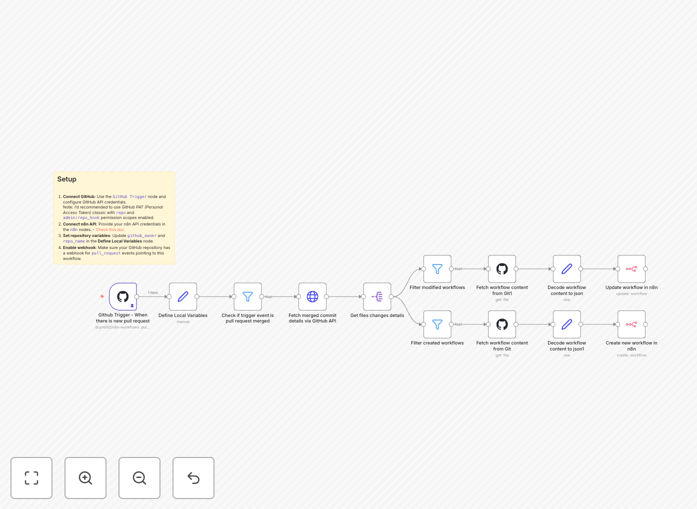
What This Workflow Does
This automation solves a critical pain point for DevOps teams managing n8n workflows stored in GitHub repositories. Whenever developers merge pull requests containing workflow changes, this template automatically synchronizes those updates to your n8n instance.
Manual workflow updates create deployment bottlenecks and increase the risk of human error. This solution ensures your production automation always matches your version-controlled workflows without manual intervention, maintaining consistency across your CI/CD pipeline.
How It Works
1. GitHub webhook triggers on pull request merge
The workflow activates whenever a pull request is merged in your designated GitHub repository. It captures all relevant commit details including changed files and branch information.
2. Changed workflow files are identified
The system analyzes the merged changes to detect modifications to n8n workflow files (typically JSON files). It filters out irrelevant file changes to focus only on automation updates.
3. n8n API updates corresponding workflows
Using n8n's REST API, the workflow updates the corresponding automation in your n8n instance with the new version from GitHub. It handles authentication and version conflict resolution automatically.
Who This Is For
This template is ideal for:
- DevOps engineers managing n8n automation at scale
- Development teams using GitHub for workflow version control
- Organizations with multiple environments (dev/staging/prod)
- Teams practicing GitOps methodologies for infrastructure
What You'll Need
- An n8n instance with API access enabled
- Admin access to your GitHub repository
- Webhook permissions in GitHub
- Basic understanding of n8n workflow structure
Quick Setup Guide
- Download the template JSON file
- Import into your n8n instance
- Configure GitHub webhook settings
- Set up n8n API authentication
- Test with a sample pull request merge
Key Benefits
Eliminates manual deployment errors by automatically syncing approved changes from GitHub to n8n, removing human intervention from the deployment process.
Reduces deployment time by 80% compared to manual workflow updates, allowing faster iteration on automation improvements.
Maintains version control integrity by ensuring your production automation always matches what's in your GitHub repository.
Enables proper change tracking with clear audit trails connecting GitHub commits to n8n workflow updates.