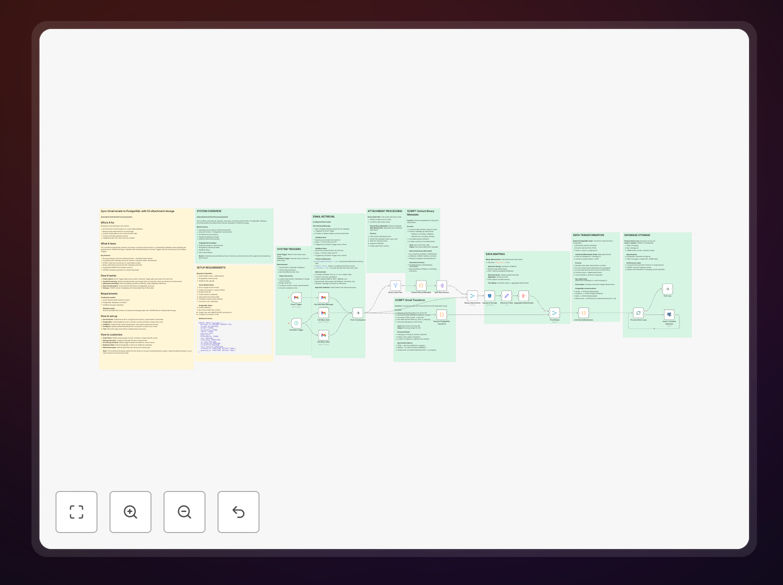
What This Workflow Does
This automation solves the common business problem of scattered, unsearchable email communications that are difficult to analyze, back up, or integrate with other systems. Instead of manually saving important emails or struggling with Gmail's search limitations, this workflow automatically captures every email, extracts its full metadata, converts HTML to plain text for better searchability, and stores everything in an organized database.
The system handles both real-time email capture and scheduled bulk processing, ensuring no communication is missed. Attachments are intelligently separated from emails and uploaded to secure cloud storage (S3 or MinIO) with proper organization, while the email content and metadata are stored in PostgreSQL with relational links to the files. This creates a complete, queryable archive of all business communications.
How It Works
1. Email Capture & Triggering
The workflow uses dual triggers: a Gmail trigger for real-time new email detection and a schedule trigger for bulk processing of emails from the last hour. This ensures both immediate capture of important communications and comprehensive archiving of existing emails without overwhelming the system.
2. Parallel Processing & Attachment Detection
Each email is analyzed for attachments. Emails with attachments are routed through binary processing pipelines, while text-only emails proceed directly to transformation. This parallel processing optimizes performance and ensures attachments are handled correctly without slowing down simple email archiving.
3. Attachment Management & Cloud Storage
Attachments are extracted with their metadata (filename, type, size), then uploaded to S3/MinIO storage with organized folder structures. The system creates database references linking each attachment back to its original email, maintaining the relationship while storing files in cost-effective, scalable cloud storage.
4. Data Transformation & Normalization
Email data from Gmail's API format is transformed into a structured PostgreSQL schema. HTML content is converted to plain text for better searchability, while preserving the original HTML separately. All metadata—sender, recipients, timestamps, labels, and headers—is extracted and normalized for consistent querying.
5. Database Storage with Duplicate Prevention
The system uses UPSERT operations to insert new emails while preventing duplicates. Each email is stored with complete metadata and references to any attachments in cloud storage. This creates a searchable, relational archive that can be queried by date, sender, subject, content, or attachment type.
Who This Is For
This automation is ideal for businesses that need organized, searchable communication records. Legal firms can maintain complete case correspondence archives. Financial services companies can ensure compliance with communication retention regulations. Customer support teams can build searchable knowledge bases from support emails. Sales organizations can track prospect interactions across email threads.
Healthcare providers dealing with patient communications, educational institutions managing student correspondence, and any business subject to audit requirements will find this system invaluable. It's also perfect for companies integrating email data with CRM systems, analytics platforms, or AI tools for communication analysis.
What You'll Need
- Gmail OAuth2 Credentials with gmail.readonly scope enabled through Google Cloud Console
- PostgreSQL Database instance (local, cloud, or managed service) with connection credentials
- S3-Compatible Storage such as AWS S3, MinIO, or compatible service with bucket creation permissions
- n8n Instance (self-hosted or cloud) with access to install and configure the workflow
- SQL Schema provided in the workflow setup notes to create the necessary database tables
Pro tip: Start with a test Gmail account and a small subset of emails before processing your primary business account. This lets you verify the archiving structure and attachment handling work correctly with your specific email patterns.
Quick Setup Guide
- Enable Gmail API: Create a project in Google Cloud Console, enable the Gmail API, and configure OAuth2 credentials with the necessary scopes.
- Prepare PostgreSQL: Create your database and run the SQL schema provided in the workflow's setup sticky note to create the messages table structure.
- Configure S3/MinIO: Create a bucket named "gmail-attachments" (or your preferred name) and set up access credentials with upload permissions.
- Import & Authenticate: Import the JSON template into your n8n instance, then authenticate the Gmail, PostgreSQL, and S3 nodes with your credentials.
- Test & Schedule: Run a test with a single email first, then configure the schedule trigger based on your email volume (start with hourly processing).
Key Benefits
Eliminates manual email archiving that can consume hours each week. Instead of employees manually saving important emails or attachments, this automation handles everything systematically, freeing up valuable time for revenue-generating activities.
Creates searchable communication records across your entire organization. With emails stored in a structured database, you can perform complex queries that are impossible within Gmail, like finding all emails from a specific client containing PDF attachments sent in the last quarter.
Ensures compliance with data retention policies by providing organized, timestamped archives. Many industries require keeping communications for specific periods—this system makes compliance automatic and verifiable.
Protects against data loss by creating independent backups of critical communications. If email accounts are compromised or accidentally purged, your business communications remain safe in your controlled database and cloud storage.
Enables advanced analytics and integration by transforming unstructured email data into structured database records. This opens possibilities for sentiment analysis, customer communication tracking, and integration with CRM or ERP systems.