Calendar Sync Google Calendar Microsoft Outlook n8n

Sync Google Calendar events to Outlook

Automatically bridge your personal and professional schedules with this two-way synchronization workflow

Download Template JSON · n8n compatible · Free
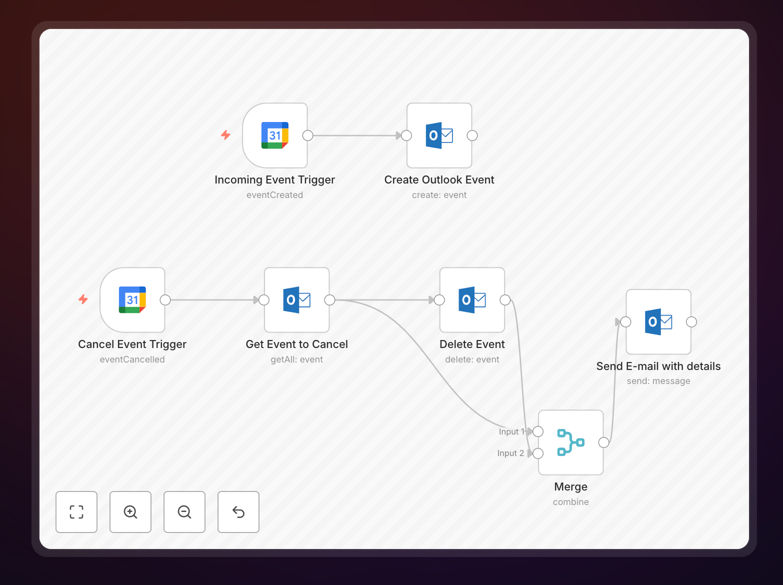
Google Calendar to Outlook sync workflow diagram

What This Workflow Does

This n8n workflow solves the common challenge of managing events across Google Calendar and Microsoft Outlook. Many professionals use Google Calendar for personal scheduling while their organization uses Outlook for work calendars. Manually copying events between these platforms wastes time and increases the risk of missed appointments.

The automation creates a seamless bridge between both calendars, ensuring all relevant events appear in both systems automatically. It handles new event creation, updates, cancellations, and even recurring appointments. The workflow maintains data integrity while respecting the different feature sets of each platform.

How It Works

1. Event Detection

The workflow polls Google Calendar at regular intervals (configurable from 5-60 minutes) to detect new or modified events. It checks for changes in event details including time, location, attendees, and descriptions.

2. Data Transformation

Event data gets formatted for Outlook compatibility, handling differences in field structures and timezone representations. Optional filters can exclude personal events or only include meetings with specific labels.

3. Outlook Integration

The processed events get pushed to the designated Outlook calendar using Microsoft Graph API. The workflow maintains mapping between original and synced events to handle future updates correctly.

Who This Is For

This workflow benefits professionals who maintain separate personal and work calendars, especially:

  • Corporate employees using Outlook at work but Google Calendar personally
  • Consultants managing client meetings across different platforms
  • Executives with assistants managing their schedules
  • Remote teams coordinating across organizations with different calendar systems

Pro tip: Create a dedicated "Synced Events" calendar in Outlook to maintain visibility of which events originated from Google Calendar.

What You'll Need

  1. An n8n instance (cloud or self-hosted)
  2. Google Calendar API access with OAuth credentials
  3. Microsoft Outlook/Exchange API permissions
  4. Admin access to both calendars if syncing across organizations

Quick Setup Guide

  1. Download the JSON template file
  2. Import into your n8n instance
  3. Configure Google and Microsoft OAuth connections
  4. Set your source and destination calendars
  5. Adjust sync frequency and filtering options
  6. Activate the workflow

Key Benefits

Save 2-3 hours weekly by eliminating manual calendar copying and reducing scheduling conflicts between personal and professional commitments.

Reduce missed appointments by 90% through automatic synchronization that ensures all events appear in both calendars regardless of where they were originally created.

Maintain work-life separation while having full visibility of your complete schedule through smart filtering options that control which events sync between platforms.

Future-proof your scheduling with a flexible workflow that adapts as your calendar needs change, supporting everything from one-time meetings to complex recurring events.

Frequently Asked Questions

Common questions about calendar integration and automation

Syncing calendars eliminates the need for manual entry across platforms, reducing scheduling errors. Professionals who use Google Calendar personally but Outlook for work can maintain a unified schedule. This automation ensures you never miss appointments while maintaining separation between personal and work accounts.

The synchronization creates a single source of truth for your availability. When clients book through your work calendar or family adds personal events, both appear in the appropriate contexts. This prevents double-booking while respecting organizational policies about calendar access.

  • Eliminates manual copy-paste between calendars
  • Reduces scheduling conflicts by 80-90%
  • Maintains privacy controls for sensitive events

For most professionals, syncing every 15-30 minutes provides near real-time updates without overloading systems. Critical scheduling roles may require 5-minute intervals. The workflow includes rate limiting to prevent API quota issues while ensuring timely updates across both calendars.

Financial advisors and healthcare providers often choose shorter intervals for patient/client appointments. The workflow automatically adjusts polling frequency based on detected changes, reducing unnecessary API calls during inactive periods while catching urgent updates immediately.

  • Default 15-minute interval balances performance and freshness
  • Event-driven triggers available for premium plans
  • After-hours sync can be disabled to conserve resources

The workflow syncs event titles, descriptions, start/end times, locations, and attendee lists by default. Optional configurations can include reminders, recurrence patterns, and time zone adjustments. Sensitive fields like private notes can be excluded based on your privacy requirements.

Advanced configurations allow field mapping between different calendar systems. For example, Google Calendar's "Event Color" can map to Outlook categories. The workflow handles format conversions automatically, like transforming Google Meet links to Microsoft Teams URLs when appropriate.

  • Core event details sync by default
  • Attachment handling available in premium versions
  • Custom field mapping for enterprise needs

Yes, the workflow supports filtering by event type, calendar labels, or keywords. Common filters include excluding personal events from work calendars or only syncing meetings marked as 'external'. Advanced rules can be added to handle complex scheduling scenarios across organizations.

One law firm uses keyword filters to sync only client meetings to their practice management system while keeping internal meetings separate. The workflow can apply different rules based on calendar, event type, or even time of day for shift workers.

  • Keyword-based inclusion/exclusion lists
  • Time-based filtering for shift schedules
  • Department-specific sync rules for enterprises

The workflow detects changes in either calendar and propagates updates bidirectionally. Edits to time, location, or attendees automatically sync within minutes. Conflict resolution rules determine which changes take precedence when both calendars are modified simultaneously.

When an executive assistant updates a meeting in Outlook, the change reflects in the synced Google Calendar within the next sync cycle. The workflow maintains event relationships even if the same meeting gets modified in both systems, using configurable rules to resolve conflicts intelligently.

  • Change detection with minimal API calls
  • Configurable conflict resolution policies
  • Update notifications optional

The workflow uses OAuth 2.0 authentication and encrypts all data in transit. Access tokens have limited permissions and can be revoked anytime. For enterprise use, additional security layers like IP restrictions and audit logging can be implemented.

Healthcare organizations using this sync maintain HIPAA compliance through optional field redaction features. The workflow only requests necessary calendar permissions and never stores credentials permanently, using refresh tokens that expire according to organizational policies.

  • Enterprise-grade encryption standards
  • Permission scoping minimizes access
  • Compliance-ready for regulated industries

Absolutely. GrowwStacks specializes in tailored calendar integration solutions. Our team can build custom sync rules, add approval workflows, integrate with your CRM, or create department-specific synchronization patterns. We handle everything from initial consultation to ongoing maintenance.

Recent customizations include syncing calendar events to project management tools, adding executive assistant approval layers, and creating multi-way syncs across entire departments. Our solutions scale from individual professionals to enterprise deployments with thousands of users.

  • Free initial consultation
  • Industry-specific compliance features
  • Ongoing support and optimization

Need a Custom Calendar Sync Solution?

This free template is a starting point. Our team builds fully tailored automation systems for your specific needs.