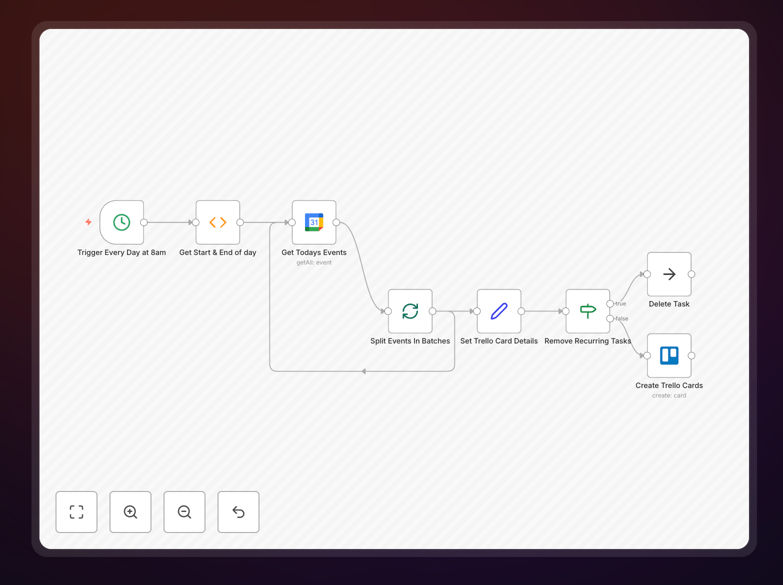
What This Workflow Does
This automation solves the common problem of having your schedule in Google Calendar but your tasks and notes in Trello. Each morning, it automatically copies your day's calendar events into Trello as individual cards, transforming appointments into actionable tasks.
The workflow pulls event details like title, time, description, and attendees, then creates corresponding Trello cards with appropriate labels and organization. This eliminates manual copying, reduces missed follow-ups, and creates a unified system where scheduled time directly translates to trackable work.
How It Works
Step 1: Daily Trigger
A scheduled trigger runs each morning (configurable to your preferred time) to initiate the synchronization process. This ensures your Trello board is updated with the day's commitments before you start work.
Step 2: Fetch Calendar Events
The workflow connects to your Google Calendar and retrieves all events scheduled for the current day. It can filter by specific calendars, event types, or keywords to ensure only relevant appointments are processed.
Step 3: Process Event Data
Each event is processed to extract key information: event title becomes the card name, time becomes the due date, description becomes card notes, and attendees can be added as card members or mentioned in comments.
Step 4: Create Trello Cards
The processed data creates new Trello cards in your specified board and list. You can customize which list cards go to, add specific labels based on event type, and include meeting notes or attachments automatically.
Pro tip: Configure the workflow to run 30 minutes before your workday starts. This gives you a fresh, organized Trello board waiting when you begin your day, with all appointments already converted to actionable tasks.
Who This Is For
This automation is ideal for professionals, teams, and businesses that use Google Calendar for scheduling but Trello for task management. It's particularly valuable for:
- Consultants & Freelancers who need to track client meetings alongside project tasks
- Project Managers coordinating team schedules with project deliverables
- Sales Teams converting prospect meetings into follow-up tasks
- Remote Teams maintaining visibility across time zones and schedules
- Solopreneurs wanting to unify their calendar and task systems
What You'll Need
- An n8n instance (cloud or self-hosted)
- Google Calendar account with events to sync
- Trello account with a board and list for the cards
- Google Calendar API credentials configured in n8n
- Trello API key and token set up in n8n
- Basic understanding of n8n workflow import process
Quick Setup Guide
Follow these steps to implement this automation in your workflow:
- Download the template using the button above and save the JSON file
- Import into n8n by going to Workflows → Import from File
- Configure Google Calendar node with your calendar ID and authentication
- Set up Trello node with your board ID, list ID, and label preferences
- Adjust trigger timing to match when you want the sync to run daily
- Test with a single event before activating the daily schedule
- Activate the workflow and verify cards appear correctly in Trello
Important: You'll need to find your Trello label IDs for meeting types. Check the workflow description for instructions on locating these IDs in Trello's interface.
Key Benefits
Save 15-30 minutes daily by eliminating manual copying of calendar events to task lists. This time savings adds up to 60-120 hours annually that can be redirected to higher-value work.
Reduce missed follow-ups by automatically converting every meeting into a trackable task with context, deadlines, and assigned responsibility built right into your project management system.
Improve meeting accountability with automatic documentation of appointments as Trello cards that can include notes, action items, and follow-up tasks directly linked to the original calendar event.
Create consistency across teams by ensuring everyone's calendar commitments are visible in the shared project management tool, improving coordination and reducing scheduling conflicts.
Enable better time management by having your scheduled time and task management in one unified system, making it easier to balance commitments, track progress, and manage workload.