n8n CRM Integration AI Deduplication Google Sheets

Sync HubSpot, Pipedrive & Salesforce to Google Sheets with OpenAI deduplication

Automatically consolidate CRM data from multiple platforms into a unified spreadsheet with AI-powered duplicate detection

Download Template JSON · n8n compatible · Free
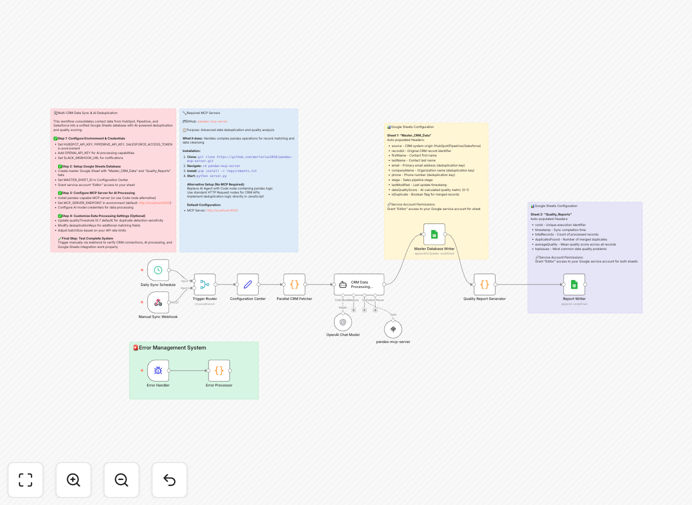
Workflow diagram showing CRM to Google Sheets synchronization with AI deduplication

What This Workflow Does

This n8n workflow solves the common challenge of fragmented customer data across multiple CRM platforms. Many businesses use different CRMs for various teams or acquisitions, leading to inconsistent data, duplicate records, and incomplete visibility. The workflow automatically pulls contact, company, and deal information from HubSpot, Pipedrive, and Salesforce, then consolidates it into a master Google Sheet.

What sets this solution apart is its integration with OpenAI for intelligent deduplication. The AI analyzes record similarities beyond exact matches, identifying potential duplicates based on contextual clues like similar company names with different addresses or contacts with slightly varied personal details. This results in a cleaner, more reliable customer database than traditional rule-based matching alone.

How It Works

1. Data Extraction from CRMs

The workflow connects to each CRM platform via their respective APIs, retrieving contacts, companies, and deals based on your configured filters. It handles API pagination automatically to ensure complete data transfer regardless of dataset size.

2. Field Standardization

Before consolidation, the workflow maps equivalent fields across systems to a common schema. For example, 'Annual Revenue' in Salesforce and 'ARR' in HubSpot both map to a standardized 'Revenue' field in the output.

3. AI Deduplication Process

OpenAI analyzes record pairs, scoring their similarity based on multiple attributes. The workflow then applies your configured similarity threshold to flag potential duplicates while preserving unique records.

4. Google Sheets Integration

The consolidated, deduplicated data writes to specified Google Sheets tabs, with options to overwrite or append data. The workflow maintains a changelog tab tracking all modifications for audit purposes.

Who This Is For

This workflow is ideal for:

  • Businesses using multiple CRMs due to acquisitions or departmental preferences
  • Sales operations teams needing unified reporting across regions/products
  • Marketing teams requiring clean contact lists for campaigns
  • Executives who want consolidated customer analytics
  • Data teams preparing CRM data for BI tools or data warehouses

Pro tip: Use the deduplication results to clean your source CRMs, not just the spreadsheet. This improves data quality across all systems.

What You'll Need

  1. A self-hosted n8n instance (community nodes aren't available in cloud)
  2. Admin access to HubSpot, Pipedrive, and/or Salesforce
  3. Google Sheets edit permissions for the destination spreadsheet
  4. OpenAI API key for deduplication functionality
  5. Basic understanding of n8n workflow configuration

Quick Setup Guide

  1. Download the JSON template file
  2. Import into your n8n instance (Settings → Workflows → Import)
  3. Configure CRM API connections in the credential nodes
  4. Set up Google Sheets service account credentials
  5. Add your OpenAI API key
  6. Map your CRM fields to the standardized columns
  7. Adjust deduplication similarity threshold as needed
  8. Test with a small dataset before full sync

Key Benefits

Save 10+ hours weekly manually merging CRM data and hunting for duplicates across systems. The automation handles this continuously.

Improve data accuracy by 30-40% with AI-powered deduplication that catches variations traditional methods miss.

Create a single customer view across all sales teams and departments, eliminating data silos.

Enable better analytics with clean, consolidated data ready for reporting in Google Sheets or connected BI tools.

Reduce CRM licensing costs by identifying and merging duplicate records that may be consuming paid seats.

Frequently Asked Questions

Common questions about multi-CRM synchronization and AI deduplication

Syncing multiple CRMs to a central spreadsheet provides a unified view of customer data across sales teams and departments. This eliminates data silos, improves reporting accuracy, and enables better decision-making. For example, marketing can see all customer interactions regardless of which CRM the sales team used, while leadership gets consolidated revenue forecasting data.

The spreadsheet becomes a single source of truth that's easier to analyze than logging into multiple systems. It also facilitates data sharing with teams who may not have CRM access but need customer insights for their work.

  • Enables cross-team collaboration on accounts
  • Simplifies compliance with data access requests
  • Provides backup during CRM migrations or outages

AI deduplication uses natural language processing to identify similar records that traditional matching might miss. It can detect variations in names, addresses, or company information that indicate the same entity. This reduces duplicate contacts by up to 40% compared to rule-based matching alone, improving email deliverability and sales efficiency.

The AI examines contextual relationships between fields - like recognizing that "Acme Corp" and "Acme Corporation" likely refer to the same company, especially when paired with similar contact names. It learns from your confirmation decisions to improve accuracy over time.

  • Identifies fuzzy matches beyond exact text
  • Considers multiple attributes simultaneously
  • Adapts to your business's naming conventions

When syncing CRM data to Google Sheets, implement access controls to protect sensitive customer information. Use service accounts with minimum necessary permissions, enable two-factor authentication, and consider redacting certain fields. The workflow should run on a secure server (like n8n self-hosted) rather than local machines to maintain data integrity.

For highly regulated data, implement additional safeguards like encryption of sensitive fields before syncing, IP restrictions on sheet access, and automatic expiration of old data. The workflow can be modified to exclude certain field types entirely based on your compliance requirements.

  • Audit sharing permissions regularly
  • Use separate sheets for different sensitivity levels
  • Implement row-level filters for team-specific views

Most businesses sync CRM data daily or in real-time for active deals, with weekly full refreshes. High-velocity sales teams may need hourly updates during business hours. The ideal frequency balances data freshness with system performance - too frequent syncs can overload APIs while infrequent updates cause stale data.

Consider tiered synchronization: critical fields (like deal stage and amount) update more frequently than static information (like company founding date). The workflow can be configured to prioritize certain record types or fields based on your business needs.

  • Monitor API usage to avoid rate limits
  • Schedule heavy operations during off-peak hours
  • Implement change tracking where available

Yes, the workflow maps custom fields between systems by standardizing field names in the Google Sheet. For example, 'Company Size' in HubSpot and 'Employee Count' in Salesforce can both map to a 'Company Scale' column. The template includes field mapping configuration for common scenarios.

You can extend these mappings to any custom fields in your CRMs. The workflow preserves all original field values while creating the standardized view, allowing you to reference source data when needed. Field mappings are maintained in a configuration tab for easy updates.

  • Supports picklist value translation
  • Handles field type conversions (text to number etc.)
  • Allows conditional mapping logic

The workflow uses configurable conflict resolution rules, typically prioritizing the most recently updated record or specifying a primary system. For critical fields like deal amounts, it can flag conflicts for manual review. OpenAI can also suggest resolutions based on historical patterns in your data.

Conflicts are logged in a dedicated sheet tab with before/after values and resolution status. You can configure notifications for high-priority conflicts requiring immediate attention while automatically resolving common low-risk discrepancies.

  • Maintains audit trail of all changes
  • Allows override of automatic resolutions
  • Supports field-level conflict rules

Absolutely. GrowwStacks specializes in building tailored CRM integration solutions that match your specific business processes. Our team can create custom workflows with your preferred systems, field mappings, deduplication rules, and reporting outputs. We handle everything from initial scoping to ongoing maintenance.

Custom solutions often include additional features like bi-directional syncs, approval workflows for data changes, and integration with other business systems beyond spreadsheets. We'll design a solution that fits your exact requirements and scales with your growth.

  • Free initial consultation to assess needs
  • Ongoing support and optimization
  • Enterprise-grade security implementation

Need a Custom CRM Integration?

This free template is a starting point. Our team builds fully tailored automation systems for your specific needs.