What This Workflow Does
Every time a visitor fills out a form on your Webflow website, they become a potential lead. But manually copying that information into your Pipedrive CRM wastes time, introduces errors, and delays sales follow-up. This automation solves that problem by instantly capturing form submissions and syncing them as fully structured leads in Pipedrive.
The workflow ensures each lead is accurately associated with the correct organization (based on email domain), checks for duplicates to keep your CRM clean, and creates a new person record with all submitted details. It transforms a manual, error-prone process into a seamless, automated funnel from marketing capture to sales management.
How It Works
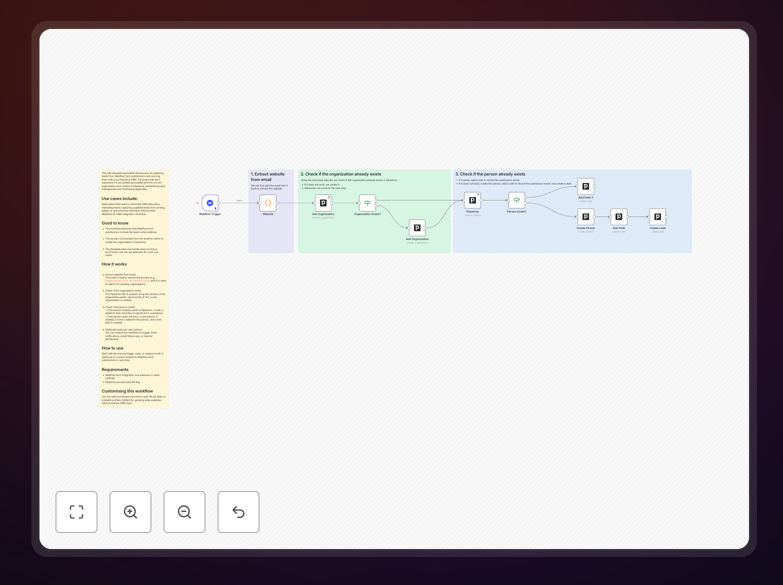
Step 1: Capture the Webflow Form Submission
The workflow triggers whenever a form is submitted on your Webflow site. It receives the lead's name, email, phone, and any custom fields you've set up. This data becomes the foundation for the CRM entry.
Step 2: Extract Company Domain from Email
The lead's email address is analyzed to extract the company domain (e.g., [email protected] → company.com). This domain is used to search Pipedrive for an existing organization, ensuring leads are grouped correctly under their company.
Step 3: Find or Create the Organization
Pipedrive is queried using the domain. If the organization already exists, the workflow proceeds. If not, a new organization is created automatically, keeping your CRM organized without manual intervention.
Step 4: Check for Existing Person & Create Lead
The workflow searches Pipedrive for a person with the same email. If found, a note is added to their activity log about the new submission. If not, a new person record is created, a note is added, and a new lead is generated in Pipedrive—ready for sales assignment.
Pro tip: You can extend this workflow to instantly notify your sales team via Slack or email when a high-value lead is captured, enabling immediate follow-up while the lead is still warm.
Who This Is For
This automation is ideal for sales teams, marketing agencies, SaaS companies, and any business using Webflow for landing pages and Pipedrive for CRM. It's perfect for:
- Sales teams wanting to eliminate manual CRM data entry
- Marketing teams capturing qualified leads from landing pages
- Startups needing a seamless lead funnel from website to sales pipeline
- Businesses looking to improve lead response time and conversion rates
- Teams struggling with CRM duplicates and inconsistent data entry
What You'll Need
- A Webflow site with form submissions enabled
- A Pipedrive CRM account with API access
- n8n instance (cloud or self-hosted) to run the automation
- Basic understanding of your Webflow form fields and Pipedrive custom fields
- The lead's email address must be captured in the Webflow form (required for domain extraction)
Quick Setup Guide
- Download the template JSON file and import it into your n8n instance.
- Configure the Webflow trigger node with your site's form webhook URL.
- Set up the Pipedrive nodes with your API credentials and customize field mappings.
- Test the workflow with a sample form submission to verify data flows correctly.
- Activate the workflow and monitor initial leads to ensure everything works as expected.
Key Benefits
Eliminate manual data entry: Save 2–5 hours per week previously spent copying form data into CRM. This time can now be used for actual sales activities.
Reduce CRM duplicates: Automatic duplicate checking ensures your Pipedrive stays clean and organized, improving data accuracy and sales efficiency.
Accelerate sales follow-up: Leads appear in Pipedrive instantly, enabling sales teams to reach out within minutes instead of days, significantly increasing conversion chances.
Improve lead qualification: Automated organization matching provides context about the company, helping sales reps prioritize and personalize their outreach.
Create a seamless marketing-to-sales funnel: From website visitor to CRM lead in seconds—no gaps, no delays, no missed opportunities.