Google Drive Airtable File Sync n8n

Sync new files from Google Drive with Airtable

Automatically track and share newly uploaded files with team members via email notifications

Download Template JSON · n8n compatible · Free
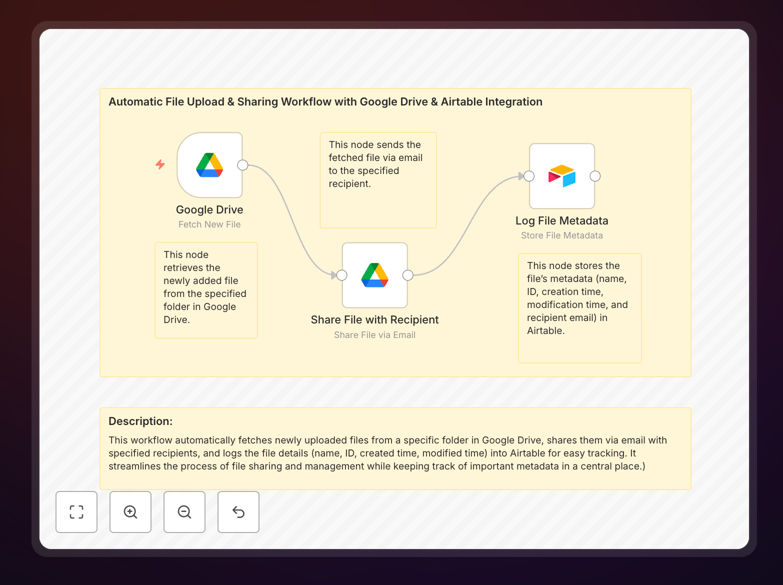
Google Drive to Airtable sync workflow diagram

What This Workflow Does

Managing shared documents across teams often leads to version confusion and missed updates. This automation solves that by instantly syncing new Google Drive files to your Airtable base while notifying relevant stakeholders.

Whenever someone uploads a file to your monitored Google Drive folder, the workflow automatically captures its details (name, type, link) in Airtable and sends email alerts to specified recipients. This creates a searchable document database of company documents while ensuring everyone stays informed.

How It Works

1. Monitors your Google Drive folder

The workflow continuously checks your specified Drive folder for new uploads using n8n's polling trigger. You can set the check frequency based on your needs (from minutes to daily).

2 Extracts file metadata

For each new file, the system captures essential details like filename, type, size, creator, and sharing link. This metadata gets structured for easy searching and reporting in Airtable.

3 Creates Airtable records

The workflow adds a new row to your designated Airtable base containing all file metadata. You can customize which fields get populated based on your tracking needs.

4 Sends email notifications

Configured recipients receive an email containing the file link and key details. The template is customizable to include project codes, approval requests, or other context.

Pro tip: Use Airtable views to create filtered dashboards showing recently added files by department or project.

Who This Is For

This workflow benefits any team collaborating on shared documents:

  • Marketing teams managing campaign assets
  • HR departments organizing employee documents
  • Product teams sharing specifications
  • Accounting departments handling invoices/receipts

What You'll Need

  1. A Google Workspace account with Drive access
  2. An Airtable base with appropriate fields setup
  3. n8n instance (cloud or self-hosted)
  4. Email service (like Gmail or SendGrid)

Quick Setup Guide

  1. Import the JSON template into your n8n dashboard
  2. Connect your Google Drive and Airtable credentials
  3. Specify the target Drive folder and Airtable base
  4. Configure email recipients and notification template
  5. Activate the workflow

Key Benefits

Eliminates manual file tracking - Automatically log every new upload without team members needing to update spreadsheets or send alerts.

Reduces document search time by 70% - With all files indexed in Airtable, finding specific documents takes seconds instead of digging through folder hierarchies.

Ensures timely notifications - Stakeholders receive alerts the moment files are added, preventing delays from manual processes.

Creates audit trails - Every file gets timestamped with upload details, providing accountability and version history.

Frequently Asked Questions

Common questions about Google Drive and Airtable integration

Automating Drive-to-Airtable sync eliminates manual file tracking and reduces human error. When team members upload files to a shared Drive folder, the system automatically logs them in Airtable with metadata like upload dates and sharing permissions.

This creates a searchable database of company documents while ensuring stakeholders receive notifications about new files. Businesses save 2-3 hours weekly on document management with this automation.

This workflow handles all common Google Drive file types including PDFs, spreadsheets, images, documents, and presentations. For optimal results, we recommend standardizing file naming conventions and using consistent folder structures.

Marketing teams often use it for campaign assets, for example automatically logging new product images in their asset management system while alerting designers and copywriters.

Yes, the workflow allows complete customization of notification recipients. You You can set recipients by department (e.g. [email protected]), by project role (project-manager@), or dynamically based on Airtable record values.

A common setup includes sending different notifications to internal teams versus clients, with appropriate access links and file descriptions for each audience.

The workflow inherits Google Drive's enterprise-grade security. Files maintain their existing permission settings during transfer, and you can configure the automation to apply additional security measures.

For Advanced Access Controls (AAC), we recommend setting up separate workflows with additional verification steps for sensitive documents.

The workflow includes built-in error handling that retries failed syncs up to 3 times before alerting administrators. All sync attempts are logged in Airtable with timestamps and error details.

Common issues like temporary API outages or permission errors are automatically resolved in subsequent runs, while systematic problems trigger notifications for IT intervention.

Absolutely. The workflow can extract and store any available available metadata including creator information, modification dates, file properties, and custom Drive fields.

Many teams enhance this by adding business-specific tags, project codes, or approval statuses that get written to corresponding Airtable fields.

Our team at GrowwStacks specializes in building tailored document management automations. We can create custom workflows that integrate your specific business rules, approval processes, and existing systems.

Typical customizations include adding rules for different file types, connecting to additional apps like Slack or Trello, and implementing complex permission hierarchies.

Need a Custom Drive-to-Airtable Integration?

This free template is a starting point. Our team builds fully tailored automation systems for your specific needs.