Zapier Content Creation AI Summarization WordPress OpenAI

Sync Note.com Articles to WordPress with AI Categorization

Automatically publish your Note.com articles to WordPress with intelligent category and tag assignment powered by OpenAI. Eliminate manual copying and ensure perfect SEO organization.

Download Template JSON · n8n compatible · Free
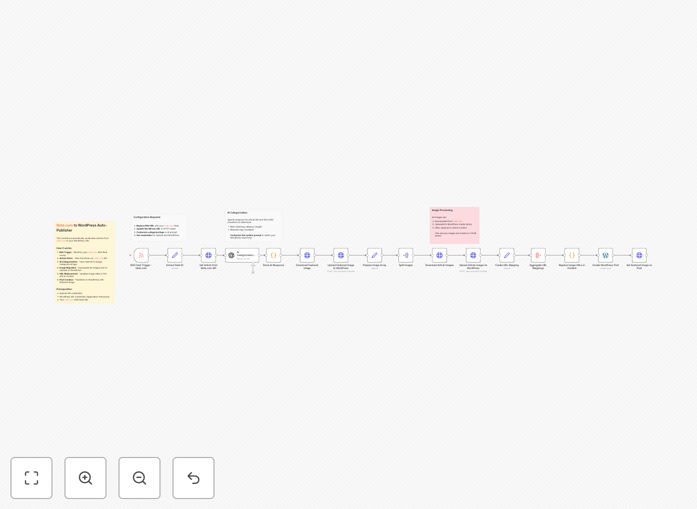
Automated workflow diagram syncing Note.com articles to WordPress with AI categorization

What This Workflow Does

This automation solves a common problem for content creators who publish on multiple platforms: manually copying articles from Note.com to WordPress is time-consuming, error-prone, and lacks intelligent organization. Each transfer requires copying text, downloading images, uploading to WordPress media library, setting categories, adding tags, and formatting—a process that can take 30-60 minutes per article.

The workflow automatically monitors your Note.com RSS feed for new articles, fetches the complete content through Note.com's API, uses OpenAI to analyze the article and assign appropriate WordPress categories and tags, downloads all images (including featured images), uploads them to your WordPress media library, replaces image URLs in the content, and publishes the post with proper formatting—all without manual intervention.

Beyond simple transfer, this automation adds intelligent content organization that improves SEO and user experience. The AI categorization ensures articles appear in the right site sections, while automated image handling preserves visual quality and optimizes loading speed.

How It Works

1. RSS Feed Monitoring

The workflow starts by checking your Note.com RSS feed at regular intervals (default: hourly). When a new article is detected, it triggers the automation pipeline and extracts the article URL for processing.

2. Content Extraction & AI Analysis

The system fetches the full article content from Note.com's API, including text, images, and metadata. This content is then sent to OpenAI with a custom prompt that analyzes the article's themes, topics, and context to determine the most relevant WordPress categories and tags from your predefined taxonomy.

3. Image Processing & Upload

All images from the Note.com article are downloaded, optimized if needed, and uploaded to your WordPress media library. The workflow identifies the featured image and sets it appropriately, while replacing all image URLs in the article content to point to your WordPress-hosted versions.

4. WordPress Publication

Using WordPress REST API with Application Password authentication, the workflow creates a new post with the analyzed categories, tags, formatted content, and featured image. You can configure it to publish immediately or save as drafts for review.

Who This Is For

This workflow is ideal for bloggers, content marketers, and businesses who maintain both a Note.com presence and a WordPress website. It's particularly valuable for:

  • Content creators who publish tutorials or articles on Note.com but want them on their WordPress blog
  • Marketing teams distributing content across multiple platforms while maintaining a central WordPress hub
  • Small business owners who use Note.com for quick publishing but need organized content on their main website
  • SEO-focused publishers who want consistent categorization and tagging across all content
  • Agencies managing multiple client websites with content from various sources

What You'll Need

  1. Note.com account with published articles (free account works)
  2. Self-hosted WordPress site with REST API enabled (most modern WordPress installations have this)
  3. OpenAI API key (for intelligent categorization—sign up at platform.openai.com)
  4. WordPress Application Password (generated from Users → Your Profile in WordPress admin)
  5. n8n instance (cloud or self-hosted) to run the workflow

Pro tip: Before implementing, map your WordPress categories and tags to common topics in your Note.com content. This helps the AI make better categorization decisions.

Quick Setup Guide

  1. Download the template using the button above and import it into your n8n instance
  2. Configure the RSS Trigger by replacing the example Note.com RSS feed URL with your actual profile feed
  3. Add your OpenAI API credentials in the OpenAI node settings
  4. Set up WordPress authentication by creating an Application Password and adding it with your site URL
  5. Customize the AI prompt in the OpenAI node to reference your specific WordPress categories and tags
  6. Test with a single article by manually triggering the workflow before enabling automated scheduling
  7. Activate the schedule to run hourly or daily based on your publishing frequency

Key Benefits

Save 5-10 hours per month on manual content transfer and formatting. What used to take 30-60 minutes per article now happens automatically in the background.

Improve SEO through consistent categorization powered by AI analysis. Articles are automatically tagged with relevant keywords and placed in appropriate categories.

Maintain visual quality with automated image handling. All images are downloaded, optimized, and uploaded to your WordPress media library with proper attribution.

Reduce human error in copying, formatting, and categorization. The automated process ensures consistency across all published content.

Scale content distribution without proportional increase in administrative work. Publish to multiple platforms while maintaining a centralized WordPress repository.

Frequently Asked Questions

Common questions about content automation between Note.com and WordPress

Automating content publishing saves significant time and ensures consistency. Manual copying, formatting, and image handling can take 30-60 minutes per article. Automation eliminates human error, maintains consistent formatting, and allows you to focus on creating content rather than administrative tasks.

Beyond time savings, automation ensures your WordPress site stays updated with your latest Note.com content without delays. This is especially valuable for time-sensitive content or regular publishing schedules where manual transfer would create bottlenecks.

AI analyzes the full article content to understand context, themes, and topics, then suggests the most relevant categories and tags. This creates more accurate taxonomy than manual guessing, improves SEO through better content organization, and ensures articles appear in the right site sections automatically.

The AI considers semantic relationships between concepts in your article, something humans might miss when quickly tagging. This results in more discoverable content and better user experience as readers find related articles through consistent categorization.

Key benefits include: 1) Time savings of 5-10 hours per month for regular publishers, 2) Consistent formatting and image handling, 3) Improved SEO through proper categorization, 4) Reduced human error in copying content, and 5) Ability to maintain separate platforms while syncing content automatically.

Additionally, automation creates a reliable content pipeline that works while you sleep. Your Note.com articles automatically appear on your WordPress site, maintaining content freshness and regular updates that search engines reward with better rankings.

Yes, the workflow automatically downloads all images from Note.com articles, uploads them to your WordPress media library, replaces image URLs in the content, and sets the appropriate featured image. This preserves visual content quality and ensures images are hosted on your WordPress site rather than linked externally.

The system identifies the primary article image as the featured image based on Note.com's metadata or image positioning. All images are processed to maintain aspect ratios and quality while being stored locally on your WordPress installation for better loading speeds and reliability.

The template provides a pre-built structure that requires basic configuration: adding your API keys for OpenAI and WordPress, and setting your Note.com RSS feed URL. Most users can set it up in 15-30 minutes following our step-by-step guide. No coding is required beyond copying API credentials from your accounts.

We provide detailed instructions for each configuration step, and the workflow includes comments explaining what each node does. Even beginners can implement this with basic computer literacy—the hardest part is generating the WordPress Application Password, which involves clicking a button in your WordPress admin.

The workflow includes error handling and logging to catch issues. If WordPress or Note.com APIs change, minor adjustments might be needed in the workflow nodes. Regular maintenance ensures compatibility. Most API changes are backward-compatible for extended periods, and the template community provides updates for major changes.

For critical publishing workflows, we recommend setting up monitoring alerts and testing with draft posts first. The modular design makes it easy to update specific components without rebuilding the entire automation, and n8n's active community often shares updates when platform APIs evolve.

Absolutely. The OpenAI node includes customizable system prompts that you can modify to match your specific WordPress categories, tags, and content types. You can train the AI to recognize your niche terminology, prioritize certain taxonomy terms, or apply different rules for different content formats like tutorials vs. news articles.

For example, you could create separate prompts for technical tutorials (prioritizing technical tags) versus opinion pieces (prioritizing conceptual categories). The workflow can be extended with conditional logic to apply different AI instructions based on article characteristics detected in the Note.com content.

Yes, GrowwStacks specializes in building tailored automation solutions for businesses. While this free template provides a solid foundation for Note.com to WordPress publishing, we can create custom workflows that integrate additional platforms, add approval workflows, implement custom content transformations, or connect with your specific CMS setup.

Our team handles the technical implementation so you can focus on creating content. We've built automated publishing systems for media companies, marketing agencies, and educational platforms that handle complex requirements like multi-language support, custom taxonomies, scheduled publishing, and content moderation workflows.

  • Integration with additional platforms beyond Note.com
  • Custom approval workflows with team notifications
  • Advanced content transformation and formatting rules
  • Multi-language support and translation automation

Need a Custom Content Publishing Automation?

This free template is a starting point. Our team builds fully tailored automation systems for your specific business needs.