What This Workflow Does
This automation solves a common problem for businesses using Stripe for payments and HubSpot for CRM: disconnected financial and customer data. When payment information lives separately from your CRM, your sales and marketing teams lack visibility into customer spending behavior, making personalized communication and accurate forecasting difficult.
The workflow automatically pulls charge data from Stripe and updates corresponding contacts in HubSpot with their total amount charged. It creates a custom property in HubSpot to store this financial information if it doesn't already exist, ensuring your customer profiles are enriched with actual payment data without manual data entry.
By bridging this gap, you gain a unified view of each customer—combining their engagement history from HubSpot with their financial behavior from Stripe. This enables more targeted marketing campaigns, better customer service, and data-driven decision making across your organization.
How It Works
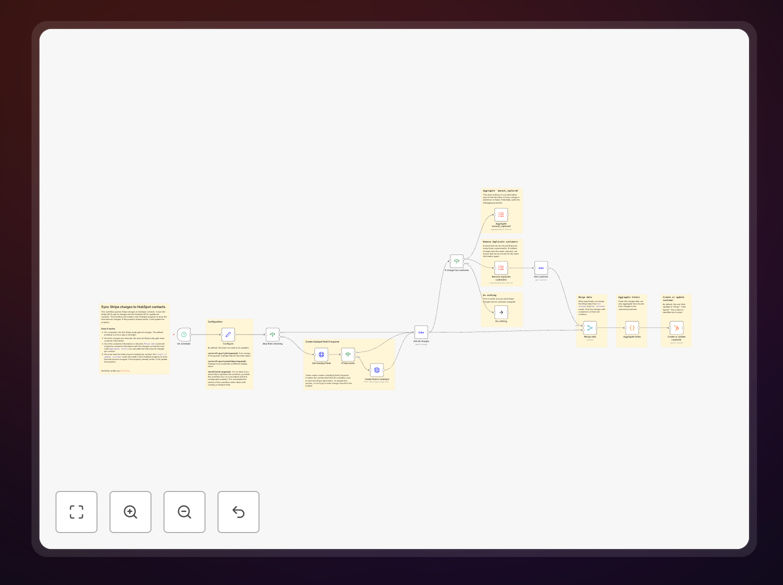
1. Schedule Trigger & Property Check
The workflow runs on a daily schedule (configurable) and first checks if the required custom property exists in HubSpot. If not, it creates the property to store total charge amounts, ensuring the data structure is ready before processing payment data.
2. Stripe Charge Retrieval
The workflow queries Stripe's API to retrieve all charges within a specified timeframe. It handles pagination to ensure all transactions are captured, including metadata about each charge such as amount, currency, customer ID, and status.
3. Customer Data Enrichment
For each charge, the workflow fetches additional customer information from Stripe to get email addresses and other identifiers needed to match with HubSpot contacts. This step ensures accurate contact matching between the two systems.
4. Data Merging & Aggregation
The charge data and customer information are merged, then aggregated to calculate total amounts charged per contact. This processing step transforms raw transaction data into meaningful customer-level insights ready for CRM updates.
5. HubSpot Contact Updates
Finally, the workflow creates or updates HubSpot contacts with the calculated total charge amounts. Existing contacts are updated with new financial data, while new contacts are created if they don't already exist in your HubSpot database.
Who This Is For
This workflow is ideal for SaaS companies, e-commerce businesses, subscription services, and any organization that processes payments through Stripe while managing customer relationships in HubSpot. Marketing teams benefit from enriched segmentation capabilities, sales teams gain visibility into customer spending, and finance teams appreciate automated reconciliation between systems.
Businesses with recurring revenue models particularly benefit from this integration, as it helps track customer lifetime value, identify expansion opportunities, and monitor payment patterns that might indicate churn risk. Agencies managing multiple client accounts can also use this workflow to provide enhanced reporting and customer insights to their clients.
What You'll Need
- Stripe Account: Active Stripe account with API access enabled and charges processed through the platform.
- HubSpot Account: HubSpot Professional or Enterprise plan with API access permissions.
- n8n Instance: Self-hosted n8n or n8n.cloud account with available workflow execution capacity.
- API Credentials: Stripe secret key and HubSpot private app access token configured in n8n credentials.
- Basic Understanding: Familiarity with navigating both Stripe and HubSpot interfaces to verify data.
Pro tip: Before running this workflow in production, test it with a small subset of data by adjusting the Stripe query to limit charges to the last 7 days. This ensures everything works correctly without overwhelming your HubSpot account with updates.
Quick Setup Guide
- Download the template using the button above and import it into your n8n instance.
- Configure credentials for both Stripe and HubSpot in n8n's credential management.
- Adjust the schedule trigger to match your preferred sync frequency (daily is recommended).
- Test the workflow by executing it once manually and checking that data appears correctly in HubSpot.
- Activate the workflow and monitor the first few automated runs to ensure stability.
- Verify data in HubSpot by checking that the custom property exists and contains expected values.
Key Benefits
Eliminate manual data entry between your payment processor and CRM, saving 2-5 hours per week that would otherwise be spent on spreadsheet exports and manual updates.
Improve sales intelligence by giving your team real-time visibility into customer spending patterns directly within HubSpot, enabling more informed conversations and timely follow-ups.
Enhance marketing segmentation with financial behavior data, allowing you to create segments based on purchase frequency, average order value, or customer lifetime value.
Increase data accuracy by automating the sync process, reducing human error in data transfer and ensuring your CRM always reflects the most current payment information.
Scale your operations without adding administrative overhead, as the automated sync handles increasing transaction volumes with zero additional effort from your team.