What This Workflow Does
This automation solves the common challenge of manually exporting and organizing time tracking data from Toggl Track into usable reports. Many businesses waste hours each week copying data to spreadsheets, reformatting it, and creating custom views for different stakeholders.
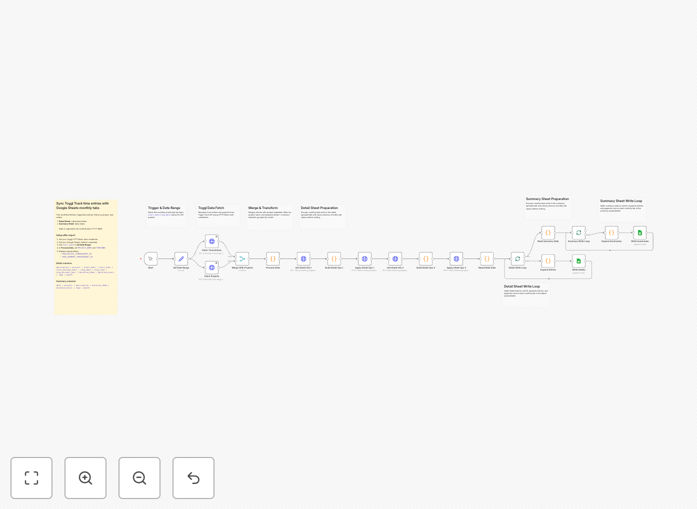
The workflow automatically syncs all time entries from Toggl Track to a Google Sheets document, creating both detailed logs and summary views. It organizes data by month, project, and team member while preventing duplicates. This gives you real-time visibility into time allocation without manual data entry.
How It Works
1. Fetch time entries from Toggl Track
The workflow connects to your Toggl Track account via API and retrieves all time entries within your specified date range. It handles pagination to ensure all records are captured, even with large datasets.
2. Process and transform the data
Each entry is processed to calculate durations, apply client/project mappings, and flag billable hours. The workflow can exclude specific tags or projects based on your configuration.
3. Create or update Google Sheets tabs
The system checks for existing monthly tabs in your Google Sheet and either updates them or creates new ones. Summary tabs are generated automatically with pivot tables showing hours by project, client, and team member.
4. Handle errors and retries
If any step fails (like API rate limits), the workflow implements intelligent retry logic and sends notifications. It maintains a log of processed entries to prevent duplicates on subsequent runs.
Who This Is For
This automation is ideal for:
- Agencies tracking billable hours across multiple clients
- Remote teams needing visibility into time allocation
- Freelancers managing multiple projects
- Managers analyzing team productivity trends
- Accountants reconciling timesheets with invoices
Pro tip: Use the summary tabs to identify projects consistently going over estimated hours - this can reveal scope creep or estimation issues.
What You'll Need
- A Toggl Track account with API access enabled
- A Google Sheets document with edit permissions
- An n8n instance (cloud or self-hosted)
- Basic understanding of n8n workflows (or follow our setup guide)
Quick Setup Guide
- Download the JSON template file
- Import it into your n8n instance
- Configure your Toggl Track API credentials
- Add your Google Sheets document ID
- Set your preferred sync frequency (daily recommended)
- Test with a small date range first
- Schedule the workflow to run automatically
Key Benefits
Save 3-5 hours per week by eliminating manual time entry exports and spreadsheet formatting. The automation handles all data transfer and organization.
Improve billing accuracy with automatic calculation of billable hours and client/project breakdowns. Reduce disputes and missed billable time.
Gain historical insights with permanent records of time tracking data that you can analyze alongside other business metrics.
Customize reporting views for different stakeholders - executives get high-level summaries while project managers see detailed breakdowns.
Scale with your team - the workflow automatically handles new projects and team members without additional configuration.