WooCommerce Google Sheets Slack n8n

Sync WooCommerce orders and inventory with Google Sheets and Slack

Automate order fulfillment and inventory sync from WooCommerce to Google Sheets and Slack

Download Template JSON · n8n compatible · Free
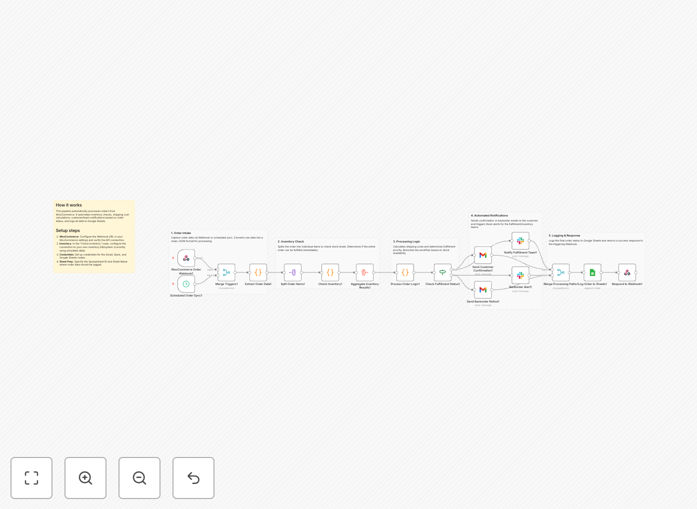
WooCommerce order sync workflow diagram

What This Workflow Does

This automation solves the common eCommerce challenge of manually tracking orders and updating inventory across multiple systems. When a customer places an order in WooCommerce, the workflow automatically syncs the order details to a Google Sheet for record-keeping and updates inventory levels in real-time.

The system also sends Slack notifications to your team whenever new orders come in or when inventory drops below threshold levels. This creates a seamless, automated pipeline that eliminates manual data entry errors and keeps all stakeholders informed.

How It Works

1. New WooCommerce order trigger

The workflow monitors your WooCommerce store for new orders. When an order is placed, it captures all relevant details including customer information, products ordered, quantities, and payment status.

2. Google Sheets update

The order data is automatically appended to a designated Google Sheet, creating a centralized record of all transactions. The workflow also adjusts inventory quantities in the sheet based on the items sold.

3. Slack notifications

Custom Slack messages are sent to your team channels with order summaries and inventory alerts. These can include @mentions for specific team members when action is required.

Who This Is For

This workflow is ideal for eCommerce businesses using WooCommerce that want to:

  • Eliminate manual order processing
  • Maintain accurate inventory records
  • Improve team communication about orders
  • Create audit trails for accounting
  • Scale operations without adding staff

What You'll Need

  1. An active WooCommerce store
  2. A Google account with Sheets access
  3. A Slack workspace with appropriate channels
  4. n8n account (self-hosted or cloud)
  5. API credentials for all platforms

Quick Setup Guide

  1. Download the template file
  2. Import into your n8n instance
  3. Connect your WooCommerce API credentials
  4. Configure your Google Sheet ID and tab name
  5. Set up Slack webhook URLs
  6. Test with sample orders

Key Benefits

Reduce order processing time by 80%: Automating data entry eliminates hours of manual work per week.

Eliminate inventory discrepancies: Real-time sync ensures your records always match actual stock levels.

Improve team responsiveness: Instant Slack notifications mean orders get processed faster.

Create reliable audit trails: Google Sheets provides a searchable history of all transactions.

Scale without adding overhead: The system handles increased order volume effortlessly.

Frequently Asked Questions

Common questions about WooCommerce integration and automation

Automating WooCommerce order processing eliminates manual data entry, reducing errors and saving significant time. Businesses typically see 70-90% reduction in order processing time while improving accuracy.

For example, a clothing store processing 50 orders daily might spend 2 hours manually entering data. Automation reduces this to minutes while ensuring inventory updates happen instantly across all systems.

  • Reduces order fulfillment time
  • Minimizes human error in data entry
  • Provides real-time inventory visibility

Google Sheets integration creates a centralized, searchable database of all orders that's accessible from anywhere. It enables custom reporting and analysis that WooCommerce alone doesn't provide.

A gourmet food shop used Sheets integration to track seasonal trends and optimize inventory purchasing. The automation saved them 15 hours weekly while providing valuable sales insights through custom pivot tables.

  • Creates backup order records
  • Enables custom reporting
  • Simplifies accounting reconciliation

Automated inventory systems are more reliable than manual updates when properly configured. The workflow includes error handling to ensure updates complete successfully.

A jewelry store reduced inventory discrepancies by 95% after implementing this automation. The system includes validation checks to confirm updates were applied correctly before proceeding to the next step.

  • Real-time sync prevents overselling
  • Validation steps ensure accuracy
  • Error notifications alert staff to issues

The most valuable notifications alert teams to high-priority orders, low inventory, or exceptions needing attention. Customize messages to include key details like customer name, order total, and priority level.

A book retailer configured Slack alerts to highlight expedited shipping orders and low stock items. This reduced fulfillment time for priority orders by 60% while preventing 20+ stockouts monthly.

  • High-value order alerts
  • Inventory threshold warnings
  • Exception notifications

Yes, the workflow captures all product variations and options from WooCommerce. It can map complex product configurations to your inventory tracking system.

A furniture store selling customizable items uses this to track inventory by fabric type, finish, and size. The automation handles hundreds of possible combinations while maintaining accurate stock counts.

  • Supports product attributes
  • Tracks variations separately
  • Handles custom options

The system updates inventory in real-time whenever an order is placed. You can also configure periodic syncs (hourly/daily) to reconcile systems if using other sales channels.

A sporting goods retailer runs nightly reconciliation syncs across their WooCommerce, Amazon, and brick-and-mortar POS. This ensures inventory accuracy despite multiple sales channels.

  • Real-time order updates
  • Scheduled reconciliation
  • Multi-channel support

Absolutely! GrowwStacks specializes in custom WooCommerce automations tailored to your specific workflows. Our team can build solutions that integrate with your existing systems and unique business processes.

We've helped dozens of eCommerce businesses automate complex operations including custom manufacturing workflows, subscription management, and multi-channel fulfillment. The free template is just a starting point - we can design a complete system matching your exact requirements.

  • Custom integration development
  • Specialized for your industry
  • End-to-end implementation

Need a Custom WooCommerce Integration?

This free template is a starting point. Our team builds fully tailored automation systems for your specific needs.