n8n HRIS Microsoft Teams Slack Coda

Sync your HRIS employee directory with Microsoft Teams, Coda, and Slack

Automatically keep employee data in sync across all your collaboration platforms

Download Template JSON · n8n compatible · Free
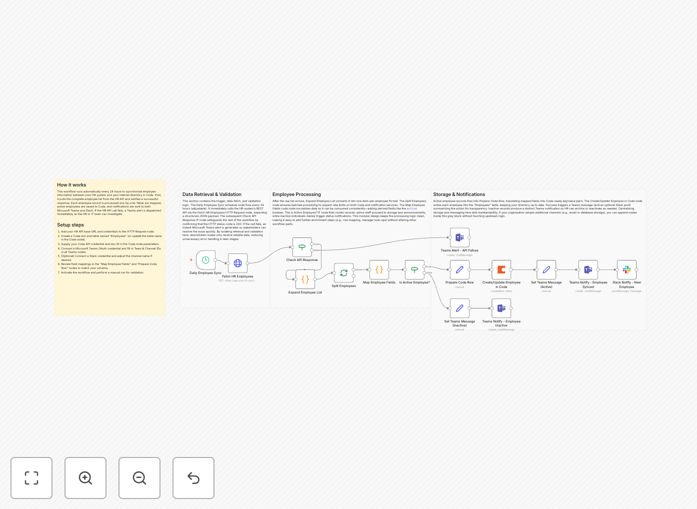
HRIS employee directory sync workflow diagram

What This Workflow Does

This automation solves the common challenge of maintaining accurate employee information across multiple collaboration platforms. HR teams often waste countless hours manually updating directories in Microsoft Teams, Slack, and Coda whenever there are new hires, role changes, or departures.

The workflow automatically syncs your HRIS (Human Resource Information System) data with these platforms, ensuring everyone has access to current employee information. It eliminates duplicate data entry, reduces errors, and keeps your teams connected with up-to-date contact details.

How It Works

1. HRIS Data Extraction

The workflow connects to your HRIS system (like BambooHR, Workday, or ADP) through its API. It pulls employee data including names, titles, departments, contact information, and reporting structures on a scheduled basis.

2. Data Transformation

Raw HRIS data is cleaned and formatted for each destination platform. The workflow handles field mapping, data normalization, and any necessary transformations to match each system's requirements.

3. Multi-Platform Sync

The processed data is simultaneously pushed to Microsoft Teams (for the organization directory), Slack (user profiles), and Coda (employee database docs). The workflow handles updates, additions, and deletions across all platforms.

Who This Is For

This automation is ideal for HR teams at growing companies using multiple collaboration tools. It's particularly valuable for:

  • Companies with 50+ employees where manual updates become burdensome
  • Organizations with distributed teams needing accurate contact information
  • HR departments looking to reduce administrative overhead
  • Companies undergoing rapid hiring or reorganization

What You'll Need

  1. An n8n instance (cloud or self-hosted)
  2. Admin access to your HRIS system with API credentials
  3. Admin permissions in Microsoft Teams, Slack, and Coda
  4. Basic understanding of your HRIS data structure

Quick Setup Guide

  1. Download the JSON template file
  2. Import into your n8n instance
  3. Configure your HRIS API connection
  4. Set up credentials for Teams, Slack, and Coda
  5. Map your HRIS fields to destination platforms
  6. Test with a small subset of employees
  7. Schedule regular syncs (daily recommended)

Key Benefits

Save HR team time: Eliminates 5-10 hours per month of manual directory updates across multiple platforms.

Improve data accuracy: Reduces errors from manual entry by automatically syncing from your single source of truth.

Enhance collaboration: Ensures teams always have current contact information and organizational structures.

Streamline onboarding: New hires appear in all systems immediately without manual setup.

Maintain compliance: Automatically removes access for departed employees across all platforms.

Frequently Asked Questions

Common questions about HRIS integration and automation

Syncing HRIS data with collaboration tools ensures employee information stays updated across all platforms. This eliminates manual updates, reduces errors, and improves team communication efficiency.

For example, when new hires join, their profiles automatically appear in Teams and Slack directories. Role changes or department moves flow through instantly, keeping org charts accurate without HR intervention.

  • Reduces onboarding time by 30%
  • Eliminates duplicate data entry
  • Ensures compliance with access controls

Automating directory updates saves HR teams 5-10 hours monthly by eliminating manual data entry. It ensures 100% accuracy across platforms and enables real-time updates when employees change roles or departments.

Companies report 30% faster onboarding when systems are automatically synced. The automation also reduces IT support tickets about outdated information and improves employee satisfaction with current org data.

  • HR time savings: 5-10 hours/month
  • Onboarding acceleration: 30% faster
  • Error reduction: 100% data consistency

Most organizations sync HRIS data daily or in real-time for critical updates. Daily syncs balance performance with data freshness, while real-time syncs are ideal for large organizations with frequent changes.

The best approach depends on your HRIS update frequency and team size. Fast-growing companies may need hourly syncs during hiring surges, while stable organizations can sync weekly. Critical updates like terminations should trigger immediate syncs.

Key data includes name, job title, department, contact info, and manager relationships. Avoid syncing sensitive data like salaries. Focus on information that improves collaboration and team connectivity.

Many companies also sync profile photos and office locations to help remote teams connect. Some include skills or expertise tags to facilitate knowledge sharing. Always comply with privacy regulations when determining what to sync.

  • Essential: Name, title, department, email
  • Recommended: Photo, location, manager
  • Avoid: Salary, SSN, sensitive personal data

Most modern HRIS platforms with API access can integrate with collaboration tools. Popular systems like BambooHR, Workday, and ADP have pre-built connectors that simplify integration.

For legacy systems, middleware may be needed to transform data formats before syncing to Teams or Slack. The workflow can be customized to handle unique field mappings or data structures in older HR platforms.

Secure integrations use OAuth authentication and encrypt data in transit. Access controls limit which employee data gets shared between systems. Most enterprise-grade HRIS platforms meet strict compliance standards for data protection.

Best practices include regular permission audits and syncing only necessary fields. The integration should follow the principle of least privilege, accessing only the HRIS data required for directory purposes.

  • Uses OAuth 2.0 authentication
  • Encrypts data in transit
  • Follows principle of least privilege

Companies typically see ROI within 3-6 months through reduced HR admin time and improved productivity. One client saved $15,000 annually by eliminating manual directory updates across their five collaboration platforms.

Additional benefits include better employee experience (no outdated info) and reduced IT support tickets. The automation also improves compliance by ensuring departed employees lose access across all systems simultaneously.

Yes, GrowwStacks specializes in custom HRIS integrations tailored to your specific systems and workflows. Our team can build automated syncs between your HR platform, Microsoft Teams, Slack, and other tools with your preferred update frequency and data mapping.

We handle everything from API connections to field transformations and error handling. Custom solutions ensure the automation fits your exact HR processes and compliance requirements while maximizing time savings for your team.

  • Tailored to your HRIS and tools
  • Custom update schedules
  • Field-level data mapping

Need a Custom HRIS Integration?

This free template is a starting point. Our team builds fully tailored automation systems for your specific needs.