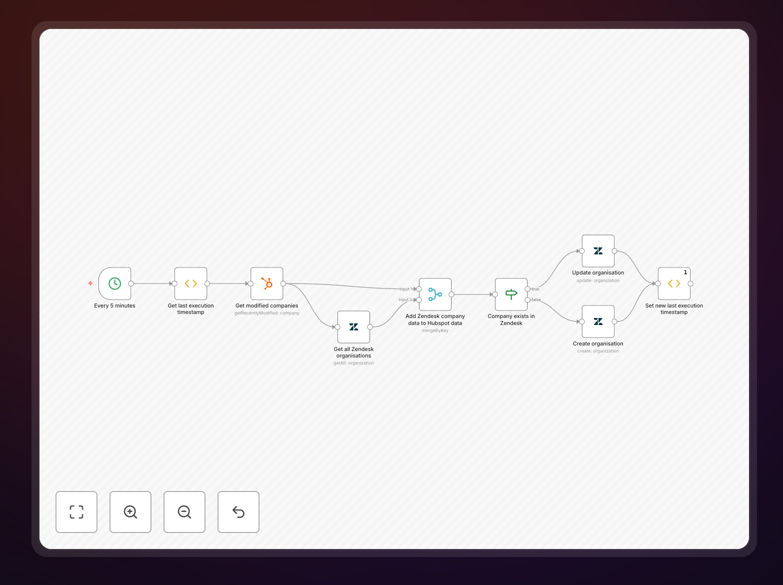
What This Workflow Does
This automation solves a critical business problem: disconnected customer data between support and sales teams. When support tickets in Zendesk aren't visible in HubSpot, sales teams might contact customers who are frustrated with unresolved issues, damaging relationships and potentially losing business.
The workflow automatically synchronizes Zendesk ticket information with corresponding HubSpot contact records every 5 minutes. It captures newly modified or created tickets, matches them with existing HubSpot contacts using email or company domain, and updates the contact's profile with relevant ticket details including status, priority, subject, and latest updates.
This creates a unified customer view where sales can see support history before making calls, marketing can segment based on support interactions, and customer success can identify at-risk accounts—all without manual data entry or switching between platforms.
How It Works
The automation follows a logical sequence to ensure accurate, efficient data synchronization between Zendesk and HubSpot.
1. Scheduled Trigger
A Cron node initiates the workflow every 5 minutes, creating a consistent sync rhythm that balances data freshness with system performance. This regular interval ensures support interactions are reflected in HubSpot quickly enough for sales to act on, without overwhelming either system with constant API calls.
2. Collect Recent Zendesk Tickets
A Function Item node queries Zendesk for tickets modified since the last successful run. It uses timestamp tracking to only process new or updated tickets, avoiding redundant processing of unchanged records. This intelligent filtering significantly reduces API calls and processing time.
3. Fetch Corresponding HubSpot Contacts
The workflow extracts email addresses or company domains from collected tickets, then uses HubSpot's API to find matching contact records. For tickets without direct email matches, it can search by company domain or other identifiers to maintain comprehensive coverage.
4. Data Matching & Transformation
A Merge node intelligently pairs Zendesk ticket data with corresponding HubSpot contact information. The workflow transforms ticket properties into HubSpot-friendly formats, mapping ticket status to contact properties, priority levels to custom fields, and creating meaningful activity notes.
5. Conditional Processing
An If node routes tickets based on whether the contact exists in HubSpot. For existing contacts, it updates their profile with new ticket information. For new contacts, it can either create them automatically or flag them for review, depending on your business rules.
6. Update HubSpot Contact Records
The HubSpot node adds ticket information to contact timelines, updates custom properties with support metrics, and creates notes about recent support interactions. This enriches the customer profile with valuable context for all customer-facing teams.
Who This Is For
This automation delivers value to businesses using both Zendesk for support and HubSpot for CRM and marketing. It's particularly valuable for:
Sales teams who need visibility into customer support issues before making calls or sending proposals. Knowing a customer has an open high-priority ticket prevents awkward sales conversations and demonstrates proactive care.
Customer success managers who monitor account health across both support and sales interactions. The sync helps identify at-risk customers based on support ticket volume, priority, or resolution time.
Marketing teams who want to segment campaigns based on support interactions. You can exclude customers with recent unresolved tickets from promotional emails or create targeted campaigns for customers who recently had positive support experiences.
Support managers who need to report on how support interactions impact customer lifetime value and retention. The synchronized data enables analysis of how support experiences correlate with sales outcomes.
What You'll Need
- Active Zendesk account with administrator access to create API credentials
- HubSpot account with Marketing Hub Professional or higher for API access
- n8n instance (cloud or self-hosted) with available workflow execution capacity
- API credentials for both Zendesk and HubSpot with appropriate permissions
- Clear field mapping plan between Zendesk ticket properties and HubSpot contact properties
Pro tip: Before implementing, audit your Zendesk custom fields and HubSpot contact properties to identify which data points provide the most value when synchronized. Focus on ticket status, priority, product category, and resolution status first.
Quick Setup Guide
Follow these steps to implement this automation in your environment:
- Download the template using the button above and import it into your n8n instance
- Configure Zendesk credentials in n8n with your subdomain, email, and API token
- Set up HubSpot credentials using OAuth or private app token authentication
- Adjust the sync frequency in the Cron node based on your volume (5 minutes is a good starting point)
- Map your custom fields between Zendesk ticket properties and HubSpot contact properties
- Test with a small subset of tickets first, then gradually expand to full sync
- Monitor initial runs to ensure data flows correctly and adjust field mappings as needed
Key Benefits
Eliminate manual data entry between support and sales teams, saving 2-5 hours per week per team member that would otherwise be spent copying information between systems.
Improve customer experience by ensuring sales and marketing teams have complete context before contacting customers, preventing tone-deaf communications to customers with unresolved issues.
Create comprehensive customer profiles that combine support history with sales interactions and marketing engagement, enabling truly personalized customer journeys.
Identify at-risk accounts proactively by analyzing support ticket patterns within HubSpot, allowing for timely intervention before customers consider leaving.
Enable data-driven decisions with unified reporting on how support experiences impact customer lifetime value, renewal rates, and expansion opportunities.