Zendesk Jira n8n Ticketing

Sync Zendesk tickets with subsequent comments to Jira issues

Automatically create Jira issues from Zendesk tickets and keep both systems in sync with all comments

Download Template JSON · n8n compatible · Free
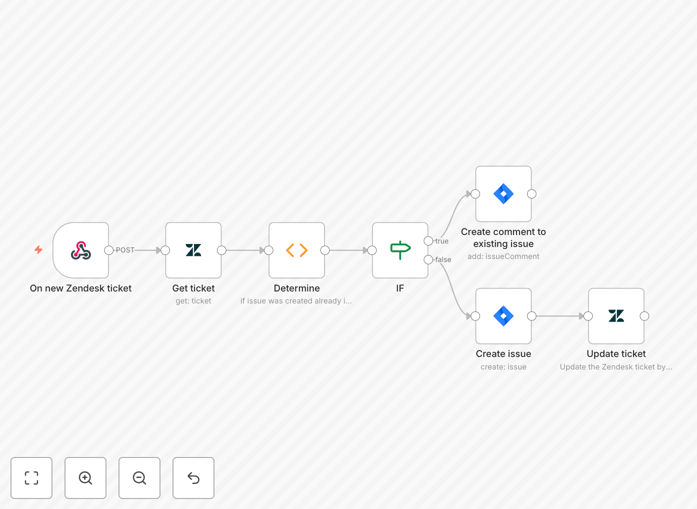
Zendesk to Jira synchronization workflow diagram

What This Workflow Does

This automation bridges the gap between customer support and development teams by automatically syncing Zendesk tickets with Jira issues. When a new ticket is created in Zendesk, the workflow instantly creates a corresponding Jira issue with all relevant details. As the support conversation evolves with new comments in Zendesk, those comments automatically appear as comments on the linked Jira issue.

The solution eliminates manual copying of information between systems, reduces errors, and ensures developers have full context of customer-reported issues. It's particularly valuable for SaaS companies and product teams who need seamless collaboration between support and engineering.

How It Works

1. New ticket detection

The workflow monitors your Zendesk instance for new tickets based on your configured trigger conditions (specific forms, tags, or priorities).

2. Ticket to issue conversion

When a new ticket is detected, the workflow extracts key information (title, description, requester details, priority) and creates a matching Jira issue in your specified project.

3. Comment synchronization

The workflow continues monitoring the Zendesk ticket for new comments. Each new comment gets posted to the Jira issue while preserving the original author information and timestamp.

4. Status tracking

Optionally, the workflow can be extended to sync status changes between systems, ensuring both platforms reflect the current state of the issue.

Pro tip: Configure custom field mapping to ensure Zendesk ticket properties translate correctly to Jira's issue fields.

Who This Is For

This workflow benefits product teams, customer support organizations, and engineering teams that:

  • Use Zendesk for customer support
  • Track development work in Jira
  • Need better visibility between support and dev teams
  • Want to reduce manual ticket duplication

What You'll Need

  1. Active Zendesk account with admin access
  2. Jira instance with project creation permissions
  3. n8n instance or cloud account
  4. API credentials for both platforms

Quick Setup Guide

  1. Download and import the JSON template into your n8n instance
  2. Configure your Zendesk trigger with the desired filters
  3. Set up Jira credentials and specify the target project
  4. Map Zendesk fields to corresponding Jira fields
  5. Test with sample tickets and verify issue creation
  6. Deploy the workflow for production use

Key Benefits

Eliminate duplicate data entry - No more copying ticket details between systems saves 5-10 minutes per ticket.

Maintain complete context - Developers see the full support conversation history directly in Jira.

Reduce response times - Instant ticket-to-issue conversion means faster triaging and resolution.

Improve collaboration - Support and engineering teams stay aligned without switching platforms.

Audit trail preservation - All comments sync with original timestamps and authors for compliance.

Frequently Asked Questions

Common questions about Zendesk and Jira integration and automation

Syncing Zendesk tickets with Jira creates a seamless connection between customer support and development teams. When a new ticket is created in Zendesk, it automatically generates a corresponding Jira issue, ensuring developers see customer-reported problems immediately. Subsequent comments on the ticket appear as comments on the Jira issue, maintaining full context without manual copying.

This automation eliminates the need for support agents to manually create Jira tickets or developers to check multiple systems for updates. The bidirectional visibility reduces miscommunication and ensures faster resolution times for customer issues.

  • Saves 5-15 minutes per ticket in manual work
  • Reduces errors from manual data entry
  • Provides real-time updates to all stakeholders

Automating Zendesk to Jira integration eliminates manual data entry between systems, reducing errors and saving significant time. Support teams can continue using Zendesk's familiar interface while developers work in Jira. The automation ensures all stakeholders have access to updates in real-time, improving collaboration and response times.

Beyond efficiency gains, this integration helps product teams with better visibility into customer-reported issues. Patterns in support tickets can inform product roadmaps when easily visible in the development tracking system.

  • 50-75% reduction in ticket handling time
  • Improved developer context for bug fixes
  • Better tracking of customer-impacting issues

The workflow monitors Zendesk for new comments on synced tickets. When detected, it captures the comment content, author information, and timestamp, then posts it as a new comment on the linked Jira issue. This maintains the full conversation history across platforms, with clear attribution of who said what and when.

The system preserves the original comment formatting where possible, and can be configured to include internal notes or limit synchronization to public comments only based on your support workflow requirements.

  • Comments sync occurs in near real-time
  • Preserves original timestamps
  • Configurable for public/private comments

Yes, advanced implementations can include attachment handling. When Zendesk comments contain files or images, the workflow can upload these to a shared storage location and include links in the Jira comments. This requires additional configuration but ensures all relevant documentation transfers between systems.

For the basic template handles text comments, our team can extend it to process attachments, screenshots, and log files that customers often include with support tickets. This prevents developers with all the context they need to reproduce and fix issues.

  • Supports common file types
  • Maintains access controls
  • Preserves original filenames

The workflow can be extended to sync status updates between systems. For example, when a ticket is marked 'Solved' in Zendesk, it could automatically transition the linked Jira issue to 'Done'. This requires mapping status values between the platforms and additional workflow steps to handle the status change triggers.

Status synchronization helps maintain alignment between support and development workflows. You can configure which status changes trigger updates and how they map between the different systems' workflows.

  • Configurable status mapping
  • Optional two-way synchronization
  • Supports custom statuses

The workflow includes field mapping to reconcile differences in data structures. Zendesk ticket fields like 'Requester Email' can be mapped to Jira's 'Reporter' field, while custom fields in either system can be matched appropriately. The template provides basic field mapping that you can customize for your specific implementation.

Complex field mappings can transform data between formats - converting Zendesk priority levels to Jira severity labels, or concatenating multiple Zendesk fields into Jira's description field. Our team can help design these transformations based on your specific needs.

  • Pre-configured common field mappings
  • Supports custom field transformations
  • Handles different data formats

Absolutely! GrowwStacks specializes in building tailored integrations between Zendesk and Jira. Our team can create custom workflows that match your business processes, including advanced features like SLA tracking, priority mapping, and multi-system synchronization. We handle all the technical complexity while you focus on serving your customers and developing your products.

Beyond basic ticket syncing, we can implement conditional workflows based on ticket types, automatic assignment rules, integration with your CRM, and custom reporting. Every business has unique requirements, and we specialize in building solutions that fit perfectly.

  • Custom field mappings
  • Advanced business logic
  • Ongoing support and maintenance

Need a Custom Zendesk-Jira Integration?

This free template is a starting point. Our team builds fully tailored automation systems for your specific needs.