What This Workflow Does
Staying ahead in the tech industry requires constant awareness of new developments, product launches, funding rounds, and emerging trends. Manually scanning dozens of news sites, blogs, and RSS feeds is a massive time sink that distracts your team from core work.
This AI-powered news curator automates the entire process. It acts as your personal research assistant, running every weekday to gather articles from configured RSS feeds and web searches, filter out noise, analyze content with Mistral AI, and produce a concise daily digest of the most important stories.
The workflow delivers structured intelligence—not just links. It provides AI-generated summaries, highlights key trends, and can route the final report to your team via Slack, email, or a shared document. You move from reactive reading to proactive insight.
How It Works
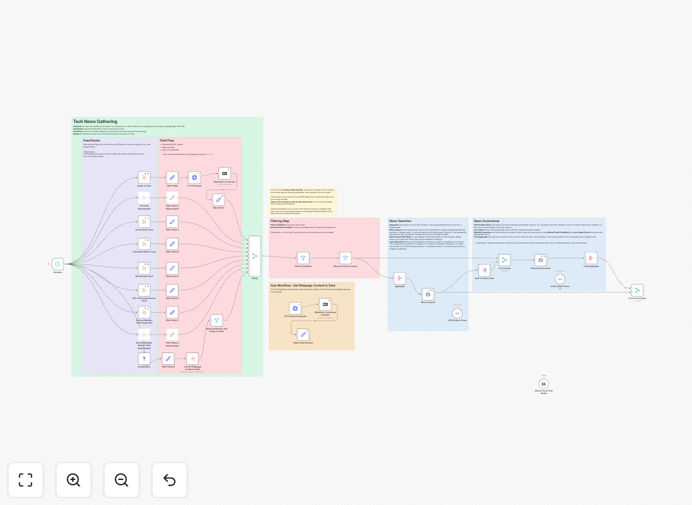
The automation follows a logical pipeline to transform raw news feeds into executive‑ready briefs.
1. Scheduled Trigger & Source Collection
The workflow is triggered on a schedule (e.g., every weekday at noon). It simultaneously fetches articles from multiple pre‑configured RSS feeds (like TechCrunch, Hacker News) and performs custom web searches via a DuckDuckGo node. This ensures broad coverage from both curated and real‑time sources.
2. Initial Filtering & Cleanup
Raw articles pass through a filtering layer. Items older than 24 hours are discarded. Articles containing user‑defined irrelevant keywords (like “job posting” or “sponsored”) are automatically removed. This step eliminates noise before any AI processing, saving costs and improving relevance.
3. First‑Pass AI Analysis (Titles)
An AI agent powered by Mistral reviews the remaining article titles and metadata. It scores each item for relevance to your defined interests (e.g., “AI startups,” “cloud security”) and selects the top candidates for deep analysis. This agent also generates a high‑level “Daily Tech Brief” title and overview.
4. Deep‑Content AI Summarization
A second, more powerful AI agent fetches the full content of the selected top articles (using HTTP GET requests). It reads and analyzes each piece, extracting key points, implications, and notable quotes. The output is a set of concise, paragraph‑length summaries that capture the essence without fluff.
5. Compilation & Distribution
The workflow merges the daily brief title, the overview, and the top 10 article summaries into a single, formatted report. This final output can be sent to a variety of destinations: posted to a Slack channel, saved as a Google Doc, emailed to a distribution list, or appended to a Notion database for archival and search.
Who This Is For
This template is ideal for tech leaders, startup founders, marketing teams, and competitive intelligence professionals who need to monitor the landscape without constant manual effort.
Startup Founders & Executives: Keep a pulse on competitors, market shifts, and investment trends without spending hours reading. Get a distilled morning briefing.
Marketing & PR Teams: Identify trending topics for content creation, track brand mentions, and discover partnership or media opportunities from news cycles.
Developers & Product Managers: Stay informed about new tools, library updates, security vulnerabilities, and platform changes that could impact your roadmap.
Investors & Analysts: Automate the initial screening of news for due diligence, portfolio monitoring, and identifying emerging companies or technologies.
What You'll Need
- An n8n instance (self‑hosted or n8n.cloud).
- A Mistral API key from Mistral AI for the AI analysis steps.
- The custom DuckDuckGo Search node installed in your n8n instance (
n8n-nodes-duckduckgo-search). - Access to RSS feeds of your preferred tech news sources (URLs are configurable in the workflow).
- A destination for the output (Slack webhook, email server, Google Sheets, etc.) configured with appropriate credentials.
Pro tip: Start with 3‑5 high‑quality RSS feeds (like Ars Technica, The Verge Tech) before adding more. This keeps initial costs low and lets you tune the AI instructions for better relevance before scaling.
Quick Setup Guide
Import and configure this workflow in under 15 minutes.
- Download the template using the button above and import it into your n8n instance.
- Add your Mistral API key in the “Mistral Cloud Chat Model” node credentials.
- Review and update the RSS feed URLs in the “RSS Read” nodes to match your preferred sources.
- Configure the keyword filters in the “Filter” nodes to exclude irrelevant topics (e.g., “advertisement”, “podcast”).
- Set your output destination—connect the final “Merge” node to Slack, Email, or your preferred app.
- Test the workflow manually once, then activate the schedule trigger to run automatically.
Key Benefits
Save 5‑10 hours per week per team member. Eliminate the daily ritual of scanning news sites. The AI does the reading and summarizing for you.
Never miss a critical update. The system runs consistently, even when your team is busy or on vacation, ensuring continuous market awareness.
Improve decision‑making with structured data. Instead of scattered articles, you get a formatted report with ranked summaries, making it easy to identify patterns and priorities.
Fully customizable and scalable. Add new sources, change AI instructions, or route outputs to different tools as your needs evolve. You own the entire logic.
Build a searchable knowledge base. By saving daily digests to a database or Notion, you create a valuable archive of tech trends over time, searchable by topic or date.