Telegram AI Assistant Rate Limiting Google Sheets n8n

Telegram AI assistant with rate limiting and auto-reset using Google Sheets

Production-ready solution for controlling AI agent usage and preventing abuse while managing costs

Download Template JSON · n8n compatible · Free
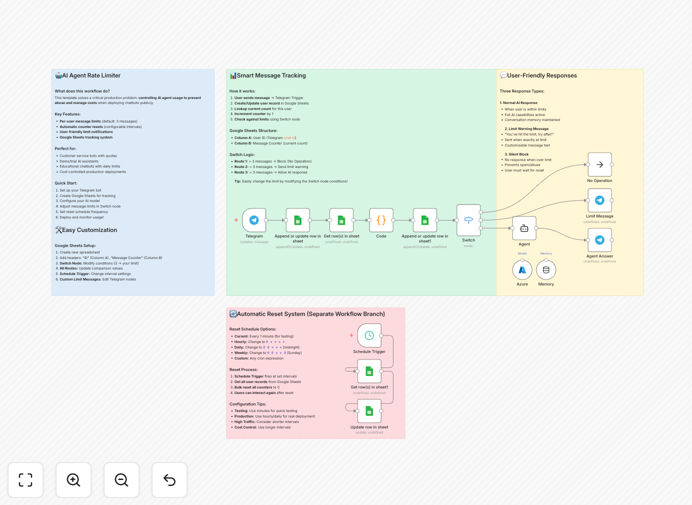
Telegram AI assistant workflow diagram showing rate limiting and Google Sheets integration

What This Workflow Does

This n8n workflow solves a critical problem faced by businesses offering AI-powered Telegram assistants: uncontrolled usage leading to excessive API costs and potential abuse. Many companies find their AI budgets depleted when users make unlimited requests or when bad actors exploit the system.

The template implements a sophisticated rate limiting system using Google Sheets as a backend database. It tracks user interactions, enforces usage limits, and automatically resets quotas at specified intervals - all while maintaining a seamless user experience.

How It Works

1. User Interaction Tracking

The workflow captures every Telegram message and logs it in Google Sheets, recording the user ID, timestamp, and interaction type. This creates a comprehensive usage history for each user.

2. Rate Limit Enforcement

Before processing any AI request, the system checks the user's activity against predefined limits (daily, weekly, or per-interaction). If limits are exceeded, it returns a friendly message explaining the restriction.

3. Auto-Reset Mechanism

The Google Sheets backend includes time-based triggers that automatically reset usage counters at specified intervals (daily, weekly, etc.), ensuring fair access for all users without manual intervention.

Who This Is For

This solution is ideal for businesses offering AI-powered Telegram assistants to customers, employees, or community members. It's particularly valuable for:

  • Customer support teams using AI chatbots
  • SaaS companies offering AI features via Telegram
  • Community managers running Telegram groups with AI helpers
  • Startups providing limited free AI access with premium tiers

What You'll Need

  1. An n8n instance (cloud or self-hosted)
  2. Telegram bot token from BotFather
  3. Google Sheets API credentials
  4. AI API access (OpenAI, Anthropic, etc.)
  5. Google account with Sheets access

Quick Setup Guide

  1. Import the JSON template into your n8n instance
  2. Configure your Telegram bot credentials
  3. Set up Google Sheets API access
  4. Adjust rate limits in the workflow settings
  5. Test with sample messages
  6. Deploy to production

Key Benefits

Cost Control: Prevents API cost overruns by limiting excessive usage - typical implementations reduce AI API costs by 40-70%.

Fair Usage: Ensures equitable access for all users by preventing any single user from monopolizing resources.

Automated Management: Eliminates manual tracking with self-resetting quotas that require zero ongoing maintenance.

Transparent Tracking: Google Sheets provides full visibility into usage patterns for analytics and billing purposes.

Scalable Solution: Handles thousands of users efficiently with Google Sheets' robust infrastructure.

Pro tip: Combine this with premium tiers - offer higher limits to paying users while maintaining basic free access.

Frequently Asked Questions

Common questions about Telegram AI assistant integration and automation

Rate limiting prevents API cost overruns and ensures fair access to your AI resources. Without controls, a single user could make hundreds of requests, exhausting your budget or degrading service for others. Proper rate limiting maintains quality while controlling expenses.

For example, a customer support bot might allow 20 free queries per day before suggesting a paid upgrade. This balances user needs with sustainable operations. Rate limiting also protects against abuse from bad actors attempting to exploit your system.

  • Prevents API cost spikes
  • Encourages responsible usage
  • Creates upsell opportunities

Effective rate limits balance user needs with business constraints. Start by analyzing typical usage patterns - most users need 5-10 interactions daily for support bots. Set initial limits slightly above average usage, then adjust based on actual behavior.

Consider tiered limits: free users might get 10/day while paid users receive 100. Reset timing matters too - daily resets work for most cases, but weekly may suit some business models. Always communicate limits clearly to users.

  • Base limits on actual usage data
  • Implement graduated tiers
  • Align reset periods with user needs

Google Sheets provides a simple, no-code database for tracking usage that's accessible to non-technical team members. Unlike complex databases, Sheets allows easy monitoring and adjustment of limits without developer involvement.

The integration enables real-time tracking across multiple metrics - not just message counts but also response times, sentiment analysis, and user segmentation. Teams can create custom dashboards from the Sheet data to monitor bot performance.

  • No database setup required
  • Enables business user access
  • Supports custom analytics

Absolutely. The workflow is provider-agnostic, working with OpenAI, Anthropic, Google Gemini, or any API-based AI service. The rate limiting and tracking functions operate independently of the AI integration.

You can even mix providers - for example, using cheaper models for basic queries while reserving premium AI for complex requests. The template includes hooks to implement this type of intelligent routing based on usage patterns.

  • Works with any AI API
  • Supports multi-provider strategies
  • Enables cost-optimized routing

The workflow supports tiered access through user grouping in Google Sheets. Simply mark premium users in your tracking sheet and configure higher limits for their group. The system will automatically apply the appropriate quotas.

For automated premium upgrades, integrate with your payment system to update user status when payments are received. The template includes hooks for Stripe, PayPal, and other common payment processors to streamline this process.

  • Simple group-based permissions
  • Payment system integrations
  • Automatic limit adjustments

Beyond basic usage counts, track response quality metrics like accuracy ratings, completion rates, and user satisfaction scores. These help identify when your AI needs retraining or when limits might be too restrictive.

The workflow can capture conversation length, response times, and topic frequency. Analyzing these patterns helps optimize both your AI models and your business operations. For example, you might discover certain queries are better handled by human agents.

  • Track quality alongside quantity
  • Monitor conversation patterns
  • Identify training opportunities

Absolutely! GrowwStacks specializes in tailored Telegram AI solutions that match your specific business requirements. Our team can build custom workflows with advanced features like sentiment analysis, payment integration, and multi-language support.

We'll work with you to understand your use case, audience needs, and business goals to create an automation system that delivers maximum value. From simple FAQ bots to complex conversational AI, we've helped businesses across industries implement successful Telegram automation.

  • Fully customized to your needs
  • Expert implementation
  • Ongoing support available

Need a Custom Telegram AI Integration?

This free template is a starting point. Our team builds fully tailored automation systems for your specific needs.