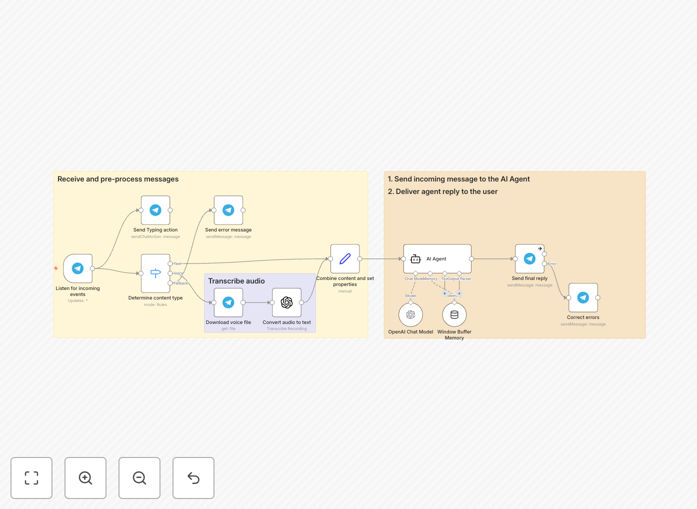
What This Workflow Does
This n8n workflow template provides a fully functional AI-powered Telegram bot that can understand and respond to both text and voice messages. It acts as a smart assistant with short-term memory, meaning it can remember the context of the last several messages in a conversation. This transforms Telegram from a simple messaging app into a powerful interface for customer service, internal Q&A, or personal productivity.
The bot listens for messages in a Telegram chat, transcribes any voice notes using AI, processes the user's request through a language model (like GPT-4), and sends back intelligent, contextual replies. It's designed to be extended easily—you can connect it to your CRM, knowledge base, or internal APIs to fetch information or trigger actions, creating a seamless bridge between your customers and your business systems.
For business owners, this automates the first line of customer interaction, answering common questions instantly, qualifying leads 24/7, and collecting information before routing complex issues to a human agent. It turns message volume from a support burden into an automated engagement channel.
How It Works
The workflow is built on a logical sequence that mimics a human conversation but at scale and speed.
1. Message Trigger
The workflow is activated whenever a new message arrives in your connected Telegram bot. It captures all message types, including text, voice notes, and commands.
2. Voice Transcription
If the incoming message is a voice note, the workflow automatically sends the audio file to OpenAI's Whisper model (or your chosen speech-to-text service) for accurate transcription. The resulting text is then processed identically to a regular text message.
3. Context & Memory Management
Before generating a response, the workflow retrieves the recent conversation history for that specific user. This "short-term memory" (typically the last 10 messages) is prepended to the new query, allowing the AI to understand references, follow-ups, and maintain a coherent dialogue.
4. AI Processing & Response Generation
The combined context and new user query are sent to a language model (like OpenAI's GPT-4). The AI analyzes the intent and generates a helpful, relevant response. You can instruct the AI on its personality, knowledge limits, and response format directly within the workflow settings.
5. Delivery & Logging
The AI's response is sent back to the user on Telegram. Simultaneously, the workflow can log the entire interaction to a database or spreadsheet for review, analytics, or training purposes, creating a complete audit trail.
Who This Is For
This template is ideal for small to medium businesses, creators, and community managers who want to provide instant, automated support or engagement via Telegram. It's perfect for:
- Customer Support Teams: Automate first-level inquiries, FAQ responses, and ticket triage 24/7.
- Digital Agencies & Consultants: Offer a value-added service to clients by managing their customer communication bots.
- Content Creators & Coaches: Engage with your audience, answer common questions about your work, and schedule consultations.
- E-commerce Stores: Provide instant order status updates, product recommendations, and basic support.
- Internal IT or HR Teams: Create a internal helpdesk bot for employees to ask policy questions or report issues.
What You'll Need
- A Telegram Bot Token: Created for free via Telegram's BotFather. This is your bot's unique API key.
- An OpenAI API Key: For accessing GPT models and the Whisper speech-to-text service. Sign up on the OpenAI platform.
- A running n8n instance: You can use n8n.cloud for a managed service or self-host n8n on your own server.
- Basic understanding of Telegram: Knowing how to start a chat with your bot and send messages is helpful.
Pro tip: Start by testing the bot in a private Telegram chat with yourself or a small team. This lets you refine the AI's instructions and responses before launching to customers.
Quick Setup Guide
You can have this bot live and responding in under 30 minutes.
- Download & Import: Click the "Download Template" button above to get the JSON file. In your n8n instance, go to Workflows > Import from File and select the downloaded file.
- Configure Telegram Node: In the "Telegram Trigger" node, click the credential button and add your Bot Token from BotFather. Save the credentials.
- Configure OpenAI Nodes: In both the "OpenAI" and "Whisper" nodes, add your OpenAI API key as a credential.
- Test the Trigger: Activate the workflow. Send a message to your bot on Telegram. You should see the execution appear in n8n.
- Customize the AI Instructions: Open the "OpenAI" node. In the "Prompt" field, you can modify the system instructions to define your bot's personality, knowledge scope, and response style.
- Extend (Optional): Add nodes after the AI response to log data to Google Sheets, send notifications to Slack, or connect to your CRM.
Key Benefits
✅ 24/7 Automated Support: Instantly respond to customer questions anytime, reducing wait times and freeing your team for complex tasks. This can cut first-response time from hours to seconds.
✅ Handles Both Voice & Text: Makes your bot accessible and convenient for users on the go, increasing engagement and catering to different communication preferences.
✅ Context-Aware Conversations: Short-term memory prevents frustrating, repetitive interactions. The bot understands "What about the blue one?" after you've discussed products, just like a human would.
✅ No-Code Flexibility: Modify the bot's logic, connect new tools, or change AI models visually in n8n without writing a single line of code. Adapt it as your needs evolve.
✅ Centralized Hub: Use this single workflow to connect Telegram to your entire tech stack—databases, payment systems, calendars—creating a unified automation point that saves countless manual hours.