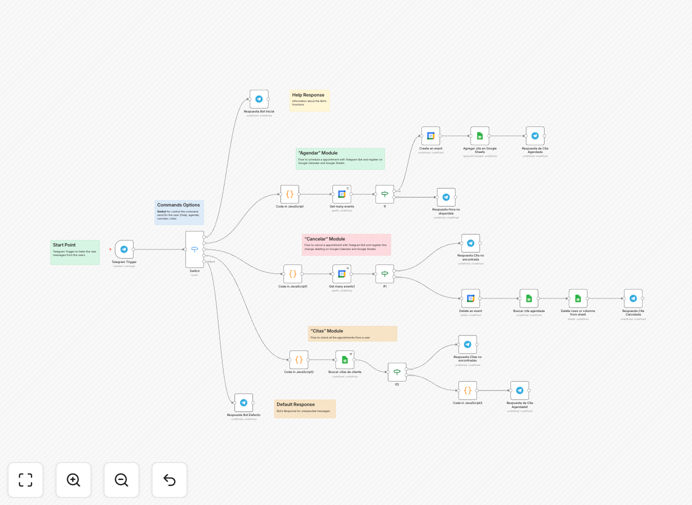
What This Workflow Does
This n8n workflow transforms your Telegram account into a powerful appointment scheduling assistant that integrates directly with Google Calendar and Google Sheets. It eliminates the back-and-forth of manual scheduling by allowing clients to book available time slots through a simple Telegram conversation.
The bot checks your Google Calendar for real-time availability, presents options to clients in an intuitive menu interface, collects necessary information, and automatically creates calendar events. All booking details are simultaneously logged in Google Sheets for record-keeping and analysis.
How It Works
1. Client initiates booking via Telegram
Clients start the scheduling process by sending a command like "/book" to your Telegram bot. The bot responds with an interactive menu showing available services or appointment types.
2. Availability check against Google Calendar
The workflow queries your Google Calendar to determine available time slots based on your predefined working hours, existing appointments, and buffer times between meetings.
3. Time slot selection
The bot presents available time slots in a user-friendly format. Clients select their preferred time through Telegram's interactive buttons, eliminating typing errors.
4. Information collection
The bot collects necessary details like name, contact information, and service specifics using formatted questions. Data validation ensures complete information before proceeding.
5. Calendar event creation
Confirmed appointments are automatically created as Google Calendar events with all relevant details. The event includes the client's contact information and any special notes for easy reference.
6. Spreadsheet logging
Every booking is recorded in Google Sheets with timestamp, client details, service type, and status. This creates an auditable record and enables data analysis for business insights.
7. Confirmation and reminders
The bot sends immediate booking confirmation to the client via Telegram and can be configured to send automated reminders as the appointment approaches.
Who This Is For
This workflow is ideal for service-based businesses and professionals who manage client appointments:
- Consultants and coaches with regular client sessions
- Healthcare providers scheduling patient visits
- Beauty salons and barbershops managing bookings
- Tutors and educators coordinating student meetings
- Freelancers who bill by the hour
- Any business needing to streamline appointment scheduling
Pro tip: Configure your Telegram bot to suggest follow-up appointments at the end of each session. This increases repeat bookings while the client is engaged.
What You'll Need
- A Telegram account and bot token (free to create)
- Google Calendar with your availability properly configured
- Google Sheets for logging appointments
- n8n instance (self-hosted or cloud)
- Basic understanding of n8n workflows (or follow our setup guide)
Quick Setup Guide
- Download the template file
- Import into your n8n instance
- Connect your Telegram bot credentials
- Authorize Google Calendar and Sheets access
- Configure your working hours and services
- Test with sample bookings
- Share your bot link with clients
Key Benefits
Reduce scheduling admin by 80%: Automate the entire booking process from availability checks to confirmations, freeing up hours each week.
24/7 booking availability: Clients can schedule appointments anytime, even outside business hours, without staff involvement.
Eliminate double bookings: Real-time Google Calendar integration ensures time slots are accurately marked as unavailable once booked.
Professional client experience: Provides a modern, convenient booking method through a platform clients already use daily.
Actionable business insights: Google Sheets logging helps analyze booking patterns, peak times, and service popularity.