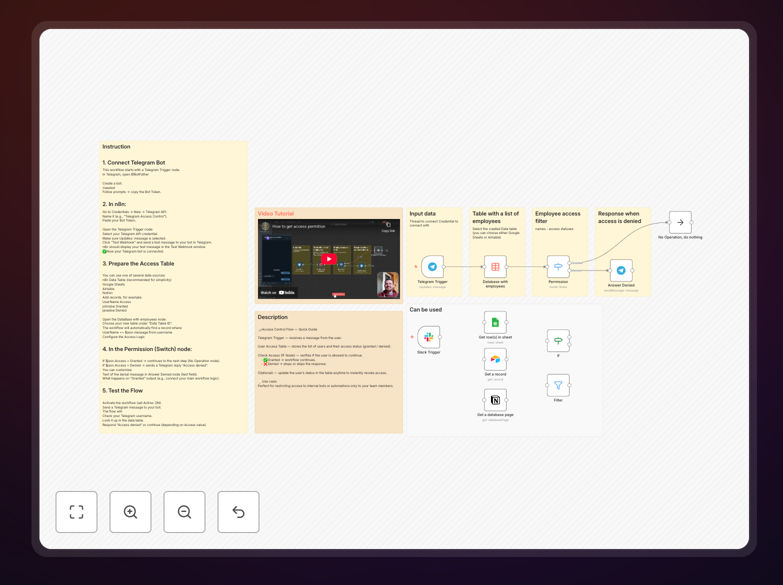
What This Workflow Does
Internal chatbots and team chat channels often contain sensitive automations or confidential information. Without proper access control, anyone could trigger workflows, view data, or disrupt operations. This n8n workflow solves that problem by automatically verifying each user against a permission database before allowing any interaction.
When a user sends a message to your Telegram bot (or similar platform), the workflow instantly checks their username or ID against your approved list. If they're authorized, the conversation proceeds normally. If they're not, the workflow stops—preventing any further automation or data exposure. This creates a secure gatekeeper for your internal automations.
The system is particularly valuable for teams using chat-based interfaces for CRM updates, task assignments, data queries, or internal reporting. It ensures that only trusted team members can activate these processes, while automatically blocking outsiders without manual intervention.
How It Works
Step 1: Message Trigger
The workflow starts when a user sends a message to your Telegram bot. The Telegram Trigger node captures the incoming message and extracts the user's identifier (username or ID). This data becomes the input for the entire permission verification process.
Step 2: Permission Table Lookup
Next, the workflow queries your user permission database—typically a Google Sheet, Airtable base, or simple database table. This table contains a list of all team members and their current access status (granted or denied). The lookup node matches the incoming user identifier against this list and retrieves their permission status.
Step 3: Access Decision
An IF node evaluates the retrieved permission status. If the status is "granted", the workflow proceeds to the next step. If the status is "denied", the workflow execution stops immediately. This logic gate ensures only approved users can continue.
Step 4: Conditional Response
For authorized users, the Telegram node sends the normal bot response or triggers your main automation process. For unauthorized users, you can configure a polite "access denied" message or simply end the workflow silently. The response is fully customizable based on your security preferences.
Who This Is For
This workflow is ideal for businesses and teams that use chat platforms for internal operations. Specifically:
- Development teams using chatbots to trigger deployments, query logs, or manage infrastructure.
- Sales and support teams using chat interfaces to update CRM records, assign tasks, or generate reports.
- Internal operations teams that rely on Telegram/Slack bots for workflow approvals, data requests, or notification systems.
- Companies with confidential automations that should only be accessible to specific departments or authorized personnel.
- Startups and SMEs wanting to implement basic security gates without complex IT infrastructure.
What You'll Need
- A Telegram bot token (or equivalent credentials for Slack/Discord if adapting the workflow).
- A permission database—this can be a Google Sheet, Airtable base, MySQL table, or even a simple CSV file.
- Your list of authorized users with their identifiers and access status.
- An n8n instance (cloud or self-hosted) to run the workflow.
- Basic understanding of how to import JSON workflows into n8n.
Quick Setup Guide
Follow these steps to implement this access control system in your environment:
- Download the template using the button above and save the JSON file.
- Import into n8n by opening your n8n instance, going to the workflows page, and clicking "Import from File". Select the downloaded JSON.
- Configure the Telegram trigger by adding your bot token in the Telegram Trigger node settings.
- Connect your permission database by updating the data lookup node to point to your Google Sheet, Airtable, or database.
- Test with a known user by sending a message from an authorized team member. Verify the workflow proceeds correctly.
- Test with an unauthorized user (or simulate one) to confirm the workflow stops as expected.
- Activate the workflow and monitor initial interactions to ensure everything works smoothly.
Pro tip: Start with a simple Google Sheet as your permission table. It's easy to update and provides immediate visibility into who has access. Later, you can migrate to a more robust database if needed.
Key Benefits
Instant security enforcement: Automatically blocks unauthorized users without manual monitoring. This eliminates the risk of outsiders triggering sensitive automations or accessing confidential data.
Centralized permission management: All access controls reside in a single database or spreadsheet. Update user permissions by editing the table—no need to modify the workflow itself.
Reduced operational overhead: Team members no longer need to manually verify users or monitor chat channels for suspicious activity. The automation handles it silently and instantly.
Scalable foundation: This basic workflow can be extended with role-based permissions, time-based access windows, or multi-level approval chains. It provides a robust starting point for complex access logic.
Cross-platform adaptability: While designed for Telegram, the core logic works identically for Slack, Discord, WhatsApp Business, or any chat platform with an n8n integration.