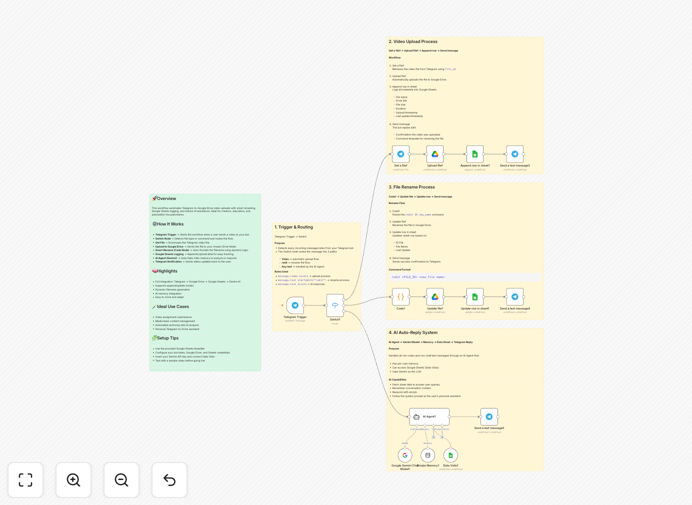
What This Workflow Does
Manually downloading videos from Telegram, renaming them, uploading to Google Drive, and keeping track of everything in a spreadsheet is a tedious, error-prone process that wastes valuable hours each week. This automation solves that problem completely.
Whenever someone sends a video to your Telegram bot or channel, this workflow instantly captures it, uploads it to a designated Google Drive folder with intelligent naming, logs all details (sender, timestamp, file info) in Google Sheets, and can even use Google's Gemini AI to analyze the content. It's like having a dedicated media manager working 24/7.
The system ensures no video is ever lost, creates a searchable database of all submissions, and provides peace of mind through automated confirmation messages. Whether you're collecting student assignments, marketing content, or team updates, this workflow turns chaos into organized, accessible digital assets.
How It Works
The automation follows a logical sequence that mimics exactly what a human would do—but faster, more accurately, and without breaks.
1. Telegram Trigger & File Detection
The workflow starts when a video file arrives in your Telegram bot or channel. A trigger node monitors for new messages and immediately captures the file metadata, sender information, and any accompanying text or captions.
2. Smart File Processing & Renaming
Before uploading, the workflow processes the file using a Code node to generate a meaningful filename. It can incorporate the date, sender's username, video topic (from caption), or custom tags—transforming generic filenames like "VID_20250101.mp4" into "2024-03-15_JaneDoe_ProjectUpdate.mp4".
3. Secure Upload to Google Drive
The video is streamed directly from Telegram's servers to your specified Google Drive folder. The connection uses secure OAuth2 authentication, and you can organize files into date-based subfolders or category folders automatically.
4. Comprehensive Logging in Google Sheets
Every upload is documented in a Google Sheet with timestamp, sender ID, filename, Drive link, file size, and status. This creates an instant audit trail and searchable database of all video submissions without manual data entry.
5. AI-Powered Analysis (Optional)
Using Google's Gemini AI, the workflow can analyze video content to generate descriptions, extract key topics, or flag content for review. This turns raw video files into searchable, categorized assets.
6. Confirmation & Notification
Finally, the sender receives a confirmation message in Telegram with the Drive link and upload details. You can also set up notifications to Slack, email, or other channels for team awareness.
Who This Is For
This automation delivers the most value for teams and individuals who regularly receive video content through Telegram and need it systematically organized. Education institutions can use it for assignment submissions, marketing teams for content collection, remote teams for daily updates, and content creators for audience submissions.
If you're currently spending more than 30 minutes per week manually handling Telegram videos, this workflow will pay for itself in time savings within the first month. It's particularly valuable for distributed teams, online course instructors, community managers, and agencies collecting client content.
What You'll Need
- A Telegram Bot Token (create via @BotFather)
- Google Cloud Platform credentials with Drive and Sheets API enabled
- A Google Sheet for logging (template provided)
- Google Gemini API key (optional, for AI features)
- n8n instance (cloud or self-hosted)
- Basic folder structure in Google Drive for organization
Pro tip: Create a dedicated Google Service Account for this automation rather than using personal credentials. This improves security and makes permission management much simpler.
Quick Setup Guide
You can have this automation running in under 15 minutes with these simple steps:
- Download the template using the button above and import it into your n8n instance.
- Create your Telegram bot via @BotFather and note the API token.
- Set up Google Cloud credentials with Drive and Sheets API access, then download the JSON key file.
- Duplicate the provided Google Sheet template and note its ID from the URL.
- Configure each node in the workflow with your credentials (Telegram Bot, Google Drive, Google Sheets).
- Test with a sample video sent to your bot to verify the complete flow works.
- Activate the workflow and start receiving automated uploads immediately.
Key Benefits
Eliminate manual file handling: No more downloading, renaming, and uploading videos manually. The automation handles everything from capture to organization, saving 5-10 hours per week for teams receiving regular video content.
Never lose a submission again: Every video is instantly backed up to Google Drive with a complete audit trail in Sheets. Search by sender, date, or topic to instantly locate any file, eliminating the "I sent it last week, can't you find it?" problem.
AI-powered content understanding: With Gemini AI integration, your video library becomes searchable by content, not just filenames. Ask "find all videos discussing Q3 projections" and get instant results based on actual video analysis.
Scalable for any volume: Whether you receive 5 videos per day or 500, the system handles them all with equal reliability. The workflow scales automatically without additional setup or cost.
Professional client/student experience: Automatic confirmation messages and organized delivery create a polished, professional impression. Submitters know their content was received and can access it anytime via the provided Drive link.