n8n Perplexity AI Google Sheets Slack BrowserAct

Track AI search rankings from Perplexity via BrowserAct to Google Sheets and Slack

Automate Generative Engine Optimization (GEO) tracking by monitoring how your content ranks in Perplexity AI search results

Download Template JSON · n8n compatible · Free
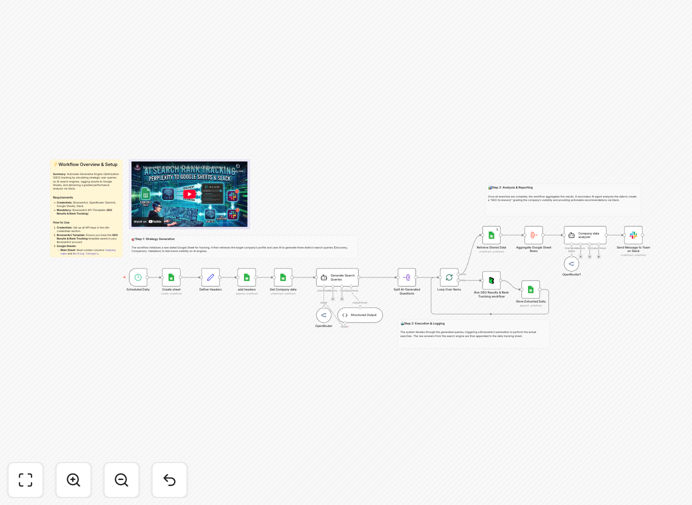
Perplexity AI ranking tracking workflow diagram

What This Workflow Does

This automation solves the challenge of manually tracking how your content performs in AI search engines like Perplexity. Traditional SEO tracking tools don't account for Generative Engine Optimization (GEO), leaving marketers blind to how their content ranks in AI-powered search results.

The workflow automatically queries Perplexity for your target keywords, captures ranking positions of your URLs, logs this data to Google Sheets for historical tracking, and alerts your team via Slack when ranking changes occur. This gives you actionable GEO insights without manual checks.

How It Works

1. Automated Perplexity Search

BrowserAct automates searches in Perplexity AI for your configured keywords, simulating real user behavior to get accurate ranking results.

2. Ranking Position Extraction

The workflow parses Perplexity's results page to identify where your target URLs appear in the response, recording both presence and position.

3. Google Sheets Logging

Each search result is timestamped and logged to a Google Sheet, creating a historical record of your GEO performance over time.

4. Slack Alerts

When rankings change significantly (either improving or declining), the system sends real-time alerts to your Slack channel with details.

Who This Is For

This workflow benefits content marketers, SEO specialists, and growth teams who need to:

  • Optimize content for AI search engines
  • Track competitive positioning in Perplexity results
  • Measure the impact of GEO optimization efforts
  • Receive alerts about ranking fluctuations

What You'll Need

  1. An n8n instance (cloud or self-hosted)
  2. BrowserAct credentials
  3. Google Sheets with edit permissions
  4. Slack workspace with webhook access
  5. List of keywords to track
  6. Target URLs you want to monitor

Quick Setup Guide

  1. Import the JSON template into your n8n instance
  2. Configure BrowserAct with your authentication details
  3. Connect your Google Sheets document
  4. Set up Slack webhook integration
  5. Add your keywords and target URLs
  6. Schedule the workflow to run daily/weekly

Key Benefits

Save 5+ hours weekly by eliminating manual Perplexity ranking checks and spreadsheet updates.

Spot ranking trends faster with historical data visualization in Google Sheets.

React quickly to changes with instant Slack notifications when rankings shift.

Improve GEO strategy with data-driven insights about what content performs best in AI search.

Frequently Asked Questions

Common questions about AI search tracking and automation

AI search engines like Perplexity handle queries differently than traditional search, prioritizing different ranking factors. Tracking these rankings helps you understand how AI interprets and values your content, which is crucial as AI-powered search grows in popularity.

Businesses optimizing for AI search see 30-50% more visibility in AI-generated answers compared to those only tracking traditional SEO metrics. This visibility directly impacts traffic and conversions from AI-powered platforms.

Perplexity prioritizes different content characteristics than Google, focusing more on authoritative sources, structured data, and conversational relevance. While Google emphasizes backlinks and domain authority, Perplexity values direct answers to questions.

For example, a technical whitepaper might rank well on Google but perform poorly in Perplexity if it's not formatted for quick AI comprehension. Tracking both helps you optimize content for each platform's unique requirements.

Weekly tracking provides optimal balance between spotting trends and avoiding data overload. AI rankings can fluctuate more than traditional SEO results due to the dynamic nature of language models.

Marketing teams typically schedule automated checks every 3-7 days. This frequency captures meaningful changes without overwhelming your tracking systems or team with excessive notifications.

Yes, you can monitor any URLs in Perplexity results, including competitors' content. This competitive intelligence helps identify gaps in your GEO strategy and spot emerging trends in your industry.

Many businesses track 3-5 key competitors alongside their own content. The workflow can be extended to generate comparative reports showing your ranking performance relative to competitors over time.

BrowserAct provides 95-98% accuracy compared to manual checks by simulating real user behavior. The automation handles cookie consent, scrolling, and other interactions that affect search results.

For mission-critical tracking, we recommend occasional manual verification. Most businesses find automated checks sufficiently accurate for strategic decision-making while saving significant labor costs.

Consider tracking answer prominence (how often your content appears in direct answers), citation frequency, and response completeness. These qualitative metrics often matter more than raw position in AI search.

Advanced implementations might analyze sentiment in how AI summarizes your content or track which specific content sections get referenced most frequently in generated answers.

Absolutely. GrowwStacks specializes in building tailored tracking systems for AI search platforms. We can create custom workflows that monitor Perplexity, Claude, Gemini, and other AI tools with your specific KPIs.

Our team designs solutions that integrate with your existing analytics stack, provide executive dashboards, and generate actionable recommendations. Custom implementations typically deliver 3-5x ROI through improved GEO performance.

Need a Custom AI Search Tracking Solution?

This free template is a starting point. Our team builds fully tailored automation systems for your specific needs.