What This Workflow Does
Manual SEO rank tracking is time-consuming, error-prone, and doesn't provide the historical data needed for strategic decisions. This automation solves that by connecting DataForSEO's powerful search engine results API directly to Google Sheets, creating a centralized, timestamped record of your keyword positions.
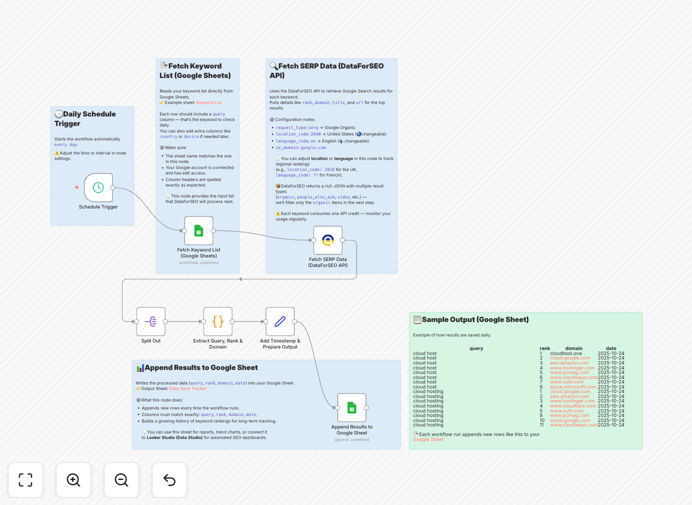
The workflow reads your target keywords from a Google Sheet, queries DataForSEO for current rankings, extracts key metrics like position, domain, and search volume, then appends the results with a date stamp back to your spreadsheet. This creates a clean, queryable dataset perfect for trend analysis, client reporting, and performance dashboards.
For SEO agencies, marketing teams, and business owners, this represents a shift from reactive to proactive SEO management. Instead of spending hours each week checking positions, you gain immediate visibility into ranking fluctuations and can focus your efforts on optimization rather than data collection.
How It Works
Step 1: Read Keywords from Google Sheets
The workflow begins by connecting to your designated Google Sheet and reading the list of target keywords from a specified column. This allows for easy management—simply add or remove keywords in your spreadsheet, and the automation picks them up on the next run.
Step 2: Fetch SERP Data via DataForSEO API
Each keyword is sent to the DataForSEO API, which returns comprehensive search results data including organic positions, featured snippets, local pack results, and competitor domains. The API provides real data from actual search data centers, ensuring accuracy.
Step 3: Parse and Structure Results
The raw API response is processed to extract the most valuable information: keyword, current rank, ranking URL/domain, search volume estimates, and SERP features. This structured data is cleaned and formatted for consistent reporting.
Step 4: Add Timestamp and Append to Sheet
A current date stamp is added to each record, then the complete dataset is appended to a new row in your Google Sheet. This creates a growing historical log that can be analyzed for trends, visualized in dashboards, or used for automated reporting.
Who This Is For
This automation is ideal for SEO agencies managing multiple client accounts who need efficient, accurate reporting. In-house marketing teams will benefit from the time savings and data consistency. E-commerce businesses tracking competitive keywords for product categories can use this to monitor market position. Content marketers measuring article performance will gain valuable insights into which topics are gaining or losing traction in search results.
Even small business owners with limited technical resources can implement this to track their core service keywords without needing to learn complex SEO tools. The simplicity of managing everything through Google Sheets makes it accessible while providing enterprise-grade data accuracy.
What You'll Need
- DataForSEO Account: Sign up for a DataForSEO account to get API credentials (they offer a free tier with limited queries).
- Google Sheets Access: A Google account with Sheets access and a spreadsheet prepared with your keyword list.
- n8n Instance: Either n8n.cloud (hosted) or a self-hosted n8n installation.
- Basic API Understanding: Comfort with copying API keys and connecting services (no coding required).
- Keyword List: Your target keywords organized in a Google Sheet with appropriate columns.
Pro tip: Start with 10-20 core keywords to test the workflow before scaling to hundreds. This helps you understand data volume and optimize your Google Sheet structure before committing to large-scale tracking.
Quick Setup Guide
- Download and Import: Download the template JSON file and import it into your n8n instance using the "Import from File" option.
- Configure Google Sheets: Create a connection to Google Sheets in n8n and update the workflow to point to your specific spreadsheet ID and sheet name.
- Add DataForSEO Credentials: Enter your DataForSEO API login and password in the HTTP Request node or use the dedicated DataForSEO node if available.
- Set Location Parameters: Adjust the location_code (country) and language_code parameters in the API call to match your target market.
- Test and Schedule: Run the workflow once manually to verify data flows correctly, then set up a Schedule Trigger node for daily automatic execution.
Key Benefits
Save 5-10 hours weekly by eliminating manual rank checking across multiple keywords and search engines. What used to be a tedious weekly task becomes a fully automated process that runs in the background.
Improve decision accuracy with consistent, timestamped data that shows true trends rather than snapshot observations. Historical data reveals seasonal patterns, algorithm update impacts, and campaign effectiveness.
Enhance client reporting with clean, organized data that can be easily transformed into professional dashboards or automated reports. Agencies can provide more value with less manual work.
Early problem detection through daily monitoring that catches ranking drops immediately rather than discovering them weeks later during monthly check-ins.
Scalable foundation that can be extended with additional features like competitor tracking, rank change alerts, or integration with other marketing platforms.