SEO Google Sheets Bright Data Automation n8n

Automate Google Search Rank Tracking with Bright Data & Sheets

Free n8n workflow to track keyword rankings daily, log results in Google Sheets, and receive automated email reports—eliminating manual SEO checks.

Download Template JSON · n8n compatible · Free
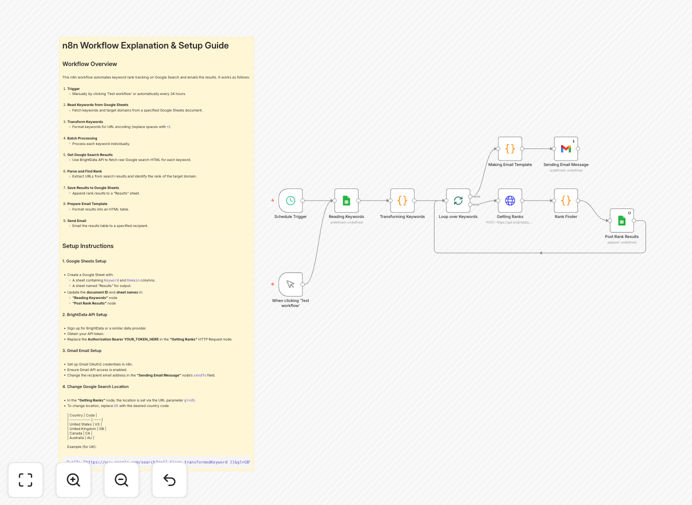
Google Search Rank Tracking Automation workflow diagram showing Bright Data, Google Sheets, and Gmail integration

What This Workflow Does

Manual Google rank tracking is time-consuming, error-prone, and doesn't scale. This automation solves that by automatically checking your website's search engine positions for target keywords daily or weekly, logging everything in Google Sheets, and sending you formatted email reports.

The workflow connects Bright Data's SERP API (for accurate, residential IP-based search results) with Google Sheets (for historical data storage) and Gmail (for alerting). It processes keyword lists in batches, extracts ranking positions from search results, and maintains a clean audit trail of your SEO performance over time.

Instead of spending hours each week manually checking rankings or paying for expensive SaaS tools with limited queries, this free n8n template gives you complete control over your tracking frequency, data structure, and reporting—all while keeping your data private in your own Google Workspace.

How It Works

1. Trigger & Data Collection

The workflow starts either on a schedule (daily/weekly) or manually. It reads your target keywords and domains from a configured Google Sheet. Each keyword is formatted for URL querying and prepared for API requests.

2. Rank Checking via Bright Data

For each keyword, the workflow sends a request to Bright Data's SERP API with specified location parameters (default is US). The API returns raw HTML of Google search results, mimicking real user searches from residential IPs to avoid detection blocks.

3. Result Parsing & Position Detection

The HTML is parsed to extract all non-Google result links. The system scans through these results to find your target domain, recording its position (rank), the specific URL that ranked, and the total number of results checked. A timestamp is added for historical tracking.

4. Data Logging & Reporting

All findings—keyword, domain, rank, URL, and timestamp—are appended to a "Results" sheet in Google Sheets. The workflow then compiles a clean HTML table summarizing current rankings and sends it via Gmail to your specified recipients.

Who This Is For

This automation is ideal for SEO agencies managing multiple client campaigns, marketing teams tracking content performance, SaaS companies monitoring competitive keywords, and business owners who want visibility into their organic search performance without manual work.

If you're currently using spreadsheets to track rankings manually, paying for rank-tracking software with monthly fees, or lacking consistent SEO performance data, this workflow will save you significant time and money while providing more reliable, customizable tracking.

What You'll Need

  1. n8n instance (cloud or self-hosted) with access to Google Sheets and Gmail nodes
  2. Bright Data account with SERP API access and credentials
  3. Google Sheets document with "Keywords" and "Domains" columns
  4. Google Workspace account for Sheets and Gmail integration
  5. Basic understanding of n8n workflow import and credential setup

Pro tip: Use separate Google Sheets for different clients or campaigns. The workflow can be duplicated and pointed to different source sheets for parallel tracking.

Quick Setup Guide

  1. Download the template using the button above and import it into your n8n instance.
  2. Create your Google Sheets with "Keywords" and "Domains" columns, plus a "Results" sheet for logging.
  3. Connect Google Sheets node with OAuth2 authentication to your Google account.
  4. Add your Bright Data API token to the HTTP Request node's authorization header.
  5. Configure the Gmail node with your sending account and recipient email addresses.
  6. Test the workflow manually with a few keywords to verify data flow and formatting.
  7. Set the Schedule trigger to your preferred frequency (daily recommended for most use cases).
  8. Activate the workflow and let it run automatically—your first report will arrive via email.

Key Benefits

Save 5-10 hours monthly on manual rank checking and spreadsheet updates. The automation handles everything from data collection to reporting.

Improve data accuracy with consistent, timestamped tracking that eliminates human error in manual position recording.

Gain historical insights with all ranking data stored in your Google Sheets, enabling trend analysis and performance reporting.

Reduce software costs by replacing expensive rank-tracking subscriptions with your own automated system.

Customizable alerts when rankings drop significantly or when you reach top positions for competitive terms.

Frequently Asked Questions

Common questions about SEO rank tracking automation and integration

Tracking Google rankings is crucial for understanding your online visibility, measuring SEO campaign effectiveness, and identifying opportunities to outrank competitors. Without tracking, you're flying blind—you won't know if your content efforts are working or if you're losing ground to competitors.

Automated tracking saves hours of manual checking and provides consistent, reliable data for strategic decisions. It helps you correlate ranking changes with website updates, content publication, or technical SEO fixes.

For most businesses, weekly tracking is sufficient to spot trends without data overload. Daily tracking is ideal for competitive niches or during active SEO campaigns.

This automation can run daily, weekly, or on-demand, giving you flexibility without manual effort. Consistent tracking helps you catch ranking drops early and correlate them with website changes or algorithm updates.

Bright Data provides reliable, residential IP-based searches that mimic real user behavior, reducing the risk of being blocked by Google. Many rank-tracking tools use datacenter IPs that Google can detect and block.

Bright Data's SERP API delivers accurate, localized results and handles JavaScript rendering, giving you the same data real searchers see. This means you get more accurate ranking positions compared to tools that might show different results.

Yes, this workflow can be extended to track rankings for different locations (countries, cities) and devices (mobile, desktop) by modifying the Bright Data API parameters.

You can create separate tracking sheets for each location/device combination or add columns to your existing sheet to compare performance across different search contexts. This is particularly valuable for businesses targeting multiple geographic markets.

Use Google Sheets' built-in charts and pivot tables to visualize trends. Create line charts showing ranking position over time, bar charts comparing keyword performance, and calculate average position improvements.

Set up conditional formatting to highlight keywords that moved up (green) or down (red). You can also connect Sheets to Data Studio for advanced dashboards that combine ranking data with Google Analytics traffic metrics.

First, verify the drop isn't a data collection issue. Check for recent website changes, technical issues, or content updates. Review Google Search Console for manual actions or indexing problems.

Analyze competitor movements and recent algorithm updates. This automated tracking gives you early warning, so you can investigate and respond before traffic loss impacts your business. Consider whether the drop affects all keywords or just specific ones.

The current workflow tracks organic search results. For local pack rankings (Google Maps), you'd need to modify the Bright Data query to include local parameters and parse different result types.

Many businesses run both organic and local tracking workflows side-by-side to get a complete picture of their search visibility across different result types. Local tracking is especially important for brick-and-mortar businesses and service area businesses.

Absolutely. GrowwStacks specializes in building tailored SEO automation systems. We can create custom workflows that track rankings across multiple search engines, monitor competitor movements, alert you to significant changes, integrate with your CRM or project management tools, and generate executive reports.

Our solutions handle complex requirements like tracking thousands of keywords, multiple locations, and combining rank data with traffic analytics. We'll design a system that fits your specific workflow and reporting needs.

  • Multi-engine tracking (Google, Bing, regional search engines)
  • Competitor monitoring and gap analysis
  • Automated reporting to Slack, Teams, or your internal dashboards
  • Integration with SEO tools like SEMrush or Ahrefs data

Need a Custom SEO Rank Tracking Automation?

This free template is a starting point. Our team builds fully tailored automation systems for your specific business needs.