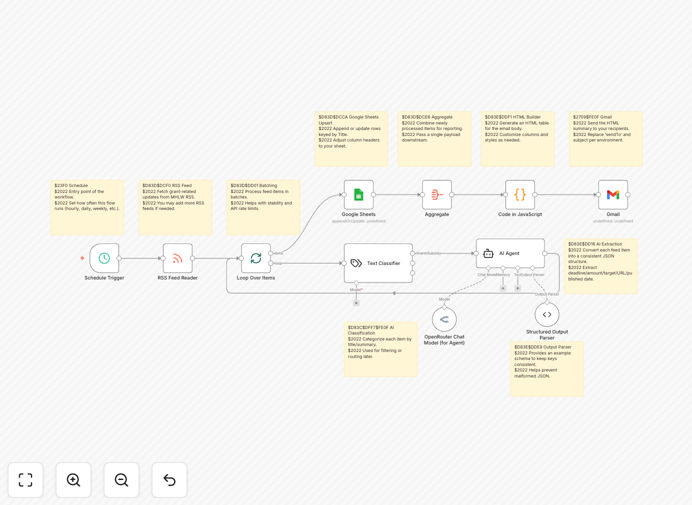
What This Workflow Does
This automation solves the challenge of manually monitoring multiple government grant programs for new funding opportunities. Nonprofits, researchers, and small businesses often miss time-sensitive grants or waste hours reviewing irrelevant listings. The workflow continuously checks official RSS feeds, uses AI to extract key details, and organizes everything in Google Sheets with email alerts.
By automating the discovery and initial evaluation process, organizations can focus on crafting strong applications rather than administrative tasks. The system captures 100% of available grants while filtering for your specific eligibility criteria - something impossible to maintain manually across dozens of funding sources.
How It Works
1. RSS Feed Monitoring
The workflow checks Ministry of Health, Labour and Welfare RSS feeds at regular intervals, capturing all new grant announcements in their raw format. This replaces error-prone manual website checking that often misses updates.
2. AI-Powered Processing
OpenRouter AI analyzes each grant listing to extract structured data: deadlines, funding amounts, eligibility requirements, and focus areas. The AI identifies matches based on your configured priorities, reducing irrelevant results.
3. Google Sheets Organization
All processed grants get logged in a master Google Sheet with consistent columns for easy filtering and sorting. The sheet serves as both a database and collaboration tool for your team.
4. Email Notifications
Critical alerts about high-priority grants or approaching deadlines get sent directly to relevant team members via Gmail, ensuring timely follow-up.
Pro tip: Configure separate Sheets tabs for different grant categories (research, community development, etc.) to streamline team workflows.
Who This Is For
This automation delivers the most value for organizations that:
- Apply to 5+ government grants annually
- Have limited administrative staff for manual research
- Compete for time-sensitive funding opportunities
- Need to track grants across multiple ministries or programs
What You'll Need
- n8n account (free or paid)
- Google Workspace account
- OpenRouter API key
- Ministry RSS feed URLs you want to monitor
Quick Setup Guide
- Download the JSON template file
- Import into your n8n instance
- Configure your target RSS feeds in the HTTP Request node
- Add your OpenRouter API key
- Connect your Google Sheets and Gmail accounts
- Test with sample grants before activating
Key Benefits
Never miss funding deadlines: Automated monitoring operates 24/7, catching announcements the moment they're published.
Reduce administrative workload: Cuts grant research time by 80-90%, freeing staff for higher-value work.
Improve application quality: More time to develop strong proposals rather than hunting for opportunities.
Centralized tracking: All grant data organized in one searchable location with team access.
AI-powered filtering: Only see grants matching your specific eligibility and focus areas.